

Managing subscriptions can be a challenge in any cloud journey. Here's a script to save you some time - quickly switch between your Azure subscriptions by entering a listed index.
Forked and updated from matthiasguentert/azure-subscription-switcher .
Choose console or desktop
| Variant | Use when | Prerequisites |
|---|---|---|
| Index-based | Terminal, remote session or no graphical desktop | PowerShell, Az.Accounts, Connect-AzAccount and visible subscriptions |
| Out-GridView | Selecting one subscription from a Windows desktop table | The above plus a working Out-GridView command and graphical session; not a browser/mobile action |
Tested PowerShell/module versions and execution date: not recorded. Check Out-GridView availability on your host; use the index variant if unavailable.
After loading either function, call Switch-AzContext. Select one enabled subscription (or enter 0/Cancel). Expected result is the new Get-AzContext output; verify tenant and subscription ID before executing other Azure commands. These examples filter out Lighthouse-delegated subscriptions whose home tenant differs, so they are not a complete cross-tenant inventory.
Index-based version
Show complete script (63 lines)
function Switch-AzContext {
    if (-not (Get-Module -ListAvailable -Name Az.Accounts)) {
        Write-Host -ForegroundColor Red 'Az.Accounts PowerShell module not installed!'
        return
    }

    Import-Module Az.Accounts -ErrorAction Stop

    try {
        # Select only enabled subscriptions and avoid duplicates if the user has multiple tenants enrolled with Lighthouse
        $SubscriptionList = Get-AzSubscription |
            Where-Object { $_.State -eq "Enabled" -and ($_.HomeTenantId -eq $_.TenantId) } |
            ConvertTo-Json | ConvertFrom-Json
    } catch {
        Write-Host -ForegroundColor Red "You have no context, please login first!"
        return
    }

    try {
        $SubscriptionActive = Get-AzContext | ConvertTo-Json | ConvertFrom-Json
    } catch {
        Write-Host -ForegroundColor Red "You have no subscription, please login first!"
        return
    }

    $available = @()
    $index = 1
    $SubscriptionList | ForEach-Object {
        $available += [PSCustomObject]@{
            Active         = if ($_.Id -eq $SubscriptionActive.Subscription.Id) { "===>" } else { $null }
            Index          = $index++
            Subscription   = $_.Name
            SubscriptionId = $_.Id
            State          = $_.State
            HomeTenantId   = $_.HomeTenantId
            Account        = if ($_.Id -eq $SubscriptionActive.Subscription.Id) { $SubscriptionActive.Account.Id } else { $null }
        }
    }

    $available | Format-Table -AutoSize

    try {
        [int]$userInput = Read-Host "Index (0 to quit)"

        if ($userInput -eq 0) {
            Write-Host -ForegroundColor Red 'Won''t switch Azure PowerShell context!'
            return
        } elseif ($userInput -lt 1 -or $userInput -gt $index - 1) {
            Write-Host -ForegroundColor Red "Input out of range"
            return
        }

        $selection = $available | Where-Object { $_.Index -eq $userInput }
        Write-Host -ForegroundColor Cyan 'Switching to:', $selection.Subscription
        Set-AzContext -SubscriptionId $selection.SubscriptionId | Out-Null
        Get-AzContext
    } catch {
        Write-Host -ForegroundColor Red "Invalid input, please enter a valid index!"
    }
}

Clear-Host
Switch-AzContext
Here is the script output:

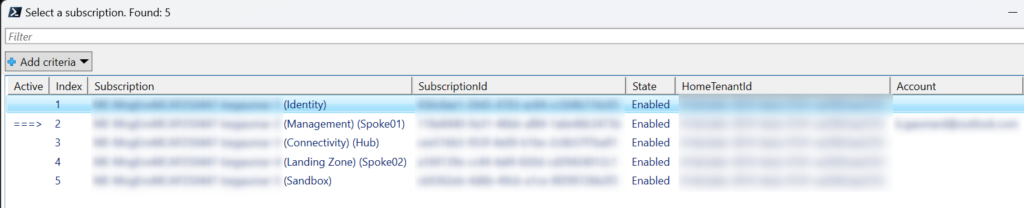
Version with a user interface (Out-GridView)
Select one row and press OK. Cancel leaves the context unchanged. Use Get-Command Out-GridView to check availability before loading this variant.
Show complete script (56 lines)
function Switch-AzContext {
    if (-not (Get-Module -ListAvailable -Name Az.Accounts)) {
        Write-Host -ForegroundColor Red 'Az.Accounts PowerShell module not installed!'
        return
    }

    Import-Module Az.Accounts -ErrorAction Stop

    try {
        $SubscriptionList = Get-AzSubscription |
            Where-Object { $_.State -eq "Enabled" -and ($_.HomeTenantId -eq $_.TenantId) } |
            ConvertTo-Json | ConvertFrom-Json
    } catch {
        Write-Host -ForegroundColor Red "You have no context, please login first!"
        return
    }

    try {
        $SubscriptionActive = Get-AzContext | ConvertTo-Json | ConvertFrom-Json
    } catch {
        Write-Host -ForegroundColor Red "You have no subscription, please login first!"
        return
    }

    $available = @()
    $index = 1
    $SubscriptionList | ForEach-Object {
        $available += [PSCustomObject]@{
            Active         = if ($_.Id -eq $SubscriptionActive.Subscription.Id) { "===>" } else { $null }
            Index          = $index++
            Subscription   = $_.Name
            SubscriptionId = $_.Id
            State          = $_.State
            HomeTenantId   = $_.HomeTenantId
            Account        = if ($_.Id -eq $SubscriptionActive.Subscription.Id) { $SubscriptionActive.Account.Id } else { $null }
        }
    }

    $selection = $available | Out-GridView -Title "Select a subscription. Found: $($SubscriptionList.count)" -OutputMode Single

    try {
        if (-not $selection) {
            Write-Host -ForegroundColor Red "No subscription selected. Operation cancelled."
            return
        }

        Write-Host -ForegroundColor Cyan 'Switching to:', $selection.Subscription
        Set-AzContext -SubscriptionId $selection.SubscriptionId | Out-Null
        Get-AzContext
    } catch {
        Write-Host -ForegroundColor Red "Invalid input, please enter a valid index!"
    }
}

Clear-Host
Switch-AzContext
Here is the script output:
Both scripts are maintained on GitHub at Benoit-Gaumard/azure-subscription-switcher .
Enjoy!