

Error and cause
The remote backend reads and writes Terraform state. The provider manages workload resources. They have separate configuration and permissions; a provider flag alone does not fix backend authentication. The error below is diagnostic output, not a command: a key-based request was rejected after shared-key access was disabled. Check all consumers before disabling keys on an existing account.
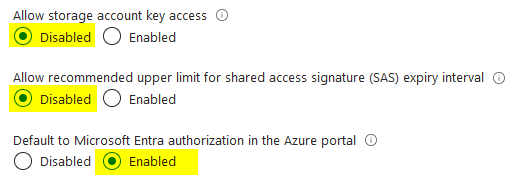
This storage account configuration will cause the following error during the terraform init phase:
Status=403 Code="KeyBasedAuthenticationNotPermitted" Message="Key based authentication is not permitted on this storage account.Remote backend configuration
Replace all four backend placeholders with your existing state location. Changing key selects a different state file; it is not a harmless rename.
On the backend.tf file, add the use_azuread_auth = true parameter:
terraform {
  backend "azurerm" {
    resource_group_name  = "<YOUR_BACKEND_STORAGE_RESOURCE_GROUP_NAME>"
    storage_account_name = "<YOUR_BACKEND_STORAGE_ACCOUNT_NAME>"
    container_name       = "<YOUR_BACKEND_CONTAINER_NAME>"
    key                  = "<YOUR_BACKEND_KEY_.tfstate>"
    use_azuread_auth     = true
  }
}
Provider configuration
In provider.tf, storage_use_azuread concerns the provider's supported Storage data-plane operations, not the backend:
terraform {
  required_providers {
    azurerm = {
      source  = "hashicorp/azurerm"
      version = "4.1.0"
    }
  }
}

provider "azurerm" {
  storage_use_azuread         = true
  skip_provider_registration  = true
  features {}
}
Verify without applying
The provider pin 4.1.0 is the article's example, not a recommendation to downgrade an existing project. Terraform CLI/backend version and technical execution validation are not recorded. Check the azurerm backend reference and the provider reference for your pinned versions.
Back up state and confirm the tenant, identity, storage network path and container permissions before reconfiguration:
terraform init -reconfigure
terraform validate
terraform plan
Expected: backend initialization succeeds without the key-authentication error and the plan addresses the expected existing resources. Stop if the plan unexpectedly recreates infrastructure. No apply is needed to validate this change.

For ordinary state operations, check the backend documentation's Storage Blob Data Contributor requirement on the state container; do not grant Data Owner automatically. Other discovery options or provider operations can require separate permissions.
Using Entra ID authentication for the remote backend is a best practice aligned with RBAC and least privilege.