

This walkthrough is for Azure SQL Database, a system-assigned App Service managed identity, and the PHP SQLSRV driver. It is not a MySQL or PDO example. Before starting, confirm the app runtime has the SQLSRV extension and a compatible Microsoft ODBC driver, an Entra administrator is configured for the SQL server, and the app has a working network/DNS path to SQL.
Reference environment versions and execution validation: not recorded. Check the PHP driver system requirements and the provider tutorial below before selecting runtime versions.
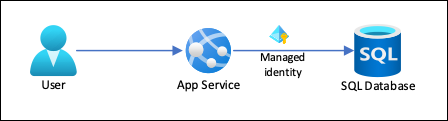
See also: How to access Azure SQL Database with managed identity in PHP in App Service
1. Enable managed identity for your app service
If using Azure App Service (Web App): go to Azure Portal → Your App Service → Identity → Enable System-assigned identity.
Save the change. The Identity page should show Status: On and an object (principal) ID. Record that ID for permission checks; deleting/recreating the app changes the identity.
2. Assign database permissions
After enabling managed identity, you need to grant it access to your Azure database.
In SSMS or another supported SQL client, connect to the target application database, not master, using an Entra identity authorised to create database users. Replace your-managed-identity-name with the app identity's name and verify it resolves to the intended object ID. This read-only example grants only db_datareader; add narrowly scoped write permissions only if the workload needs them.
-- Create the managed identity as an Azure AD user
CREATE USER [your-managed-identity-name] FROM EXTERNAL PROVIDER;

-- Grant permissions (adjust based on needs)
ALTER ROLE db_datareader ADD MEMBER [your-managed-identity-name];
To display external providers already created:
-- SID to OBJECTID
SELECT
    DP.name,
    DP.principal_id,
    DP.type,
    DP.type_desc,
    DP.SID,
    OBJECTID = CONVERT(uniqueidentifier, DP.SID)
FROM SYS.database_principals DP
WHERE DP.type IN ('S', 'X', 'E')
Replace your-managed-identity-name with the actual name of your managed identity - usually the web app name.
3. Connect with the PHP SQLSRV driver
Run this inside the configured App Service runtime, not a local PHP terminal without that managed identity. Replace myazureserver and myazuredatabase. Expected result: the read-only version query succeeds. Keep diagnostics in access-controlled server logs; never print driver errors to a public response.
$azureServer = 'myazureserver.database.windows.net';
$azureDatabase = 'myazuredatabase';
$connectionInfo = array(
    'Database' => $azureDatabase,
    'Authentication' => 'ActiveDirectoryMsi'
);
$conn = sqlsrv_connect($azureServer, $connectionInfo);

if ($conn === false) {
    echo "Could not connect with Authentication=ActiveDirectoryMsi (system-assigned).\n";
    error_log('Azure SQL connection failed; inspect protected runtime diagnostics.');
} else {
    echo "Connected successfully with Authentication=ActiveDirectoryMsi (system-assigned).\n";

    $tsql = "SELECT @@Version AS SQL_VERSION";
    $stmt = sqlsrv_query($conn, $tsql);
    if ($stmt === false) {
        echo "Failed to run the simple query (system-assigned).\n";
        error_log('Azure SQL validation query failed.');
    } else {
        while ($row = sqlsrv_fetch_array($stmt, SQLSRV_FETCH_ASSOC)) {
            echo $row['SQL_VERSION'] . PHP_EOL;
        }
        sqlsrv_free_stmt($stmt);
    }
    sqlsrv_close($conn);
}
Validation checklist
- Identity is on and the database principal matches the app's object ID.
- The app resolves the SQL hostname and reaches the intended public or private endpoint.
- The SQLSRV/ODBC drivers are available in the deployed PHP runtime.
- The connection and read-only query succeed without a stored password.
- A login failure prompts identity/database-user checks; a timeout prompts DNS and network checks; a missing-function error prompts extension checks.
- Remove the diagnostic page after testing; grant no broader database role than the application needs.