

Authentication establishes who signed in. Authorisation decides whether that identity may use the app. Requiring assignment on an Enterprise Application is an additional sign-in gate, not a replacement for configuring App Service authentication or application-level permissions.
This post will guide you on how to use Microsoft Entra ID to secure your web app by managing authentication and authorization for users or security groups.
1. Configure the two objects
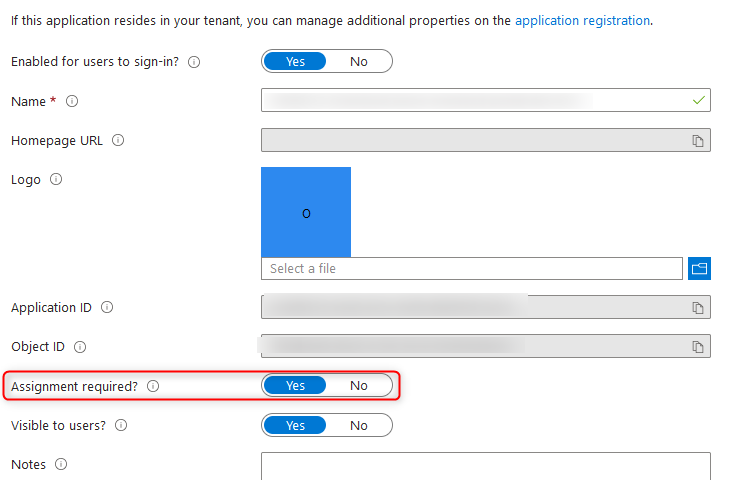
In App Service → Authentication, configure the Microsoft identity provider for the intended tenant and require authentication for requests. Record its application/client ID. Then open Microsoft Entra ID → Enterprise applications → All applications, find the service principal by that same application ID, and open Properties → Assignment required? → Yes → Save.
Do not confuse the app registration with this tenant's Enterprise Application. Keep a permitted administrator/test account to avoid accidental lockout.
2. Assign the allowed audience
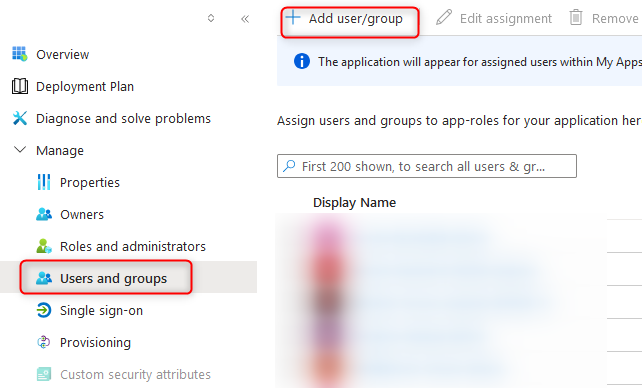
In that Enterprise application → Users and groups → Add user/group, select the intended user or a security group such as WebApp-Readers, select the applicable app role, then assign. Group assignment can have licensing and membership limitations; verify the current assignment documentation .
3. Test both outcomes
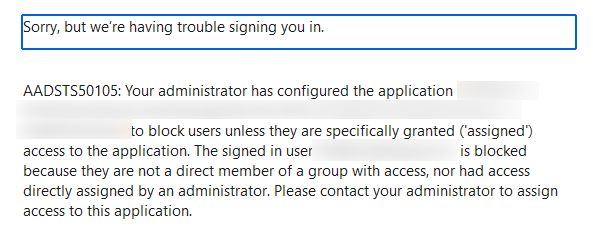
Use separate private browser sessions: an explicitly assigned account should sign in and reach the intended page; an unassigned account in the same tenant should be rejected. Also test an anonymous request to ensure App Service is not bypassing authentication. Previously issued sessions/tokens can affect immediate retests.
| Unexpected result | Check |
|---|---|
| Everyone still reaches the page | App Service requires authentication, correct Enterprise Application ID, and fresh sessions |
| Assigned user is denied | Direct/effective assignment, tenant, chosen app role and group-assignment support |
| Sign-in works but an operation fails | Application permissions/roles and backend authorisation; sign-in alone does not grant data access |
Technical execution validation and portal reference version: not recorded. Consult Restrict your app to a set of users and the Entra built-in roles reference when delegating administration.