
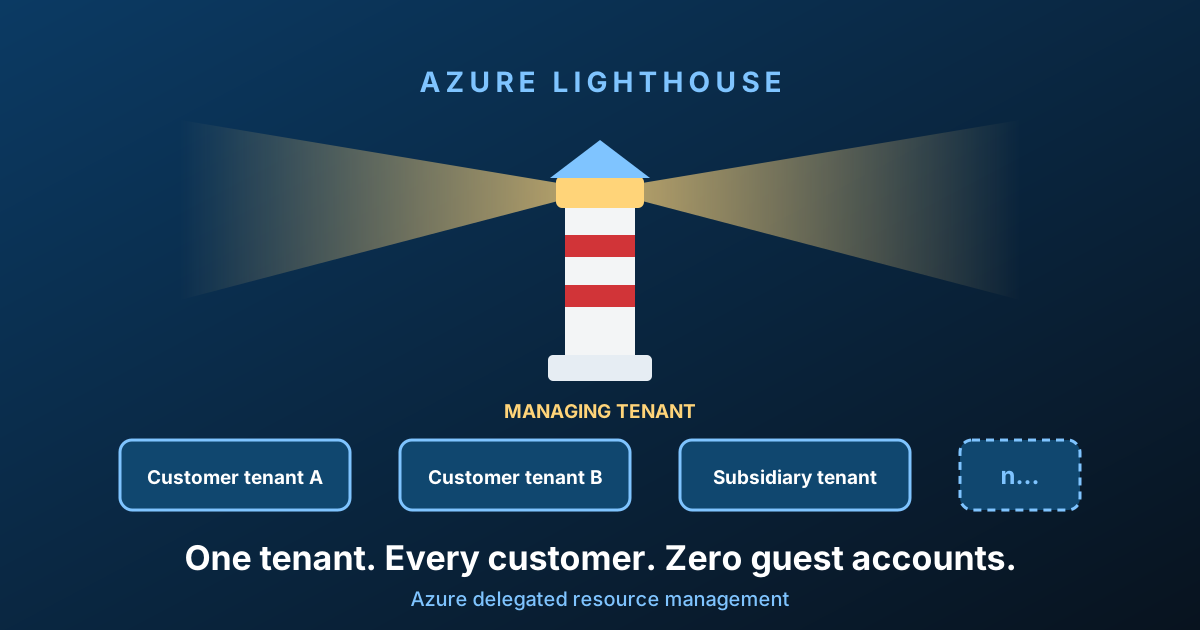
Lighthouse delegates supported Azure resource-management operations across tenants. Resources remain in the customer tenant; the managing tenant's named identities receive specific supported roles at an agreed scope. It does not grant general Entra directory or data-plane access.
Which scenario concerns you?
| Need | Scope and benefit | Boundary | Read |
|---|---|---|---|
| Maintain one customer's application | Delegate its resource group; operators use their managing-tenant identities | Not permission to every subscription or application data store | Application maintenance |
| Operate several enterprise tenants | Explicit subscriptions/resource groups; shared operational visibility | Tenant consolidation and directory administration remain separate | Multi-tenant enterprise |
| Support an ISV deployment | Agreed customer deployment scope and support role | Customer consent, lifecycle and removal must remain explicit | ISV patterns |
Read what Lighthouse does not do before writing the onboarding template. Throughout this article, managing tenant = operator/provider, and managed tenant = customer/resource owner. Use those labels, not diagram colours, to follow the one-way authorisation.
Technical execution validation and current licensing/limit review: not recorded. Confirm supported scenarios and limitations before rollout.
The problem nobody wants to admit they have
You manage Azure for someone else. Maybe you're a managed service provider, maybe you're the platform team of a group that swallowed three companies last year, maybe you're an ISV who ships software into customer subscriptions. The mechanics are always the same:
- The customer creates a guest account (B2B) or, worse, a cloud-only account in their tenant for each of your engineers.
- Your engineers collect one identity per customer. Each has its own MFA registration, its own password, its own lifecycle.
- Every task starts with a tenant switch in the portal, or an
az login --tenant, or a fresh browser profile. - When an engineer leaves, someone has to remember to ask 27 customers to disable an account.
- Automation is worse: a service principal per tenant, a secret per tenant, a rotation schedule per tenant.
It works. It doesn't scale. And from a security standpoint it's a slow-motion accident: dormant privileged accounts spread across tenants you don't control and can't audit.
The failure mode is not "someone hacks you". It's "an engineer left 14 months ago and still has Contributor on a customer subscription, because offboarding lives in a tenant your HR system has never heard of".
What Azure Lighthouse actually is
Azure Lighthouse is Azure delegated resource management. A customer delegates a subscription (or specific resource groups) to your tenant. From that moment, named users, groups and service principals in your tenant hold Azure RBAC roles on those resources - while still signing in with their own identity, in their own tenant, with your own Conditional Access and MFA policies.
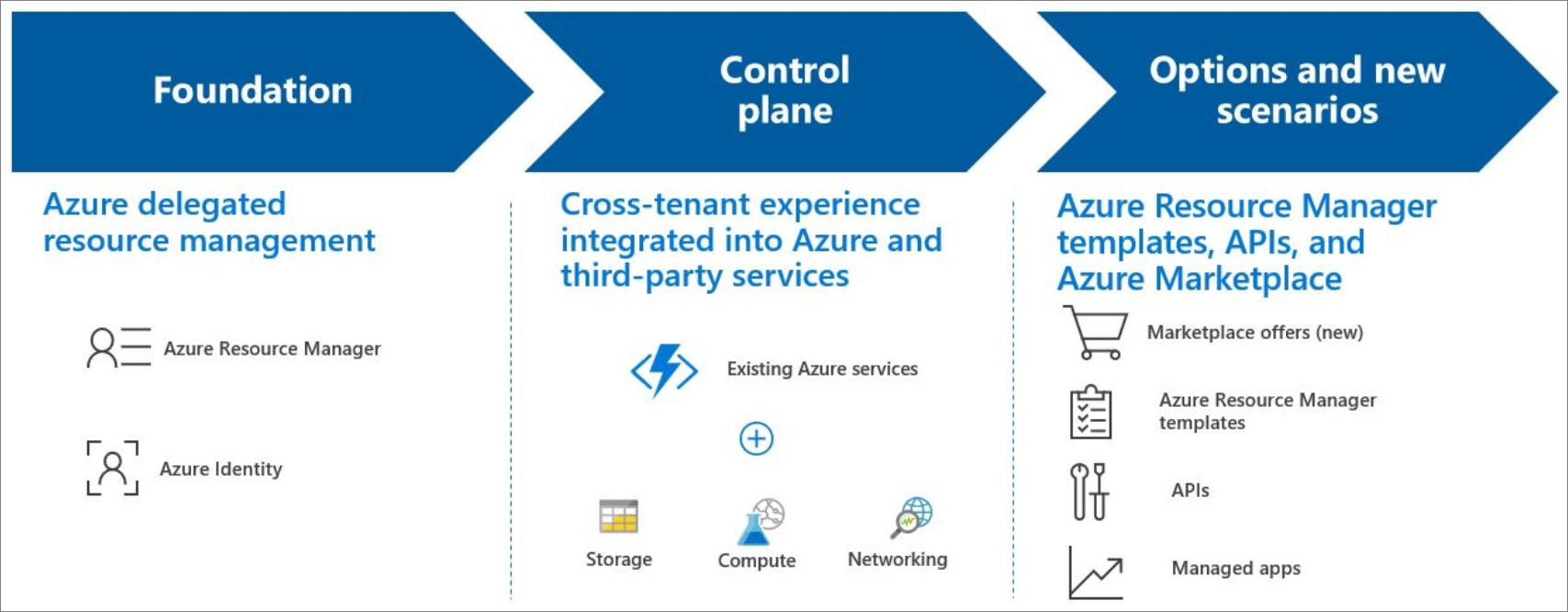
No guest accounts. No tenant switching. No extra cost - Lighthouse itself is free, for any Azure customer or partner.
Logical projection, not data movement
The key concept is logical projection. Nothing moves. No resource is copied, no data crosses a boundary. Azure Resource Manager simply learns that identities from tenant A are authorised on scopes in tenant B.
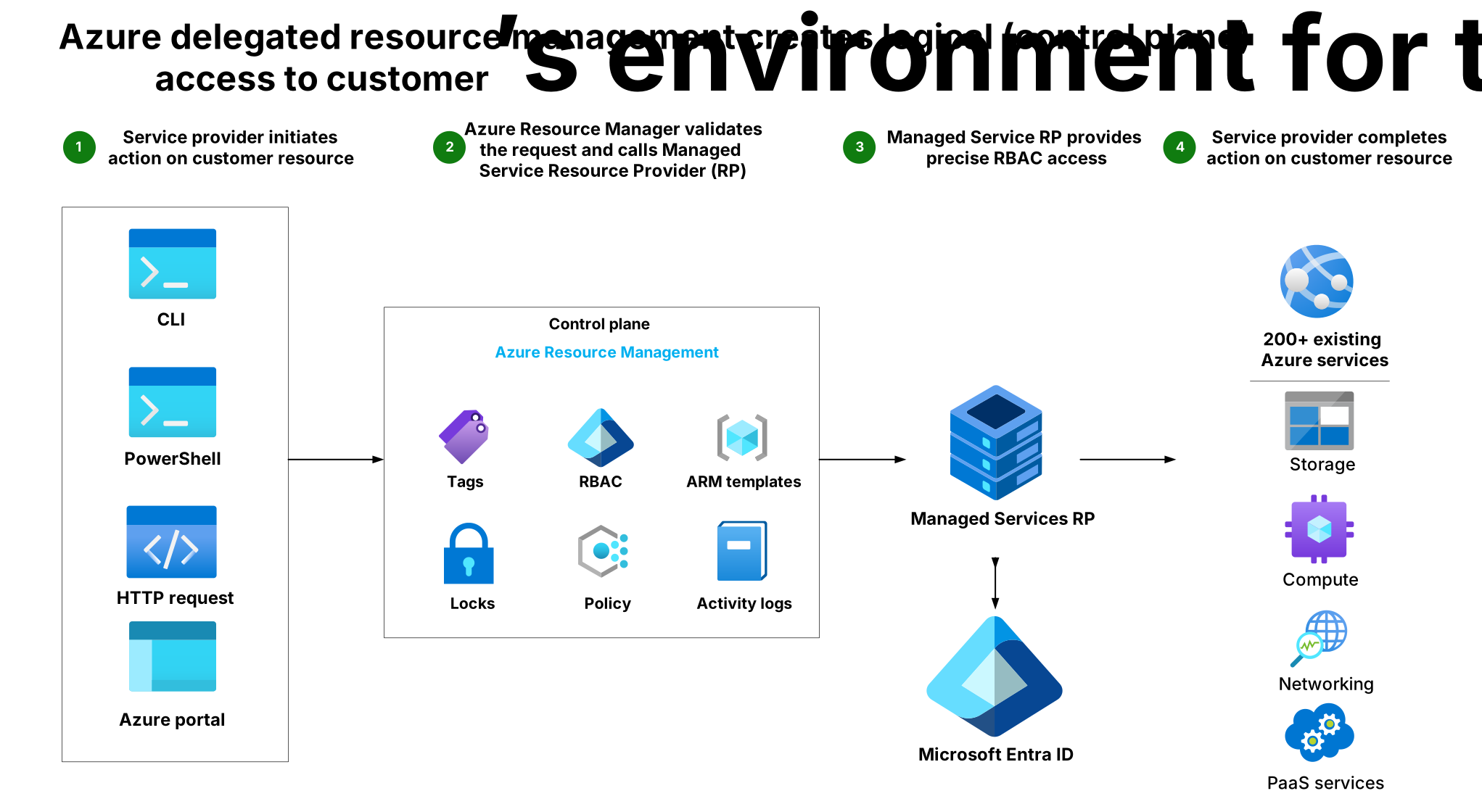
When a user in your tenant touches a delegated resource, Resource Manager authenticates the request exactly as it would for a native user, then checks that two objects exist in the customer's tenant:
| Object | Resource type | What it holds |
|---|---|---|
| Registration definition | Microsoft.ManagedServices/registrationDefinitions | The managing tenant ID and the list of authorizations (principal + built-in role) |
| Registration assignment | Microsoft.ManagedServices/registrationAssignments | The scope the definition applies to - a subscription or a resource group |
The registration definition always lives at subscription level. The registration assignment lives at the delegated scope.
The direction of trust matters
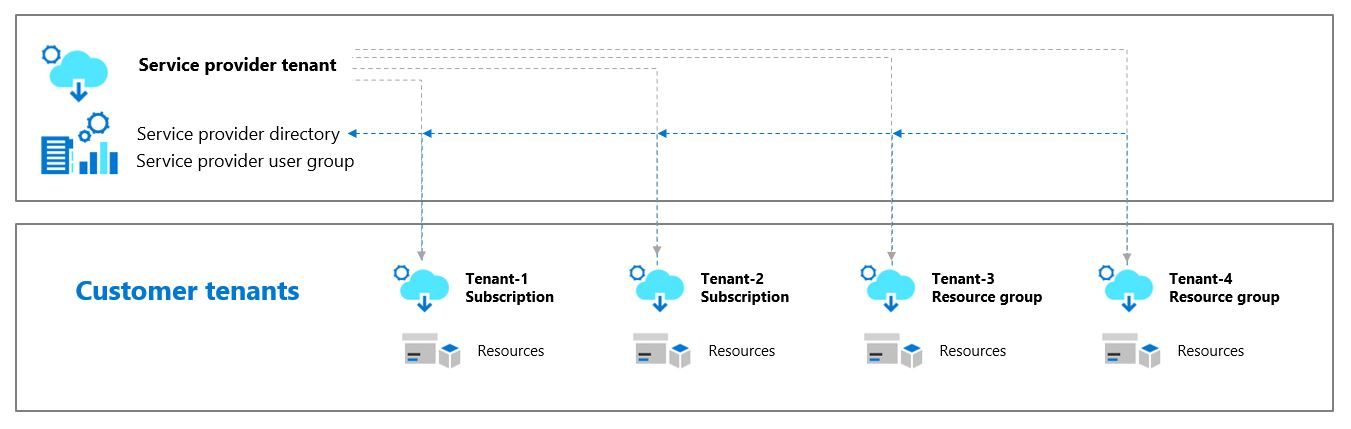
Access flows one way only: from the managing tenant to the managed tenant. Delegating your subscription to a provider gives them nothing in your Entra directory - no directory read, no user management, no Microsoft 365, no ability to create identities. It is Azure control-plane RBAC on a defined scope, and that's all.
  ┌─────────────── MANAGING TENANT (you) ────────────────┐
  │  Users / Groups / Service principals                 │
  │  Your Conditional Access, your MFA, your PIM         │
  └───────────────────────┬──────────────────────────────┘
                          │  authorizations
                          │  (principalId + built-in role)
                          ▼
  ┌─────────────── MANAGED TENANT (customer) ────────────┐
  │  Subscription  ──►  registrationDefinition           │
  │      └── RG      ──►  registrationAssignment         │
  │                                                      │
  │  Activity log records every action, by whom          │
  │  Customer can revoke the delegation at any time      │
  └──────────────────────────────────────────────────────┘

           ✗  no reverse path - the customer tenant
              gains nothing in the managing tenant
And the customer keeps the controls: they see every provider action in their activity log, they can review delegations in the Service providers blade, and they can remove the delegation unilaterally, at any moment, without asking you.
Use case 1 - Application maintenance (provider to customer)
Need: support one application. Scope: its resource group. Benefit: existing operator identities can perform approved management operations. Limit: guest OS, database/data-plane and directory permissions need their own design.
This is the bread-and-butter scenario, and the one where the ROI is immediate.
You built and now maintain an application running in the customer's subscription. Day-2 work looks like: patch the VMs, watch the alerts, tune the App Service, restore a database, deploy the next release. Today that means an account in their tenant. With Lighthouse it means nothing at all - your existing engineers, on your existing identities.
   Provider tenant                        Customer tenant
   ───────────────                        ───────────────
   grp-app-operators   ──► Contributor ──►  rg-app-prod
   grp-app-support     ──► Reader      ──►  rg-app-prod
   sp-cicd-deploy      ──► Contributor ──►  rg-app-prod
   grp-lead-engineers  ──► ELIGIBLE:         (JIT, 2 h, MFA,
                           Contributor       approval required)
                                       ──►  rg-app-prod
Scope it to a resource group, not the subscription
You maintain one application. You do not need the whole subscription. Delegating rg-app-prod and nothing else is both easier to sell to the customer's security team and much easier to defend in an audit.
The onboarding template
Onboarding is an ARM (or Bicep) deployment run by someone in the customer's tenant with Microsoft.Authorization/roleAssignments/write on the scope - typically an Owner. Here's the subscription-level template, matching the official sample :
Show complete script (38 lines)
{
  "$schema": "https://schema.management.azure.com/schemas/2018-05-01/subscriptionDeploymentTemplate.json#",
  "contentVersion": "1.0.0.0",
  "parameters": {
    "mspOfferName":        { "type": "string" },
    "mspOfferDescription": { "type": "string" },
    "managedByTenantId":   { "type": "string" },
    "authorizations":      { "type": "array"  }
  },
  "variables": {
    "mspRegistrationName": "[guid(parameters('mspOfferName'))]",
    "mspAssignmentName":   "[guid(parameters('mspOfferName'))]"
  },
  "resources": [
    {
      "type": "Microsoft.ManagedServices/registrationDefinitions",
      "apiVersion": "2019-09-01",
      "name": "[variables('mspRegistrationName')]",
      "properties": {
        "registrationDefinitionName": "[parameters('mspOfferName')]",
        "description": "[parameters('mspOfferDescription')]",
        "managedByTenantId": "[parameters('managedByTenantId')]",
        "authorizations": "[parameters('authorizations')]"
      }
    },
    {
      "type": "Microsoft.ManagedServices/registrationAssignments",
      "apiVersion": "2019-09-01",
      "name": "[variables('mspAssignmentName')]",
      "dependsOn": [
        "[resourceId('Microsoft.ManagedServices/registrationDefinitions/', variables('mspRegistrationName'))]"
      ],
      "properties": {
        "registrationDefinitionId": "[resourceId('Microsoft.ManagedServices/registrationDefinitions/', variables('mspRegistrationName'))]"
      }
    }
  ]
}
The interesting part is the parameter file - this is your access model, written down and reviewable:
{
  "mspOfferName":        { "value": "Contoso Managed Services - App Maintenance" },
  "mspOfferDescription": { "value": "Day-2 operations for the ordering platform" },
  "managedByTenantId":   { "value": "00000000-1111-2222-3333-444444444444" },
  "authorizations": {
    "value": [
      {
        "principalId": "aaaaaaaa-0000-1111-2222-bbbbbbbbbbbb",
        "principalIdDisplayName": "App Operators",
        "roleDefinitionId": "b24988ac-6180-42a0-ab88-20f7382dd24c"
      },
      {
        "principalId": "cccccccc-0000-1111-2222-dddddddddddd",
        "principalIdDisplayName": "App Support (read-only)",
        "roleDefinitionId": "acdd72a7-3385-48ef-bd42-f606fba81ae7"
      },
      {
        "principalId": "aaaaaaaa-0000-1111-2222-bbbbbbbbbbbb",
        "principalIdDisplayName": "App Operators - delegation removal",
        "roleDefinitionId": "91c1777a-f3dc-4fae-b103-61d183457e46"
      }
    ]
  }
}
Those three GUIDs are, in order, Contributor, Reader, and the Managed Services Registration Assignment Delete Role. Always include that last one: without it, only the customer can remove the delegation, and "please detach us, we finished the contract" becomes a support ticket.
Deploy it from the customer tenant, at subscription scope:
az deployment sub create \
  --name lighthouse-onboarding \
  --location westeurope \
  --template-file subscription.json \
  --parameters subscription.parameters.json \
  --subscription "<customer-subscription-id>"
Or scoped to a single resource group - note this is still a subscription-level deployment, with the resource group named as a parameter:
New-AzDeployment `
  -Name 'lighthouse-onboarding' `
  -Location 'westeurope' `
  -TemplateFile .\rgDelegatedResourceManagement.json `
-TemplateParameterFile .\rgDelegatedResourceManagement.parameters.jsonNo portal wizard is required, but there is one: My customers → Create ARM Template in the managing tenant generates the template and parameter file for you, with your tenant ID and principal IDs prefilled. Hand the two files to the customer and let them deploy.
Just-in-time instead of standing Contributor
The best part, and the least known: an authorization can be eligible rather than active. It's Entra Privileged Identity Management, projected across the tenant boundary.
"eligibleAuthorizations": [
  {
    "principalId": "eeeeeeee-0000-1111-2222-ffffffffffff",
    "principalIdDisplayName": "Lead Engineers - JIT Contributor",
    "roleDefinitionId": "b24988ac-6180-42a0-ab88-20f7382dd24c",
    "justInTimeAccessPolicy": {
      "multiFactorAuthProvider": "Azure",
      "maximumActivationDuration": "PT2H",
      "managedByTenantApprovers": [
        {
          "principalId": "11111111-2222-3333-4444-555555555555",
          "principalIdDisplayName": "Service Delivery Managers"
        }
      ]
    }
  }
]
Read that again: your engineer holds Reader permanently on the customer's production, and elevates to Contributor for two hours, with MFA, after approval by a manager in your tenant. The customer sees the whole thing in their activity log.
| Constraint | Value |
|---|---|
| Activation duration | 30 minutes to 8 hours |
| Approvers | Up to 10 users or groups, optional |
| MFA | Optional, but say yes |
| Service principals | Not supported for eligible authorizations |
| Licensing | The managing tenant needs an Entra ID Governance / PIM licence |
| National clouds | Not supported |
Always pair an eligible authorization with a permanent one - typically Reader - for the same principal. Without a standing role that includes Reader, the user can't even see the scope in the portal, and therefore can't elevate into it.
Use case 2 - Multi-tenant enterprises
Need: operate estates across separate Entra tenants. Scope: each deliberately delegated subscription/resource group. Benefit: a consolidated management view. Limit: no directory merger or automatic access to every tenant resource.
Lighthouse is documented as a service-provider feature, which is exactly why enterprises miss it. Yet the single best fit I see in the field is a group that ended up with several Entra tenants and no realistic path to consolidation.
You know the story: an acquisition closed, the target has its own tenant, merging directories is an 18-month project nobody has budget for. Or a subsidiary is legally required to stay separate. Or a geography insists on its own tenant for data residency reasons. Meanwhile your platform team is expected to apply the same policies, the same backups, the same security baseline everywhere.
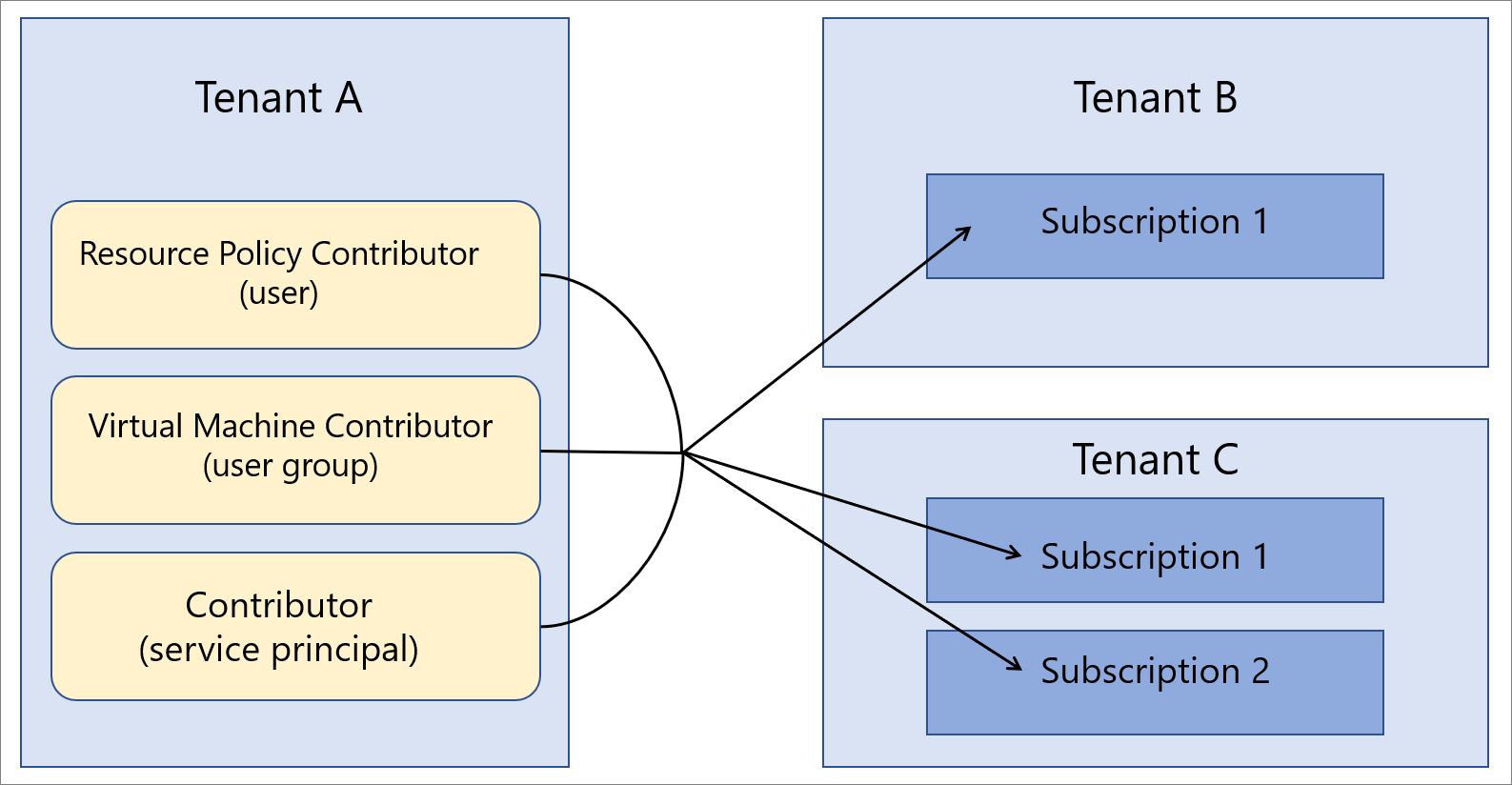
Pick one tenant as the managing tenant - usually the one where the platform team already lives - and delegate subscriptions from the others to it. Terminology maps cleanly: managing tenant = "service provider", managed tenants = "customers".
What you unlock, from one sign-in:
- Azure Policy - author and assign definitions across every tenant, and remediate
deployIfNotExistsassignments in the managed tenants. - Microsoft Sentinel - query and manage workspaces across tenants; a single SOC, several directories.
- Azure Monitor / Log Analytics - cross-workspace, cross-tenant KQL, and diagnostic settings in the managed tenant shipping logs into your central workspace.
- Azure Arc - the same baseline for on-premises servers and Kubernetes clusters attached to any of the tenants.
- Azure Resource Graph - one query, the entire estate, with the tenant ID in the results.
- Defender for Cloud, Backup, Update Manager, Migrate - all cross-tenant aware.
Once delegations are in place, this returns the whole group:
resources
| join kind=leftouter (
    resourcecontainers
    | where type == "microsoft.resources/subscriptions"
    | project subscriptionId, subscriptionName = name, tenantId
  ) on subscriptionId
| summarize resources = count() by tenantId, subscriptionName, type
| order by resources desc
And in the CLI, delegated subscriptions are simply there, tagged with the tenant they really belong to:
az account list --query "[].{name:name, home:homeTenantId, managedBy:managedByTenants[0].tenantId}" -o tableGet-AzSubscription | Select-Object Name, SubscriptionId, TenantId, HomeTenantId, ManagedByTenantIdsThe honest recommendation stands: if you can live in a single tenant, do. Lighthouse doesn't make multi-tenant good, it makes multi-tenant operable. Use it as the bridge while consolidation happens - or as the permanent answer when consolidation genuinely isn't possible.
A pattern that consistently pays off
Delegate the whole subscription for platform-owned subscriptions (connectivity, identity, management), and only specific resource groups for business-unit subscriptions. The platform team gets what it needs to enforce the baseline; the business units keep sovereignty over their own workloads.
Use case 3 - ISVs (Independent Software Vendors)
Need: support customer-owned deployments. Scope: the customer's agreed application resources. Benefit: explicit operational delegation. Limit: customer onboarding approval, supported roles and revocation remain required.
For ISVs there are three distinct patterns, and confusing them is the usual source of pain.
Pattern A - Managed Service offer in Microsoft Marketplace
Instead of emailing an ARM template to every prospect, publish a Managed Service offer in Partner Center. Purchasing the offer is the onboarding: the customer accepts it and the delegation is created. Offers can be public, or private, restricted to a list of subscription IDs - which is also how enterprises quietly use the Marketplace to onboard their own subsidiaries.
Pattern B - Lighthouse plus Azure managed applications
You ship a managed application into the customer's subscription. The infrastructure lands in a managed resource group the customer can't touch, and Lighthouse gives your support team the cross-tenant access to operate it. Your IP stays yours, the running costs stay on the customer's bill.
Pattern C - The one nobody expects: reverse delegation
This is the pattern worth the price of admission. Here the ISV hosts the resources in its own tenant, then delegates a narrow scope to the customer's tenant. The arrow flips.
   Classic direction                     ISV SaaS direction
   ─────────────────                     ──────────────────
   Provider tenant                       ISV tenant
        │ manages                             │ hosts the solution
        ▼                                     │ delegates a narrow scope
   Customer subscription                      ▼
                                         Customer tenant users
                                         (Reader on rg-customer-x)

   The ISV keeps its IP, its support plan, its VMs,
   its maintenance windows. The customer signs in with
   its own identity and sees only its own slice.
Why it's clever:
- The ISV never leaves its own tenant to sign into a VM, install a component, or run a maintenance window.
- Customers never receive a guest account in the ISV tenant, and never appear in the ISV's directory.
- The ISV's own support agreement covers the resources, because the resources are in the ISV's subscription.
- One subscription can carry many customers, each delegated to a different scope.
Mechanically: get the object ID of a security group in the customer's Entra tenant plus their tenant ID, then deploy the onboarding template on your own subscription, naming the customer tenant as managedByTenantId.
In this pattern the customer is technically the "managing tenant" over a slice of your estate. Grant the absolute minimum - Reader, or a narrow built-in role, on a single resource group. Anything broader and a customer can see or change parts of your platform that belong to other customers.
What Lighthouse does not do
Half of a good architecture decision is knowing the edges. This is where Lighthouse stops:
| Limitation | Detail |
|---|---|
| Owner role | Not supported. Ever. |
| Custom roles | Not supported - built-in roles only. |
DataActions | Roles carrying data-plane permissions aren't supported. |
Microsoft.Authorization/* | Roles that write role assignments, role definitions, locks or deny assignments are excluded. |
| User Access Administrator | Supported only for the narrow purpose of assigning roles to managed identities, and you must list which roles. |
| Cross-cloud | No delegation between a national cloud and Azure public, or between two national clouds. |
| Management groups | Delegation targets subscriptions and resource groups. Management group scope isn't a delegation target. |
| Entra ID objects | Lighthouse is Azure RBAC, not directory access. No users, groups, licences or Microsoft 365. |
| Classic administrators | Not supported. |
"No DataActions" does not mean "no data access". Some control-plane actions return keys - Virtual Machine Contributor includes Microsoft.Storage/storageAccounts/listKeys/action, which hands over storage account keys. Read the actions list of every role you delegate rather than trusting the role name.
Rolling it out without regrets
Preflight checklist: name both tenant IDs → confirm principal IDs in the managing tenant → review supported role IDs in Built-in Roles → agree on the exact delegated scope → identify the customer approver → document expiry/review and removal ownership.
After onboarding: test an intended read operation, a deliberately ungranted operation and the customer's view of the delegation/activity log. In a test scope, verify removal actually prevents new delegated operations; do not assume an old portal session proves revocation. Record observed results rather than treating this article as test evidence.
A checklist that has aged well:
- Groups, never individuals. Assign every authorization to an Entra security group. Membership changes then happen in your tenant, instantly, with no redeployment and no customer involvement. Individual
principalIdvalues mean re-onboarding for every joiner and leaver. - Security groups only. A Microsoft 365 group won't work - the group type must be Security.
- Least privilege, per scope. Different job, different authorization. Support gets Reader, operations get Contributor on one resource group, nobody gets Contributor on the subscription "just in case".
- Include the delete role.
Managed Services Registration Assignment Delete Role(91c1777a-f3dc-4fae-b103-61d183457e46), so you can detach yourself cleanly. - Make privileged roles eligible. Standing Contributor across 30 customers is the single largest blast radius you own. PIM it.
- Harden the managing tenant. Every customer's security now depends on your Conditional Access, your MFA, your joiner-mover-leaver process. That is the trade, and it is a good one only if your tenant is actually hardened.
- Version the templates in Git. The parameter file is your access model. Review it like code, because it is.
- Link your partner ID. If you're a partner, associate your MCPP ID with a service principal included in every onboarding, so the engagement is recognised.
Verifying and removing a delegation
From the managing tenant, list what you have been given:
az managedservices assignment list --output table
az managedservices definition list --output table
And to walk away:
az managedservices assignment delete --assignment <assignment-id>The customer's equivalent is the Service providers blade in their portal: every delegation, every role, every principal display name, with a Delete button that needs no approval from you. That asymmetry is deliberate, and it's exactly what makes Lighthouse acceptable to a customer's security team.
Why this is the feature to know
Azure Lighthouse costs nothing, adds no runtime component, breaks no existing tool, and removes an entire category of standing privileged accounts from tenants you don't control. It is one of the rare Azure features where the security posture improves and the operational cost goes down at the same time.
The three use cases above cover most of what I encounter:
- Application maintenance - stop collecting guest accounts, delegate the one resource group you actually operate, and make the privileged role just-in-time.
- Multi-tenant enterprise - one managing tenant, one SOC, one policy set, however many directories history has left you with.
- ISV - Marketplace offers, managed applications, and the reverse-delegation pattern that keeps your IP in your tenant while customers still reach their own slice.
If you manage Azure for anyone other than yourself, this is the least glamorous, highest-return thing you can deploy this quarter.
Further reading