
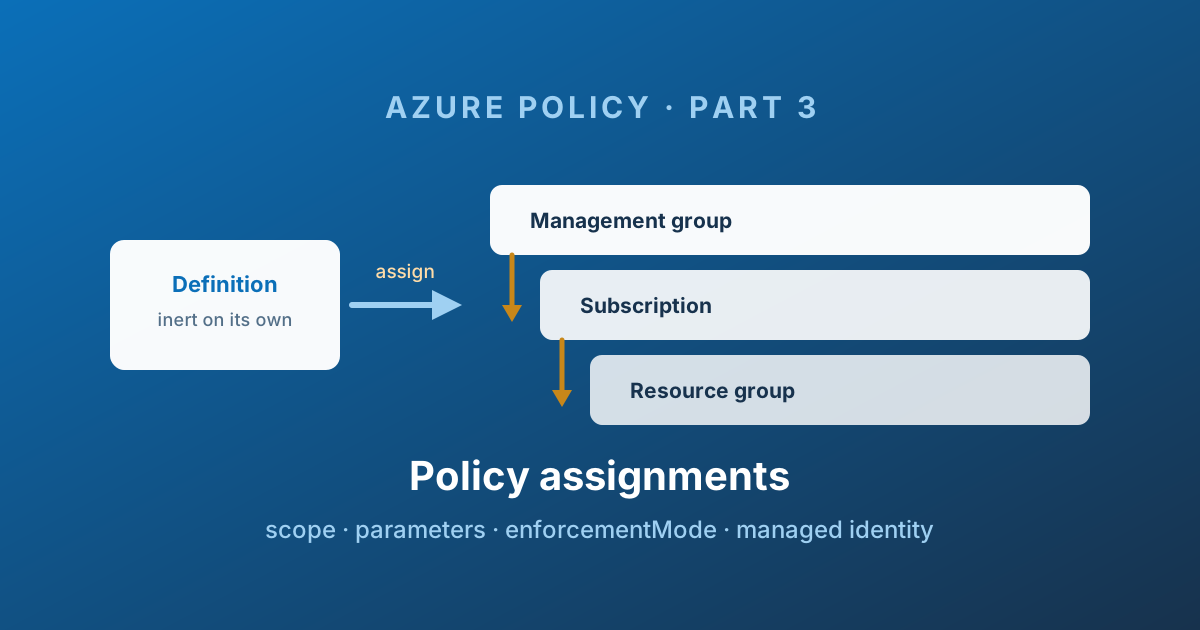
Before applying an assignment
Record the exact scope and descendants, selected definition/version, parameter values and rollback owner before deployment. Start with a small test scope and DoNotEnforce when observing compliance; do not read a production Default example as a safe trial. Remediation is a separate change that can modify resources even while enforcement is disabled.
- Scope: management group → subscriptions → resource groups → resources; inspect inherited assignments too.
- Mode:
DoNotEnforceobserves without enforcing the configured effect;Defaultenables it. Neither grants permissions to the caller. - Identity: Modify/DeployIfNotExists needs its own managed identity and appropriate resource permissions; the deployment identity is a different actor.
- After deployment: verify assignment ID, compliance scope, a known compliant/non-compliant resource, and any explicitly approved remediation result.
| Symptom | Verification |
|---|---|
| Assignment exists but no expected effect | Scope, exclusions, selectors, evaluation timing and enforcement mode |
| Remediation fails | Assignment identity, role assignment scope and role propagation |
| New resources work but old ones differ | Existing resources may need an explicit remediation task |
| Unexpected blocking | Other inherited assignments and the effective definition/parameters |
Bad message: "Denied." Better message: "Storage must disable public blob access under the storage baseline; see the platform exception process." State the required correction, not just the control name.
Technical execution validation: not recorded. Review assignment structure and the printable rollout sequence. Browse the Policies catalogue for definition context.
Definitions and initiatives describe rules; assignments apply them.
The assignment is the object that binds a definition or initiative to a piece of your resource hierarchy and says: from now on, here, this applies.
Changes to an assignment or its referenced definitions can affect production. Review both.
What an assignment actually is
An assignment is a Resource Manager object of type Microsoft.Authorization/policyAssignments. It carries:
- A pointer to one definition or one initiative, optionally pinned to a version
- A scope - where it applies
- Parameter values - filling in what the definition left open
- An enforcement mode - whether the effect actually blocks anything
- Optionally a managed identity - required for
deployIfNotExistsandmodify - Optionally exclusions, selectors, overrides, and messages
Here is a full one:
{
  "properties": {
    "displayName": "Storage security baseline - Production",
    "description": "Storage baseline enforced across the production landing zone.",
    "policyDefinitionId": "/providers/Microsoft.Management/managementGroups/mg-platform/providers/Microsoft.Authorization/policySetDefinitions/storage-security-baseline",
    "definitionVersion": "1.*.*",
    "scope": "/providers/Microsoft.Management/managementGroups/mg-corp-prod",
    "notScopes": [],
    "enforcementMode": "Default",
    "parameters": {
      "effect": { "value": "Deny" },
      "allowedLocations": { "value": [ "westeurope", "northeurope" ] }
    },
    "nonComplianceMessages": [
      {
        "message": "Storage accounts in production must meet the storage security baseline. See the platform wiki before requesting an exception."
      }
    ],
    "metadata": {
      "assignedBy": "Cloud Centre of Excellence"
    }
  },
  "identity": {
    "type": "SystemAssigned"
  },
  "location": "westeurope"
}
Scope and inheritance
Scope is the single most consequential field. An assignment can target:
| Scope | Typical use |
|---|---|
| Management group | Platform baselines applied to a whole landing zone type |
| Subscription | Workload-specific controls, or a per-subscription exception to a group standard |
| Resource group | Narrow, tactical controls - usually a smell if you have many |
| Individual resource | Rare, but supported |
Assignments inherit downwards, always, and cannot be turned off from below. An assignment on mg-corp-prod applies to every subscription, every resource group, and every resource beneath it. A subscription owner cannot delete or override it. That is the entire point - it is what makes a management group hierarchy a governance tool rather than a folder structure.
Microsoft's reference hierarchy makes the blast radius obvious. One assignment on Landing zones reaches every subscription under Corp and Online; one on Platform reaches identity, management, connectivity and security:
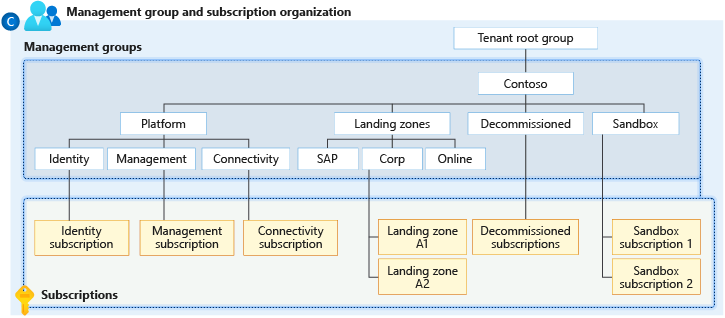
Source: Organize your resources with management groups - © Microsoft, Microsoft Learn.
If you do not have a deliberate management group design yet, policy will not save you. That comes first: What Is an Azure Landing Zone? and Don't Build Your Cloud Home on Shaky Foundations.
A policy can be assigned at a management group, but only resources at subscription and resource group level are evaluated. The management group is a distribution point, not an evaluation target.
Assignments also stack. Three assignments of the same definition at three levels of the hierarchy all apply, and the result is cumulative and most restrictive. A Deny inherited from the tenant root cannot be relaxed by an Audit assignment further down. If you need something relaxed, the mechanisms are notScopes (Part 4) and exemptions (Part 5) - never a second, gentler assignment.
enforcementMode: the setting that prevents outages
This is the field that separates a controlled rollout from an incident.
| Mode | JSON value | Effect enforced on create/update | Compliance still reported | Manual remediation |
|---|---|---|---|---|
| Enabled | Default | Yes | Yes | Yes |
| Disabled | DoNotEnforce | No | Yes | Yes |
| Enroll | Enroll | Only for enrolled resources | Yes | Yes |
DoNotEnforce is the mode every new assignment should start in. You get full compliance data - exactly which resources would have been blocked, and how many - with zero risk of blocking a deployment. You find out that 340 storage accounts fail your new rule before the change freeze, not during it.
Remediation tasks for deployIfNotExists can still be started while enforcementMode is DoNotEnforce. So you can even test the fix, not just the finding, before you turn enforcement on.
Enroll is newer and pairs with a preview resource type, Microsoft.Authorization/policyEnrollments. It inverts the model: instead of applying to everything in scope minus exclusions, the effect only applies to resources that have been explicitly enrolled in the assignment. That is an opt-in rollout rather than an opt-out one - useful when you want application teams to adopt a control on their own timeline while you still measure everyone.
Managed identity and remediation
deployIfNotExists and modify do not just report - they act. Acting requires an identity.
An assignment carrying either effect must have an identity, either system-assigned or user-assigned, and exactly one of them. A system-assigned identity also requires a top-level location, which cannot be global and cannot be changed afterwards.
The identity then needs Azure RBAC roles. The definition declares which ones in roleDefinitionIds:
"details": {
  "roleDefinitionIds": [
    "/providers/Microsoft.Authorization/roleDefinitions/749f88d5-cbae-40b8-bcfc-e573ddc772fa"
  ]
}
Note those are full role IDs, not role names. Built-in definitions come with the correct list already populated; custom definitions are your responsibility.
Remediation has its own blade, listing every assigned deployIfNotExists policy and how many resources a task would act on:
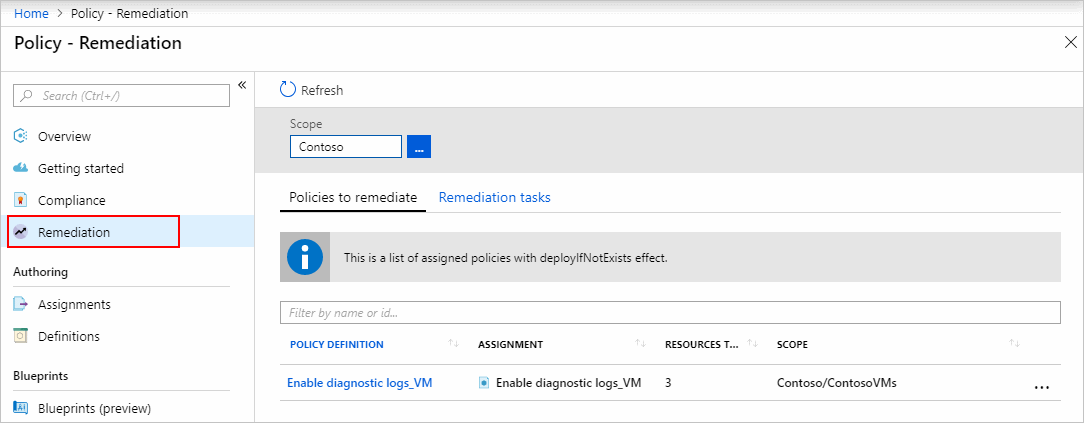
Source: Remediate non-compliant resources - © Microsoft, Microsoft Learn.
The four things that go wrong
| Symptom | Check and correction |
|---|---|
| IaC assignment succeeds but remediation lacks permissions | Inspect the assignment identity's role assignments; do not assume the portal's permission-assignment workflow runs in CLI/IaC |
| Pipeline cannot grant required roles | Separate Policy write rights from RBAC role-assignment rights; have an authorised role administrator grant only the intended roles/scopes |
| Definition changed and remediation now fails | Compare updated roleDefinitionIds with the identity's actual assignments; definition edits do not automatically grant new roles |
| Evaluation and deployment disagree | Distinguish the requesting identity used in evaluation from the managed identity executing the deployment; inspect read as well as write permissions and the evaluation details |
Remediation is not automatic for resources that already exist. Assigning a deployIfNotExists policy fixes resources created after the assignment. Existing ones need a remediation task, which you create explicitly. One task can cover up to 50,000 resources. For a management group assignment, the task must be created after evaluation has run - you cannot bundle it into assignment creation the way you can for a subscription.
Parameters
Assignment parameters fill in what the definition or initiative left open. Two properties do most of the work:
- Values must satisfy
allowedValuesif the parameter declared them - the assignment fails to create otherwise, which is a feature - Parameters without a value fall back to
defaultValue, and if there is no default, the assignment cannot be created
This is why Part 2 insisted on defaults. A parameter with a default can be added to a live initiative. One without cannot.
The metadata.parameterScopes property appears automatically when you use strongType parameters - it records which scope the portal picker was browsing. It is informational; do not hand-craft it.
resourceSelectors and overrides: safe rollout without new assignments
These two are how you do a staged rollout properly, and they are underused.
resourceSelectors
resourceSelectors narrows which resources in scope the assignment applies to, without changing the scope itself.
"resourceSelectors": [
  {
    "name": "PilotRegions",
    "selectors": [
      {
        "kind": "resourceLocation",
        "in": [ "northeurope" ]
      }
    ]
  }
]
Selector kinds are resourceLocation, resourceType, and resourceWithoutLocation. Up to 50 values per in/notIn list, and up to 10 selectors per assignment. A resource must satisfy all selectors within one selector block, and is in scope if it satisfies any one block.
The pattern: assign at the management group with a selector limiting evaluation to one region, verify, then widen the region list. One assignment, one identity, one compliance history - progressively more resources. Far cleaner than creating and deleting a series of narrow assignments.
overrides
overrides changes the effect for part of an assignment without touching the definition.
"overrides": [
  {
    "kind": "policyEffect",
    "value": "Audit",
    "selectors": [
      {
        "kind": "policyDefinitionReferenceId",
        "in": [ "storageAllowedLocations" ]
      }
    ]
  }
]
That is: assign the whole baseline as Deny, but keep this one member at Audit until the estate catches up. No fork of the initiative, no second assignment, and the exception is visible in the assignment JSON where a reviewer will find it.
Up to 10 overrides per assignment, up to 50 reference IDs each, evaluated in order. Overrides can also target resourceLocation, and there is a policyVersion override kind for rolling a new built-in version out region by region.
overrides needs policyDefinitionReferenceId values you can actually read. This is the payoff for the Part 2 advice about naming them yourself instead of accepting the portal's twenty-digit numbers.
Non-compliance messages
By default, a denied deployment returns a message containing a policy definition GUID. Nobody has ever found that helpful.
"nonComplianceMessages": [
  {
    "message": "Production storage accounts must disable public blob access. Raise a platform exception request if you believe this does not apply."
  },
  {
    "message": "This resource must carry a costCentre tag. See the tagging standard on the wiki.",
    "policyDefinitionReferenceId": "requireCostCentreTag"
  }
]
One default message, plus specific messages per initiative member. The message appears in the error returned to whoever tried the deployment, and in the compliance blade.
This is the highest-value, lowest-effort thing you can do for your internal customers. A deny with a sentence explaining what to do instead converts a support ticket into a self-service fix.
Custom non-compliance messages are only supported on definitions and initiatives using Resource Manager modes (all and indexed). They do not work with resource provider modes such as Microsoft.Kubernetes.Data.
RBAC: who can do what
| Role | Read policy | Create definitions and assignments | Trigger remediation | Grant identity roles |
|---|---|---|---|---|
| Reader | Yes | No | No | No |
| Contributor | Yes | No | Yes | No |
| Resource Policy Contributor | Yes | Yes | Yes | No |
| User Access Administrator | Yes | No | No | Yes |
| Owner | Yes | Yes | Yes | Yes |
The one that catches teams out: Contributor cannot create policy definitions or assignments. It can trigger remediation, but it cannot govern. A platform team needs Resource Policy Contributor plus a role that can assign RBAC.
All policy objects are readable by any role that can read the scope. There is no such thing as a confidential policy assignment.
A rollout sequence that will not page you
- Assign at the target scope with
enforcementMode: DoNotEnforceand the effect parameter set toAudit. - Wait for a full evaluation cycle - up to 24 hours, or trigger a scan.
- Read the compliance results as a work item list. Every non-compliant resource is either something to fix, something to exempt (Part 5), or evidence your rule is wrong.
- Narrow with
resourceSelectorsto a pilot region or resource type if the blast radius is large. - Fix the estate. Remediation tasks for
modifyanddeployIfNotExists; tickets for everything else. - Flip the effect parameter to
Deny, still with enforcement disabled. Compliance data now reflects what would be blocked. - Set
enforcementMode: Default. One landing zone at a time. Never everything at once. - Keep the audit-only overrides on members the estate has not caught up with, and burn that list down deliberately.
The step people skip is 2. Assignments take up to 30 minutes to take effect and up to 24 hours for a full compliance picture. Checking five minutes later and concluding "it works" is how a deny reaches production untested.
The Cloud Adoption Framework compresses the same idea into three phases, specifically for the deployIfNotExists and modify policies that act rather than report:
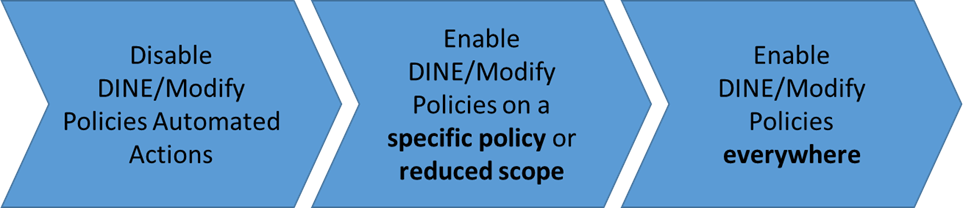
Source: Adopt policy-driven guardrails - © Microsoft, Cloud Adoption Framework.
What an assignment cannot do
It cannot make a rule less strict than something above it. It cannot apply to a scope outside its own subtree. And it cannot be selectively disabled by the teams it governs.
Which raises the obvious operational question: the payments subscription genuinely cannot meet one control this quarter. Now what?
There are exactly two answers in Azure Policy, they behave very differently, and choosing the wrong one is how governance estates rot. Part 4 covers the blunt one - exclusions and notScopes.
Enjoy!