
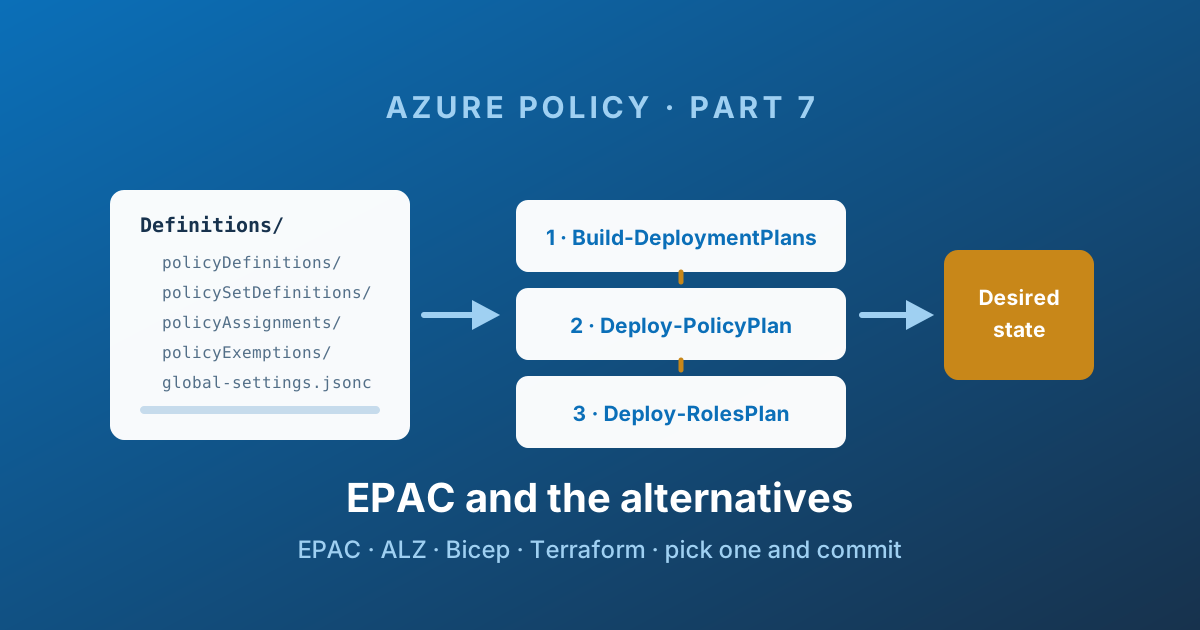
Evaluate, configure, adopt
Evaluate: use EPAC when policy-specific desired-state planning across scopes is a problem your team is ready to own. If your existing IaC already covers a small, bounded set well, adding another owner may increase complexity. Read the suitability and alternatives sections immediately below before configuration.
Configure: follow epac-dev consistently through global settings, scope and owner identity; do not copy a production root scope into a trial. Adopt: use the phased plan as a sequence, not a guaranteed completion duration.
Adoption gates: export and inventory → isolated scope/owner → inspect policy and role plans → test approved deployment/remediation → promote a limited ring → schedule drift and exemption review. Record rollback and evidence at each gate.
Technical execution validation and tested EPAC release: not recorded. Confirm schemas, behaviour and licensing against the EPAC repository and documentation , not a publication date.
Part 6 covered dependency ordering, multi-scope orchestration, the managed identity permission gap, and desired state with safe deletion.
You can implement these controls yourself, but your team then owns their ongoing maintenance.
Or you can use EPAC - Enterprise Azure Policy as Code - which is a Microsoft-published, MIT-licensed PowerShell framework that solves all four, and has been hardened by a lot of large organisations doing exactly this.
This last post covers what EPAC is, how it is structured, how the pipeline works, and - just as importantly - when it is the wrong choice.
When EPAC is the wrong answer
EPAC's own documentation is refreshingly direct about its target audience: medium and large organisations with many policies, multiple tenants, or several teams sharing responsibility for governance.
If that is not you, the honest alternatives:
| Situation | Better choice |
|---|---|
| One or two subscriptions, small team | Microsoft Defender for Cloud's automatic built-in assignments |
| Low DevOps maturity, no pipeline culture yet | Azure Landing Zones' own policy deployment (Bicep or Terraform) |
| Everything already in Terraform, one team, modest policy count | azurerm policy resources in your existing repository |
| Everything already in Bicep, ALZ-aligned | ALZ Bicep modules |
| Large, multi-team, multi-tenant, regulated | EPAC |
A framework nobody on the team can operate is worse than a simpler approach everyone understands. EPAC is PowerShell-first: if your platform team is entirely Terraform-based and allergic to PowerShell, that friction is real and you should weigh it.
The alternatives, honestly
Azure Landing Zones (Bicep and Terraform). If you deployed ALZ, you already have a policy deployment mechanism, and the ALZ Library is the upstream source of truth for those policies across the portal, Bicep, and Terraform paths. Sticking with it is a perfectly good answer until the number of custom policies or the number of teams touching them makes it painful. Note that the classic ALZ-Bicep modules are now explicitly labelled "Classic", with the newer direction built around the ALZ Library and Azure Verified Modules - worth checking which you are adopting.
Terraform. The azurerm provider covers definitions, initiatives, per-scope assignments, exemptions and remediations properly. You get real plan output and a review workflow for free. The costs: policy JSON embedded in HCL is less pleasant to read and diff, the state file becomes a governance dependency of its own, and preview objects such as policy enrollments require dropping to the AzAPI provider.
AzOps. Also from the Azure organisation - a PowerShell module that pulls your ARM hierarchy into a repository and pushes ARM and Bicep back at any scope. It is broader than policy, and it is still maintained, though at a noticeably slower cadence than EPAC. Worth knowing about; not where I would start for a policy-specific problem in 2026.
The archived GitHub Action. Azure/manage-azure-policy is archived. It is still the top result in plenty of tutorials. Do not build on it.
Azure Governance Visualizer (AzGovViz). Not a deployment tool - a reporting one. It polls ARM and Microsoft Graph and produces a genuinely excellent HTML report of your policy, RBAC and management group estate. It pairs well with any of the above and is referenced in both the Cloud Adoption Framework and the Well-Architected Framework.
AzAdvertizer. A web service tracking every built-in definition, initiative, alias, RBAC role and provider operation, including what changed and when. Indispensable when you need to know whether a built-in was updated last Tuesday. My own reference copies of that data are at Azure Policies and Azure Policy Aliases.
The built-in policy repository. Azure/azure-policy on GitHub is a read-only mirror of every built-in in Azure public cloud, updated whenever Microsoft deploys a change. It has an Atom feed on the built-in-policies folder - subscribing to it is the cheapest possible early warning that a control you depend on has changed under you.
What EPAC is
EPAC lives at github.com/Azure/enterprise-azure-policy-as-code - in the Azure GitHub organisation, MIT licensed - with documentation at azure.github.io/enterprise-azure-policy-as-code , short-linked as aka.ms/epac.
It ships as a PowerShell module, EnterprisePolicyAsCode, requiring PowerShell 7 and the Az modules.
Install-Module -Name EnterprisePolicyAsCode -Scope CurrentUserThe critical sentence from its own documentation, which you should read twice before adopting it:
> EPAC is a true desired state deployment technology. It takes possession of all Policy Resources at the deploymentRootScope and its children. It will delete any Policy resources not defined in the EPAC repo.
That is the power and the danger. Point EPAC at your tenant root with the default strategy and no preparation, and it will happily remove every policy object it did not create. There is a safe on-ramp for this, covered below, and skipping it is the classic first-week mistake.
Folder structure
Everything lives under a Definitions folder:
  Definitions/
  ├── global-settings.jsonc
  ├── policyDefinitions/
  ├── policySetDefinitions/
  ├── policyAssignments/
  ├── policyExemptions/
  ├── policyEnrollments/
  └── policyDocumentations/
One folder per object type from Parts 1 to 5, plus:
policyEnrollments/for the newerenforcementMode: Enrollopt-in model from Part 3policyDocumentations/which drivesBuild-PolicyDocumentation, generating Markdown and CSV describing what your estate actually enforces - genuinely useful when an auditor asks
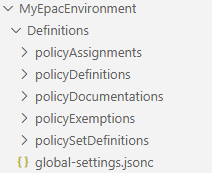
Source: EPAC documentation - © Microsoft, Azure/enterprise-azure-policy-as-code (MIT).
Subfolders inside each are free-form: organise by category, by owner, by framework, whatever suits. File names are irrelevant - EPAC registers a definition by its name attribute, not its filename - and .jsonc is supported, so you can comment your policy files. After Part 4's complaint that notScopes entries have nowhere to record a justification, that alone is worth something.
global-settings.jsonc
This is the file that makes EPAC multi-tenant and multi-environment.
The example includes desiredState.strategy: full in the isolated epac-dev scope. A full desired-state plan may delete policy objects absent from the repository. Export first, verify deploymentRootScope and pacOwnerId, and review both policy and role plans before deployment. Do not run this against a tenant root as a trial.
{
  "$schema": "https://raw.githubusercontent.com/Azure/enterprise-azure-policy-as-code/main/Schemas/global-settings-schema.json",
  "pacOwnerId": "3d6b3d1a-9f0e-4b18-9c33-1b0f0b5d21ae",
  "pacEnvironments": [
    {
      "pacSelector": "epac-dev",
      "cloud": "AzureCloud",
      "tenantId": "00000000-0000-0000-0000-000000000000",
      "deploymentRootScope": "/providers/Microsoft.Management/managementGroups/mg-epac-dev",
      "desiredState": {
        "strategy": "full"
      },
      "managedIdentityLocation": "westeurope"
    },
    {
      "pacSelector": "tenant",
      "cloud": "AzureCloud",
      "tenantId": "00000000-0000-0000-0000-000000000000",
      "deploymentRootScope": "/providers/Microsoft.Management/managementGroups/mg-intermediate-root",
      "desiredState": {
        "strategy": "ownedOnly"
      },
      "globalNotScopes": [
        "/providers/Microsoft.Management/managementGroups/mg-sandbox",
        "/subscriptions/*/resourceGroups/databricks-rg-*"
      ],
      "managedIdentityLocation": "westeurope"
    }
  ]
}
pacSelector
A symbolic name for an environment. It is the string that ties everything together: the same selector appears in global-settings.jsonc, in the pipeline parameters, and inside assignment files where you specify per-environment scopes, notScopes, and identity locations.
This is how one repository deploys the same baseline as Audit into a development tenant and Deny into production - not by duplicating files, but by keying values off the selector.
Convention: the development environment is called epac-dev; the production one is typically tenant or tenant01.
deploymentRootScope
The top of the subtree EPAC owns. A management group, a subscription, or even a resource group.
Use an intermediate root management group, not the Tenant Root Group. Two reasons: the Tenant Root Group contains objects Azure creates for you, and pointing a desired-state engine at the top of your tenant leaves you nowhere to stand if something goes wrong. This is EPAC's own strong recommendation, and it is right.
Also: epac-dev should have a deploymentRootScope outside your production hierarchy. A separate management group subtree - ideally in a separate tenant - so that testing a Deny cannot reach anything real.
EPAC's own sample shows the shape: a production hierarchy under contoso, and a parallel epac-contoso subtree that mirrors it node for node.
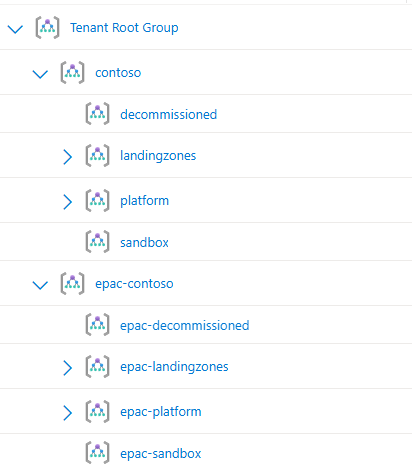
Source: EPAC documentation - © Microsoft, Azure/enterprise-azure-policy-as-code (MIT).
globalNotScopes
Exclusions (Part 4) applied across every assignment in that environment, rather than repeated in each file. It accepts resource group name patterns, which is the clean answer to platform-managed resource groups:
"globalNotScopes": [
  "/subscriptions/*/resourceGroups/databricks-rg-*",
  "/subscriptions/*/resourceGroups/synapseworkspace-managedrg-*"
]
One caveat: patterns are resolved when the deployment scripts run, not dynamically. A managed resource group created after the last deployment is not excluded until the next run.
pacOwnerId
A GUID identifying this EPAC instance. EPAC stamps it into the metadata of everything it deploys, and that stamp is what makes safe deletion possible - it is how EPAC distinguishes "an object I own", "an object another EPAC instance owns", and "an object somebody made in the portal".
It also means the portal shows a meaningful Assigned by value on assignments, instead of a service principal object ID.
Desired state: the setting that matters most
"desiredState": {
  "strategy": "full"
}| Strategy | Behaviour |
|---|---|
full | EPAC manages all policy resources in the root scope and below. Anything not in the repository is deleted. |
ownedOnly | EPAC manages only resources carrying its own pacOwnerId. Everything else is left alone. |
Under full, EPAC deletes objects with no pacOwnerId - portal-created leftovers - but does not delete objects stamped with a different pacOwnerId. That is a deliberate shared-responsibility model: a security team and a platform team can run separate EPAC instances against overlapping scopes without deleting each other's work.
Two repositories, two pacOwnerId values, overlapping subtrees, and neither one removing the other's objects:
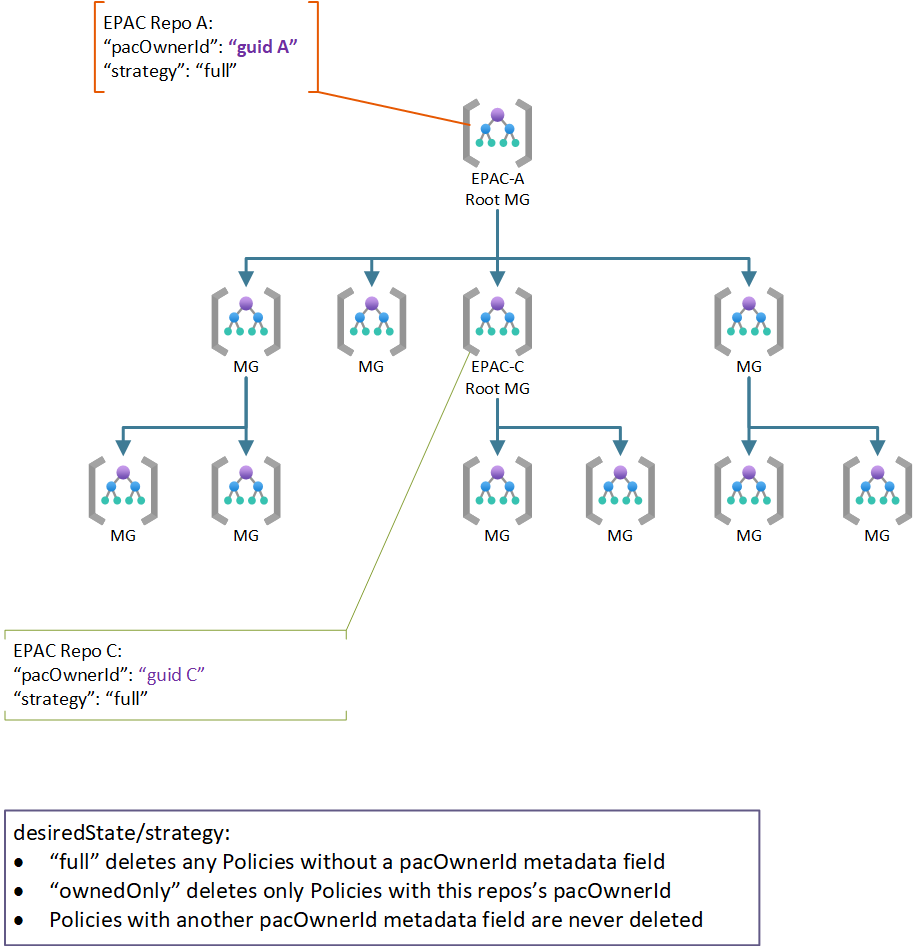
Source: EPAC documentation - © Microsoft, Azure/enterprise-azure-policy-as-code (MIT).
The adoption path that works:
- Start with
ownedOnly. Deploy your policies. Nothing existing is touched. - Run for a few weeks. Watch the plans. Build confidence.
- Inventory what is left in Azure that EPAC does not own, and either bring it into the repository or add it to
desiredState.excludedScopes/excludedPolicyAssignments. - Switch to
full.
Skipping to full on day one against a live tenant is how you learn what "true desired state" means the hard way.
There are a number of escape hatches under desiredState worth knowing about: excludedScopes, excludedPolicyDefinitions, excludedPolicyAssignments, doNotDisableDeprecatedPolicies, excludeSubscriptions, keepDfcSecurityAssignments and keepDfcPlanAssignments (for Microsoft Defender for Cloud's automatic assignments, which you almost certainly want to keep), manageChildScopeDefinitions, and cleanupObsoleteExemptions - which finally automates the expired-exemption housekeeping Part 5 said Azure will not do for you.
The three-stage pipeline
This is EPAC's answer to the privilege separation problem from Part 6.
| Stage | Cmdlet | Azure role required | Output |
|---|---|---|---|
| 1. Plan | Build-DeploymentPlans | Reader | policy-plan.json, roles-plan.json |
| 2. Deploy Policy | Deploy-PolicyPlan | Resource Policy Contributor | Definitions, initiatives, assignments, exemptions |
| 3. Deploy Roles | Deploy-RolesPlan | Role Based Access Control Administrator | Role assignments for managed identities |
Build-DeploymentPlans -PacEnvironmentSelector "tenant" `
                      -DefinitionsRootFolder ./Definitions `
                      -OutputFolder ./Output

Deploy-PolicyPlan     -PacEnvironmentSelector "tenant" -InputFolder ./Output
Deploy-RolesPlan      -PacEnvironmentSelector "tenant" -InputFolder ./Output
The whole flow, from the Definitions folder through the two plan artefacts to the two deploy stages, each with its own role:

Source: EPAC documentation - © Microsoft, Azure/enterprise-azure-policy-as-code (MIT).
Three properties make this design good:
The plan is a file. policy-plan.json is produced by a Reader identity, reviewed by a human, and consumed unchanged by the deploy stage. What you approved is what ships. If there are no changes, no plan is produced at all and the deploy stages are skipped.
Roles are a separate stage with a separate identity. The permission gap from Part 3 is solved explicitly rather than papered over, and the credential that can hand out RBAC is not the same one that deploys policy day to day.
It is idempotent. Run it repeatedly against an unchanged repository and nothing happens. That is what makes a nightly drift-detection run safe.
The plan output is also captured in a variable ($epacInfoStream) specifically so pipelines can post it as a pull request comment - which is the workflow you want: the reviewer sees the exact set of changes in the PR, not a link to a build log.
Getting started without hand-writing anything
Two things make adoption much less painful than it sounds.
The Hydration Kit is the guided onboarding path. It scaffolds the folder structure, builds a starting global-settings.jsonc, and walks you through the initial configuration. New-HydrationDefinitionsFolder and New-EpacGlobalSettings are the entry points.
Export-AzPolicyResources reverse-engineers an existing tenant into EPAC format. It reads every definition, initiative, assignment and exemption at a scope, strips the read-only fields, and writes files you can commit directly.
Export-AzPolicyResources -DefinitionsRootFolder ./Definitions `
                         -OutputFolder ./Output `
                         -IncludeChildScopes
This is the single most valuable cmdlet for an existing estate. Two hours of running an export and reviewing the result replaces what would otherwise be weeks of transcribing the portal by hand - and it is honest about what is actually deployed, including the things nobody remembers creating.
Starter pipelines for Azure DevOps, GitHub Actions and GitLab are generated by New-PipelinesFromStarterKit, with a choice of two branching models - GitHub flow, or a release flow that can fast-track exemption-only changes through a -BuildExemptionsOnly plan.
The operational toolbox
The part of EPAC people underestimate is the set of operational cmdlets that have nothing to do with deployment:
| Cmdlet | What it gives you |
|---|---|
Build-PolicyDocumentation | Markdown and CSV documentation of what you enforce - audit-ready |
New-AzRemediationTasks | Bulk remediation across scopes, with an effect filter and a test-run mode |
Export-NonComplianceReports | Non-compliance reports for distribution to workload teams |
Get-AzExemptions | Every exemption, with -ActiveExemptionsOnly and an EPAC-format export |
Get-AzMissingTags | Resources missing required tags |
New-AzPolicyReaderRole | Creates a least-privilege custom role for the plan stage identity |
New-AzureDevOpsBug / New-GitHubIssue | Files work items automatically when remediation tasks fail |
Get-AzExemptions -ActiveExemptionsOnly is the answer to Part 5's problem: Azure will not tell you which exemptions are about to lapse, so something has to, on a schedule.
There is also CSV-driven parameters for assignments, which sounds mundane and is not. It lets a non-engineer maintain per-scope parameter values in a spreadsheet while the structure stays in JSON - reducing the skill floor for day-to-day operations, which is often the real blocker to a platform team handing governance work back to workload teams.
ALZ integration
If you have deployed Azure Landing Zones, you already have a large set of Microsoft-authored policies. EPAC can consume them from the ALZ Library rather than forking them:
New-ALZPolicyDefaultStructure -DefinitionsRootFolder ./Definitions `
                              -Type ALZ -PacEnvironmentSelector "epac-dev"

Sync-ALZPolicyFromLibrary     -DefinitionsRootFolder ./Definitions `
                              -Type ALZ -PacEnvironmentSelector "epac-dev"
-Type also accepts AMBA (Azure Monitor Baseline Alerts) and SLZ (Sovereign Landing Zone), and -Tag pins a specific library release so an upstream change cannot surprise you mid-sprint.
The default structure file has to be generated at least once before syncing - it is where management group IDs, default enforcement modes, and parameter values live.
Treat library upgrades as potential breaking changes, especially for SLZ. A newer tag can rename assignment files, move folder paths, and change the assignment names that your defaultParameterValues refer to. Pin a tag, upgrade deliberately, and read the plan carefully.
A 90-day adoption plan
If you are starting from a portal-managed estate:
Days 1-15 - see what you have. Run Export-AzPolicyResources against your production scope. Commit the raw output untouched. Read it. Most teams discover assignments nobody remembers, exclusions nobody can justify, and Defender for Cloud assignments they did not know existed.
Days 16-30 - build the dev environment. A separate management group subtree, ideally a separate tenant, as epac-dev. Wire up the three-stage pipeline with OIDC (here is how). Deploy the exported policies there and prove the loop works end to end.
Days 31-60 - run alongside. Set the production environment to ownedOnly. Deploy from the pipeline. Change nothing else. Every new policy change goes through a pull request from now on; the portal becomes read-only by convention before it becomes read-only by RBAC.
Days 61-75 - reconcile. Work through everything EPAC does not own. Bring it into the repository, or add it to desiredState exclusions with a comment explaining why. Convert broad notScopes entries into targeted exemptions with expiry dates where they should have been exemptions all along.
Days 76-90 - take ownership. Switch to full. Remove human write access to policy objects in production. Add the nightly drift-detection run. Turn on Build-PolicyDocumentation and send the output to whoever asks you governance questions.
The order matters. Every step is reversible except the last one, and you should not reach the last one until the previous four have been boring for a fortnight.
The series, in one page
| Object | What it is | The trap |
|---|---|---|
| Definition | An if/then rule | Inert until assigned; a failing function is an implicit deny |
| Initiative | A group of definitions | Parameters cannot be changed after assignment - always set defaults |
| Assignment | Binds a rule to a scope | Managed identity roles are not granted outside the portal |
| Exclusion | A hole in the scope | Invisible in compliance, never expires, all-or-nothing |
| Exemption | A documented accepted failure | Targets one assignment; expires silently with no warning |
| Policy as code | Repository as source of truth | Ordering, scope spread, RBAC, and deletion are the hard parts |
| EPAC | A framework that solves those | True desired state - start with ownedOnly |
Governance is not a compliance percentage. It is whether you can answer, in a meeting, without opening the portal: what do we enforce, where, since when, who approved the exceptions, and when do they expire?
Get the five objects right and manage them as code, and that becomes a git log and a generated document rather than an archaeology project.
Enjoy!