
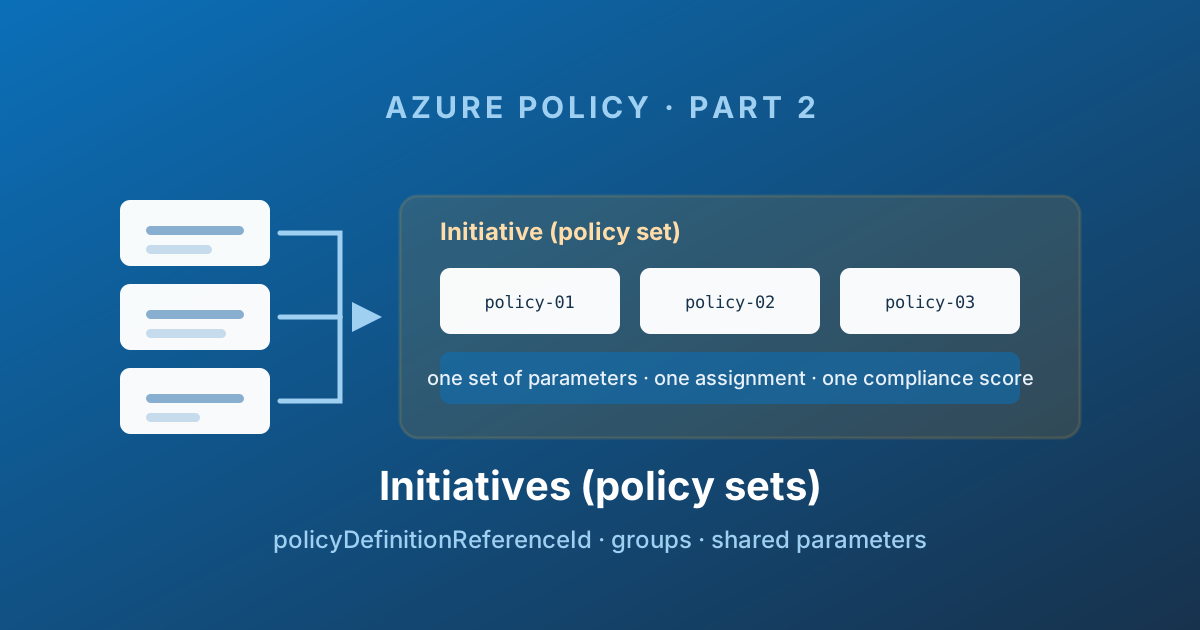
Read the parameter path
An initiative groups related definitions so you can assign and review them together. Start with the comparison, then trace the JSON example using these four distinct properties:
- Definition ID:
policyDefinitionIdlocates the reusable rule. It is an Azure resource ID, not a member nickname. - Member reference:
policyDefinitionReferenceId: storageNoPublicBlobAccessnames this rule's occurrence inside this initiative. Exemptions and member messages use this reference. - Parameters: assignment value
effect = Audit→ initiative parametereffect→ member parametereffect→ the referenced definition'sthen.effect. A member can map to a differently named parameter; match the target definition. - Groups:
groupNameslabels members for reporting; it does not create a nested initiative or a separate assignment.
These are explanations of the example, not an execution record. Technical validation: not recorded. Confirm member definitions, parameter names and version support against initiative structure .
The decision before assigning it: group controls with the same ownership/lifecycle; split them when scopes or approval processes genuinely differ.
A governance baseline often needs more than one policy definition.
"Storage accounts must be secure" is not a rule, it is ten rules: no public blob access, TLS 1.2 minimum, HTTPS only, infrastructure encryption, no shared key authorisation, private endpoints, soft delete, diagnostic settings shipped to a workspace, a customer-managed key, and a network ruleset that defaults to deny.
You could assign those ten definitions individually. Ten assignments, ten sets of parameters to keep in sync, ten rows in the compliance blade, and ten things to exclude when the payments team gets its exception. Do that across twelve standards and your assignment list becomes unusable.
The initiative exists to stop that happening.
Definition versus initiative
An initiative - the API calls it a policySetDefinition, the portal calls it an initiative, everyone in a meeting calls it a policy set, and they are all the same object - is a named, versioned, parameterised container of policy definitions.
| Criterion | Policy definition | Initiative |
|---|---|---|
| Resource type | Microsoft.Authorization/policyDefinitions | Microsoft.Authorization/policySetDefinitions |
| Contains | One if/then rule | References to many definitions |
| Assignable | Yes | Yes |
| Compliance reporting | One result | One rolled-up result, plus per-member detail |
| Typical count in a mature estate | Hundreds | A dozen |
The critical property: an initiative is assigned exactly like a definition. One assignment, one scope, one set of parameters, one managed identity, one place to put an exception. That is the entire value proposition.
An initiative cannot contain another initiative. There is no nesting. If you want a "platform baseline" made of three themed sets, you assign three initiatives - or you build one flat initiative that references all the member definitions directly.
Anatomy of an initiative
Show complete script (72 lines)
{
  "properties": {
    "displayName": "Storage security baseline",
    "description": "Baseline controls every storage account in the estate must meet.",
    "policyType": "Custom",
    "metadata": {
      "version": "1.2.0",
      "category": "Storage"
    },
    "parameters": {
      "effect": {
        "type": "String",
        "metadata": {
          "displayName": "Effect",
          "description": "Effect applied to every member definition"
        },
        "allowedValues": [ "Audit", "Deny", "Disabled" ],
        "defaultValue": "Audit"
      },
      "allowedLocations": {
        "type": "Array",
        "metadata": {
          "displayName": "Allowed locations",
          "description": "Regions storage accounts may be created in",
          "strongType": "location"
        },
        "defaultValue": [ "westeurope", "northeurope" ]
      }
    },
    "policyDefinitions": [
      {
        "policyDefinitionId": "/providers/Microsoft.Authorization/policyDefinitions/13502221-8df0-4414-9937-de9c5c4e396b",
        "policyDefinitionReferenceId": "storageNoPublicBlobAccess",
        "definitionVersion": "1.*.*",
        "groupNames": [ "dataProtection" ],
        "parameters": {
          "effect": { "value": "[parameters('effect')]" }
        }
      },
      {
        "policyDefinitionId": "/providers/Microsoft.Authorization/policyDefinitions/404c3081-a854-4457-ae30-26a93ef643f9",
        "policyDefinitionReferenceId": "storageSecureTransfer",
        "definitionVersion": "1.*.*",
        "groupNames": [ "dataProtection" ],
        "parameters": {
          "effect": { "value": "[parameters('effect')]" }
        }
      },
      {
        "policyDefinitionId": "/subscriptions/00000000-0000-0000-0000-000000000000/providers/Microsoft.Authorization/policyDefinitions/storage-allowed-locations",
        "policyDefinitionReferenceId": "storageAllowedLocations",
        "groupNames": [ "residency" ],
        "parameters": {
          "effect": { "value": "[parameters('effect')]" },
          "listOfAllowedLocations": { "value": "[parameters('allowedLocations')]" }
        }
      }
    ],
    "policyDefinitionGroups": [
      {
        "name": "dataProtection",
        "displayName": "Data protection",
        "category": "Security"
      },
      {
        "name": "residency",
        "displayName": "Data residency",
        "category": "Compliance"
      }
    ]
  }
}
Two built-ins and one custom definition, all driven by two initiative-level parameters, grouped into two themes. That is the whole pattern.
The portal builds the same object through a wizard, and its tabs map one-to-one onto that JSON: Policies is policyDefinitions, Groups is policyDefinitionGroups, and the two parameter tabs are the initiative parameters and the member parameters they feed.
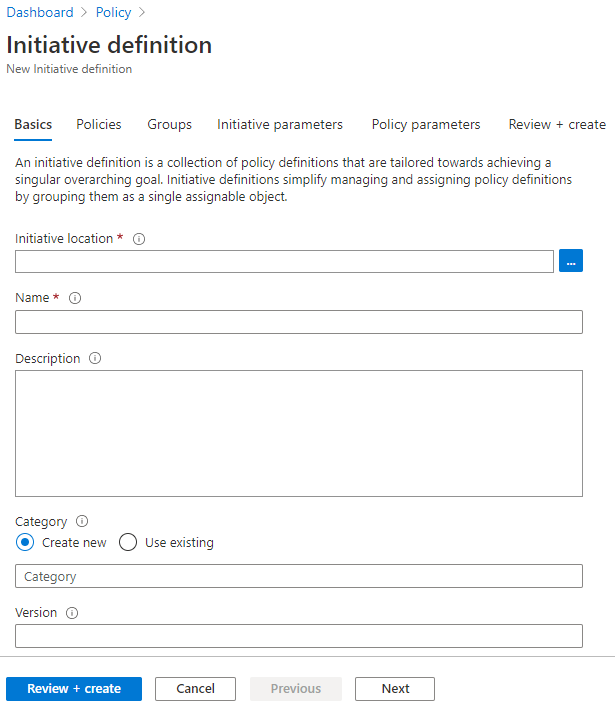
Source: Tutorial: Build policies to enforce compliance - © Microsoft, Microsoft Learn.
The four properties that matter
policyDefinitionId
The full resource ID of the member definition. Built-ins live at /providers/Microsoft.Authorization/policyDefinitions/{guid}. Custom ones live under a subscription or a management group.
This creates a hard dependency. A custom definition must already exist at a scope the initiative can see before the initiative referencing it can be created. In a deployment pipeline that means definitions deploy first, initiatives second, assignments third - a sequencing constraint that comes back in Part 6.
It also means scope placement matters. If your custom definition lives on subscription A and your initiative on management group X, the initiative cannot resolve it. Put shared definitions at the management group that is a common ancestor of everything that needs them.
policyDefinitionReferenceId
A short string you choose to name this membership. It looks like a formality. It is not.
policyDefinitionReferenceId is the handle used by:
- Exemptions, to exempt a resource from one member of an initiative rather than the whole thing (Part 5)
- Overrides on an assignment, to change the effect of one member without touching the definition (Part 3)
nonComplianceMessages, to give a specific error message per member- Compliance reporting, to identify which member produced a result
The portal generates numeric reference IDs like 10420126870854049575 when you build an initiative in the UI. They work, and they are unreadable. Write your own: storageNoPublicBlobAccess tells a reviewer what an exemption is exempting. A twenty-digit number tells them nothing.
Changing a policyDefinitionReferenceId after the initiative is assigned silently breaks every exemption and override that points at it. They do not error - they simply stop matching, and the exception you thought was in place quietly evaporates. Treat these strings as immutable once shipped.
parameters
Initiative parameters are declared at the top and passed down to members with [parameters('name')].
Supported types are string, array, object, boolean, integer, float, and datetime. The strongType metadata hint - location, resourceTypes, storageSkus, vmSKUs, existingResourceGroups, or a resource type - turns a free-text box in the portal into a proper picker. Use it; it prevents an entire class of typo-driven incidents.
The pattern to internalise is one initiative parameter driving many members. A single effect parameter wired to every member is what lets you ship the same initiative as Audit in a sandbox and Deny in production with one value change. A single allowedLocations array feeding the location rules of storage, compute, and SQL gives you one place to change data residency.
Once an initiative is assigned, initiative-level parameters cannot be added or altered. Adding a new required parameter to a live initiative is therefore a breaking change. Always give parameters a defaultValue so that adding one later does not force you to recreate every assignment.
groupNames and policyDefinitionGroups
Groups are metadata that organise members into themes. policyDefinitionGroups declares them, groupNames on each member assigns membership, and the portal renders compliance grouped accordingly.
For a custom baseline this is cosmetic but genuinely useful - "12 of 40 controls failing" is noise; "all 12 failures are in Data protection" is a decision.
For Regulatory Compliance initiatives it is the whole mechanism. Microsoft's built-in ISO 27001, NIST, PCI-DSS and CIS initiatives use groups to map each member definition to a named control in the framework, via an additionalMetadataId pointing at a read-only policyMetadata object:
"policyDefinitionGroups": [
  {
    "name": "NIST_SP_800-53_R4_AC-1",
    "additionalMetadataId": "/providers/Microsoft.PolicyInsights/policyMetadata/NIST_SP_800-53_R4_AC-1"
  }
]
Those policyMetadata objects are created by Microsoft only. You can reference them from a custom initiative to slot your own controls into an existing framework view, but you cannot invent a new framework.
The payoff is the Controls view: compliance rolled up per named framework control rather than per policy definition, which is the shape an auditor actually asks for.
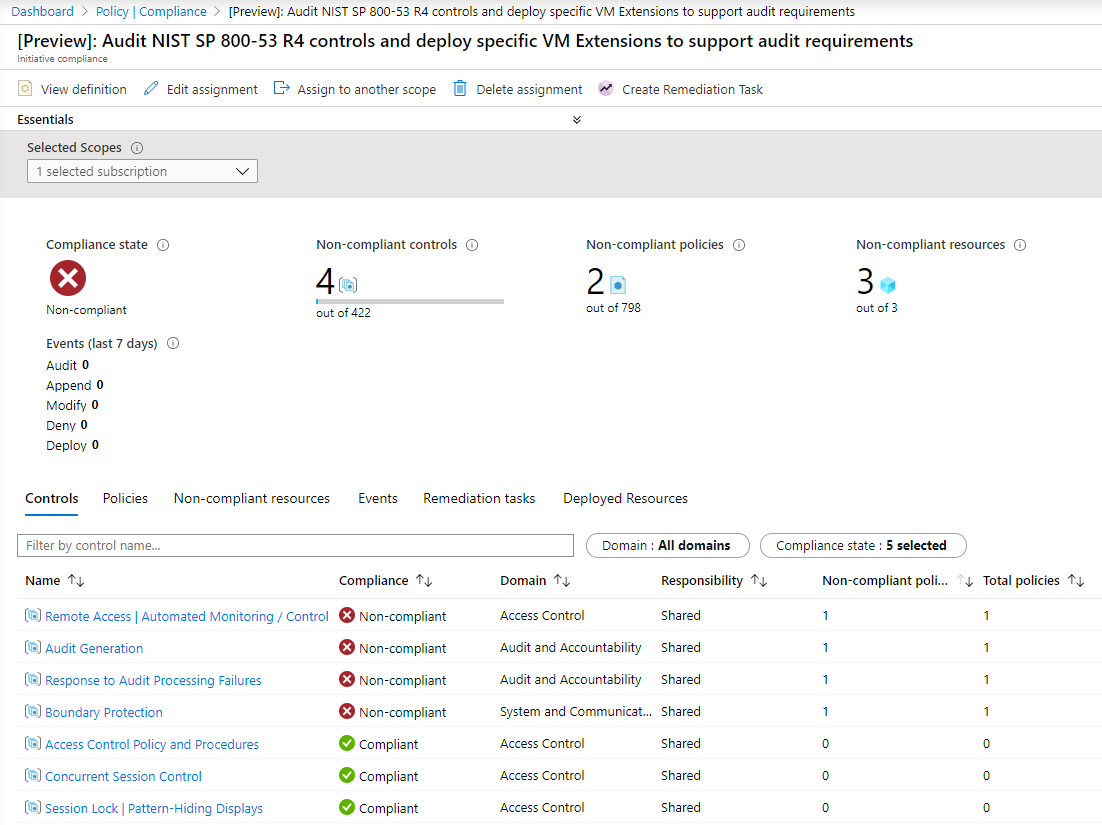
Source: Regulatory Compliance in initiative definitions - © Microsoft, Microsoft Learn.
Version pinning inside an initiative
Each member can pin the version of the built-in it references:
{
  "policyDefinitionId": "/providers/Microsoft.Authorization/policyDefinitions/0ec8fc28-...",
  "policyDefinitionReferenceId": "allowedLocationsSQL",
  "definitionVersion": "1.2.*"
}
If you omit definitionVersion, the member resolves to the latest major version at assignment time and automatically ingests minor updates.
Whether that default is acceptable is a real decision, not a detail. Automatic minor ingestion means Microsoft can add an allowed value or change a roleDefinitionIds list under a control you have attested to an auditor. Pinning to 1.2.* gives you a stable surface at the cost of having to review and bump deliberately.
My rule: pin in regulated estates, float everywhere else, and review pins on a schedule rather than never.
Where to create an initiative
An initiative is created at a management group or a subscription - never a resource group.
Create it as high as the definitions it references allow, and no higher. A management group scope makes the initiative visible to every child scope, which is what you want for a platform baseline. Creating it on one subscription means it can only ever be assigned there or below.
There is a limit that shapes this: 200 initiative definitions per scope, 2,500 per tenant, and 500 policy definitions per scope. Those are generous, but a team that generates an initiative per application will find the ceiling.
Limits worth knowing
| Where | What | Maximum |
|---|---|---|
| Initiative definition | Policy definitions | 1,000 |
| Initiative definition | Parameters | 400 |
| Scope | Initiative definitions | 200 |
| Tenant | Initiative definitions | 2,500 |
| Scope | Policy or initiative assignments | 200 |
A thousand members per initiative is far more than anyone should ever build. The practical ceiling is human: an initiative nobody can review in one sitting is an initiative nobody reviews.
How many initiatives should you actually have?
Two failure modes, both common.
One giant initiative. Everything in a single set. Every change is a change to the thing that governs the entire estate, so nobody dares touch it, and the assignment carries an exception list forty entries long. Blast radius is total.
One initiative per definition. All the overhead of initiatives with none of the benefit. The assignment list is as unmanageable as it was before.
The shape that works in practice is themed baselines aligned to how exceptions get granted:
- A platform baseline every subscription gets - tagging, allowed regions, diagnostic settings
- A security baseline aligned to your control framework
- Workload-specific sets - data platform, Kubernetes, networking
- A "landing zone type" set for sandbox versus corp versus online
The test for whether the split is right: when a team asks for an exception, does the initiative boundary make the answer obvious? If granting one exception forces you to punch a hole in a set covering nine unrelated controls, your boundaries are wrong. Exemptions can target a single policyDefinitionReferenceId, which softens this - but a clean boundary is still better than a clever exemption.
Assigning it
The one thing an initiative shares with a definition: on its own, it does nothing at all.
You can build a beautiful forty-control set, group it, version it, parameterise it perfectly, and Azure will not evaluate a single resource until you assign it. That is what makes the assignment the most operationally dangerous object in the whole system - it is the one that actually turns things on.
Part 3 covers assignments: scope and inheritance, enforcementMode, managed identities and the remediation permissions everybody gets wrong the first time, resourceSelectors and overrides for safe staged rollouts, and non-compliance messages.
Enjoy!