
Essential reading or reference
Start here: a definition describes a resource condition and an effect; an assignment applies it to a scope. RBAC answers who may act; Policy checks the resource's allowed configuration. Read the definition, Policy versus RBAC and one JSON example first.
Choose an effect: start with Audit to observe, use Deny to reject non-compliant create/update requests after testing, and evaluate Modify/DeployIfNotExists only with explicit identity permissions and remediation controls. See the effect reference for details, not a universal effect recommendation.
Trace the example: type selects storage accounts; the allowBlobPublicAccess alias addresses the tested property; allOf requires both predicates; then.effect reads the effect parameter. Change only one of those at a time when learning. Modes describe which resources/properties are evaluated, evaluation describes when, and versioning describes how the definition evolves.
Technical execution validation: not recorded. Test compliant, non-compliant and missing-property cases in an isolated scope and compare with definition structure before deployment.
Everybody in a governance meeting says "we'll put a policy on it". The useful next question is which object, scope and effect that means.
Azure Policy is not complicated, but it is made of five distinct objects that people constantly confuse: a definition, an initiative, an assignment, an exclusion, and an exemption. Mixing them up is how you end up with a governance estate nobody trusts.
This is the first of a seven-part series that takes those objects apart one at a time, then shows how to manage the whole thing as code.
The one-sentence definition
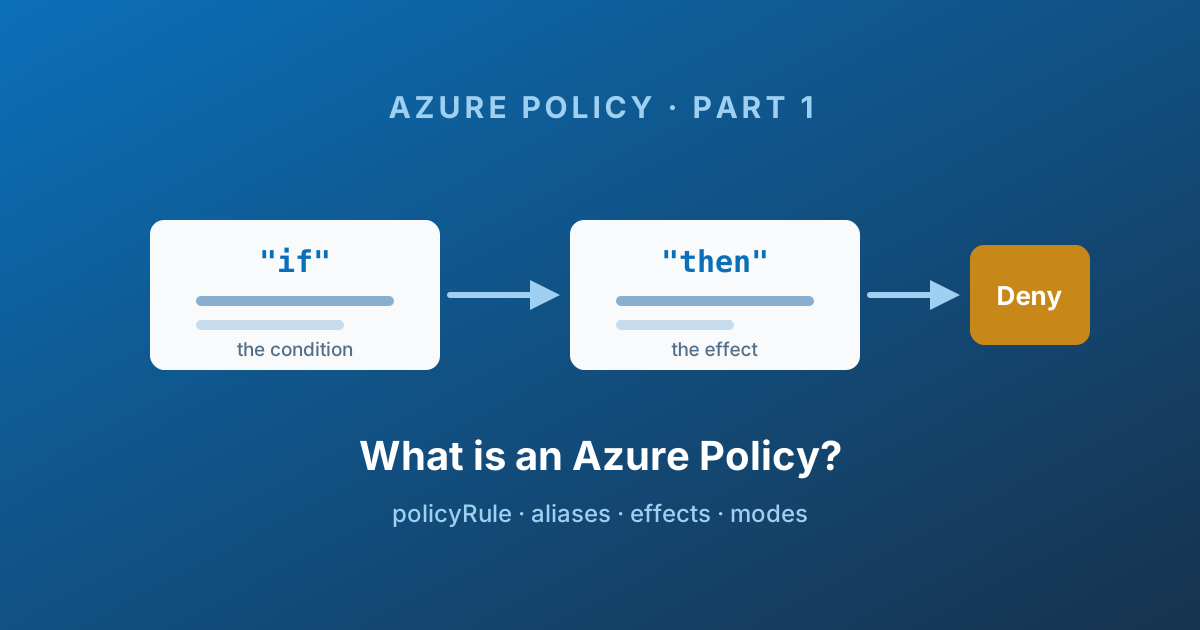
An Azure Policy definition is a rule written in JSON that Azure Resource Manager evaluates against your resources, and an action to take when the rule matches.
That is it. A condition and an effect. Everything else - initiatives, assignments, exemptions, compliance dashboards - is packaging and plumbing around that single idea.
The important consequence: a definition on its own does nothing. It is inert. It has to be assigned to a scope before a single resource is evaluated. I have lost count of the number of times someone has created a beautiful custom definition, gone to the compliance blade, and found nothing there. Nothing was wrong. Nothing was assigned. That is Part 3.
Policy is not RBAC
The single most useful mental model is this one:
| Criterion | Azure RBAC | Azure Policy |
|---|---|---|
| Question it answers | Who can do it? | What is allowed to exist? |
| Evaluated against | The caller's identity | The resource payload |
| Typical outcome | 403 because you lack a permission | 403 because the resource shape is not permitted |
| Applies to existing resources | No | Yes - continuously re-evaluated |
| Can fix things | No | Yes, with modify and deployIfNotExists |
An Owner on a subscription has every permission in Azure and still cannot create a VM in a banned region if a deny policy says so. Conversely, policy will never stop someone reading a storage key. The two systems are orthogonal, and you need both.
The second consequence of "evaluated against the resource" is the one people miss: policy keeps evaluating resources that already exist. RBAC is a gate at the door. Policy is a gate at the door and a continuous audit of everyone already in the building.
Anatomy of a definition
Here is a complete, realistic custom definition. Everything below is a variation on this shape.
Show complete script (40 lines)
{
  "properties": {
    "displayName": "Storage accounts must disable public blob access",
    "policyType": "Custom",
    "mode": "Indexed",
    "description": "Denies creation or update of a storage account that allows public blob access.",
    "metadata": {
      "version": "1.0.0",
      "category": "Storage"
    },
    "parameters": {
      "effect": {
        "type": "String",
        "metadata": {
          "displayName": "Effect",
          "description": "Enable or disable the execution of the policy"
        },
        "allowedValues": [ "Audit", "Deny", "Disabled" ],
        "defaultValue": "Audit"
      }
    },
    "policyRule": {
      "if": {
        "allOf": [
          {
            "field": "type",
            "equals": "Microsoft.Storage/storageAccounts"
          },
          {
            "field": "Microsoft.Storage/storageAccounts/allowBlobPublicAccess",
            "notEquals": "false"
          }
        ]
      },
      "then": {
        "effect": "[parameters('effect')]"
      }
    }
  }
}
Six things to notice.
displayNameis capped at 128 characters anddescriptionat 512. Write them for the person who will read the deny message at 2 a.m., not for the auditor.policyTypeis read-only. You cannot set it. Azure sets it toCustom,Builtin, orStatic(the last one being Microsoft-managed regulatory compliance content).metadata.categorydrives grouping in the portal. Pick an existing category name rather than inventing one, or your definition ends up in a bucket of one.parametersturn a hard-coded rule into a reusable one. Parameterising the effect is not optional in a serious estate - it is what lets you ship the same definition asAuditin dev andDenyin prod.policyRule.ifis the condition.policyRule.thenis the effect.
Always parameterise effect, and always name the parameter effect. Every policy-as-code tool in Part 7 assumes that convention, and it is what makes staged rollouts (audit first, deny later) a config change rather than a rewrite.
The condition side
The if block is built from logical operators and conditions.
The logical operators are allOf (AND), anyOf (OR), and not. They nest freely, which is how you end up with policy rules that need a code review.
A condition compares something on the resource with a value. The something is either a field, a value expression, or a count expression.
Fields
The universally available fields are:
| Field | What it holds |
|---|---|
name | The resource name |
fullName | Parent-prefixed name, for example myServer/myDatabase |
type | The full resource type, for example Microsoft.Storage/storageAccounts |
kind | The resource kind where one exists |
location | Normalised location; use global for location-agnostic resources |
id | The full resource ID |
identity.type | None, SystemAssigned, UserAssigned, or SystemAssigned, UserAssigned |
tags | Written as tags['costCentre'] or tags.costCentre |
Anything else - a storage account's TLS version, a VM's SKU, an NSG rule - is reached through an alias.
Aliases
An alias is Azure Policy's stable pointer into a resource provider's property bag. Microsoft.Storage/storageAccounts/allowBlobPublicAccess in the example above is one.
Aliases matter for two reasons. First, you cannot write a meaningful custom policy without them. Second, not every property has one, and discovering that a property is unreachable after you have designed a control is a bad afternoon.
Array aliases end in [*] and let you reason about collections - every NSG rule, every subnet, every IP configuration.
I keep a searchable copy of every supported alias here: Azure Policy Aliases. If you prefer the terminal, I wrote up the PowerShell approach in Search Azure Policy Aliases and Send Output to an Interactive Table.
Condition operators
Start with one predicate from the storage example: { "field": "type", "equals": "Microsoft.Storage/storageAccounts" }. It compares a field with one value. Combine predicates with allOf only after each one behaves as expected; the reference below adds alternative operators.
The full current set:
| Category | Operators |
|---|---|
| Equality | equals, notEquals |
| Wildcard | like, notLike - one * maximum |
| Pattern | match, notMatch, matchInsensitively, notMatchInsensitively |
| Substring | contains, notContains - no wildcards allowed in the value |
| Set | in, notIn, containsKey, notContainsKey |
| Numeric or date | less, lessOrEquals, greater, greaterOrEquals |
| Presence | exists |
Two traps worth memorising. match and notMatch are case-sensitive - every other string condition is not. And in a match pattern, # means a digit, ? means a letter, and . means any character. That is not a regular expression, and treating it like one produces rules that silently never fire.
Counting things
count is how you express "at least one subnet without an NSG" or "more than three inbound rules allowing any source".
Start with the smallest shape: count the elements of an array alias, then compare that count. This condition fragment asks whether any security rules are present; it does not judge whether they are safe.
{
  "count": { "field": "Microsoft.Network/networkSecurityGroups/securityRules[*]" },
  "greater": 0
}
Add a where clause when only matching members should count:
{
  "count": {
    "field": "Microsoft.Network/networkSecurityGroups/securityRules[*]",
    "where": {
      "allOf": [
        { "field": "Microsoft.Network/networkSecurityGroups/securityRules[*].direction", "equals": "Inbound" },
        { "field": "Microsoft.Network/networkSecurityGroups/securityRules[*].access", "equals": "Allow" },
        { "field": "Microsoft.Network/networkSecurityGroups/securityRules[*].sourceAddressPrefix", "in": [ "*", "Internet", "0.0.0.0/0" ] }
      ]
    }
  },
  "greater": 0
}
There is also a value count form that iterates over an array parameter rather than a resource array, which is how you write "the resource must carry every tag in this list".
If a template function inside a value expression throws, policy evaluation fails, and a failed evaluation is an implicit deny. A malformed substring() on a resource name shorter than you expected will block deployments across the whole scope. Guard functions with if(), and roll new rules out with enforcement disabled first - see Part 3.
The effect side
The effect is what happens when the condition matches. The current supported set:
| Effect | What it does |
|---|---|
audit | Records non-compliance. Changes nothing. |
deny | Blocks the create or update request. |
denyAction | Blocks a specific action - today only delete. |
append | Adds fields to the request payload before it is processed. |
modify | Adds, updates, or removes properties and tags, and can remediate existing resources. |
deployIfNotExists | Deploys an ARM template when a related resource is missing. |
auditIfNotExists | Reports non-compliance when a related resource is missing. |
disabled | Turns the rule off without deleting anything. |
manual | Compliance is set by a human attestation, for non-technical controls. |
mutate | Mutates Kubernetes objects - Microsoft.Kubernetes.Data mode only. |
addToNetworkGroup | Populates an Azure Virtual Network Manager network group - Microsoft.Network.Data mode only. |
modify and deployIfNotExists are the two that make Azure Policy an automation engine rather than a reporting tool. Both require the assignment to carry a managed identity, and the definition to declare the roles that identity needs in a roleDefinitionIds array. That is Part 3 territory, and it is where most of the operational pain lives.
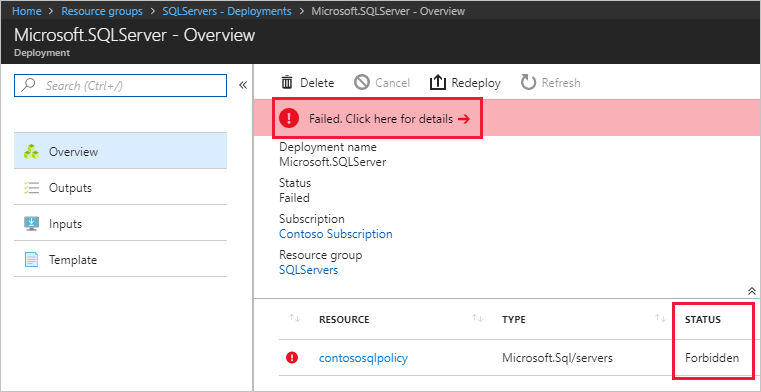
Of the whole list, deny is the one your users will meet. This is what it looks like from the other side - the deployment fails and the resource comes back Forbidden:
Source: Tutorial: Build policies to enforce compliance - © Microsoft, Microsoft Learn.
The order effects run in
This matters more than people expect, because effects layer cumulatively and the most restrictive one wins.
disabled- checked first, decides whether the rule is evaluated at allappendandmodify- they change the request, which can prevent a laterauditordenyfrom ever triggeringdeny- beforeaudit, so a blocked request is not double-loggedauditmanualauditIfNotExistsdenyAction- evaluated last
auditIfNotExists and deployIfNotExists then evaluate after the resource provider returns success, because both of them ask a question about a related resource that may only exist once the main one does.
This ordering is why append/modify and deny on the same property is a design smell. The modify fixes the payload, the deny never fires, and your compliance dashboard shows a control that has never actually blocked anything. Pick one.
denyAction, briefly
denyAction is the newest genuinely useful effect and the least known. It blocks a verb rather than a shape - today only delete - and returns 403 Forbidden. It is how you protect a production resource group from accidental deletion without resorting to locks that also block legitimate automation.
Its cascadeBehaviors setting (default deny) controls whether deleting a parent that would cascade into a protected child is also blocked. And a short list of types is deliberately exempt from denyAction so you cannot lock yourself out - policy assignments, deny assignments, locks, subscriptions, and deployment stacks among them.
Modes
mode tells Azure which resources the definition is even considered for.
| Mode | Use it for |
|---|---|
all | Everything: resource groups, subscriptions, and all resource types |
indexed | Only resource types that support tags and location |
If you write a tag or location policy and leave it in all, you will generate a flood of non-compliant results for resources that can never carry a tag. Use indexed for anything tag- or location-based, and all for everything else.
A missing mode behaves differently depending on the tool: Azure PowerShell defaults it to all, Azure CLI leaves it null, and a null mode is treated as indexed for backward compatibility. Set it explicitly. Always.
Beyond those two there are resource provider modes, which push evaluation down into a specific provider rather than Resource Manager:
- Generally available:
Microsoft.Kubernetes.Data,Microsoft.KeyVault.Data,Microsoft.Network.Data - In preview:
Microsoft.ManagedHSM.Data,Microsoft.DataFactory.Data,Microsoft.MachineLearningServices.v2.Data,Microsoft.LoadTestService.Data
Resource provider modes generally support built-in definitions only, and exemptions do not work at the component level inside them. If your governance story depends on exempting one pod in one namespace, check that constraint before you promise it.
When does evaluation actually happen?
A definition does not run continuously. Evaluation is triggered by:
- A resource being created or updated in an assigned scope - this is the only moment
denycan block anything - A policy or initiative being newly assigned or updated - allow roughly 30 minutes before it takes effect
- The standard compliance cycle, which runs about every 24 hours
- An on-demand evaluation scan that you trigger yourself
This is why the dashboard lags reality. You changed a definition, you checked compliance five minutes later, nothing moved. Nothing was wrong. Trigger a scan, or wait.
The dashboard in question is the Compliance blade, which rolls everything up into one percentage and a breakdown per assignment:

Source: Get policy compliance data - © Microsoft, Microsoft Learn.
It is also why deny is not retroactive. Existing non-compliant resources are reported, never deleted. Turning a control on does not clean up the estate - remediation does, and that is Part 3.
Versioning
Built-in definitions carry a {Major}.{Minor}.{Patch} version, and assignments can pin to one:
1.*.*- stay on major version 1, take minor and patch updates automatically1.2.*- pin to a minor version path
Patch updates are always taken automatically and cannot be opted out of, because that path is reserved for text corrections and break-glass security fixes. If you have ever been surprised by a built-in changing behaviour under you, this is the mechanism you want to understand before Part 6.
Built-in or custom?
Azure ships well over a thousand built-in definitions. The right instinct is: use a built-in unless you have proven you cannot.
Built-ins are versioned, maintained, prepopulated with the correct roleDefinitionIds, and mapped to regulatory compliance frameworks. A custom definition is a permanent maintenance liability that you now own.
You can browse the whole catalogue, including initiatives, here: Azure Policies.
Write a custom definition when the built-in genuinely does not exist, or when it exists but cannot be parameterised the way your standard requires. Not when you could not find it.
The limits that actually bite
| Where | What | Maximum |
|---|---|---|
| Scope | Policy definitions | 500 |
| Scope | Initiative definitions | 200 |
| Tenant | Initiative definitions | 2,500 |
| Policy definition | Parameters | 20 |
| Policy rule | Nested conditionals | 512 |
| Definition or assignment request body | Bytes | 1,048,576 |
The one that surprises people is 20 parameters per definition. A "one policy to rule them all" design hits that wall fast, and the fix is almost always to split the rule into several definitions and group them with an initiative - which is exactly what Part 2 is about.
There are evaluation-time limits too: a function returning a string longer than 131,072 characters, or an object nested deeper than 128 levels, causes evaluation to fail. And a failed evaluation, as noted above, behaves like a deny.
Putting it together
Read the example from the top of the article as English and it should now be unambiguous:
> For every resource that supports tags and location (mode: indexed), if the type is a storage account and allowBlobPublicAccess is not false, then apply whatever effect the assignment passes in - audit by default.
That definition, sitting in your subscription, still does nothing at all. It has no scope. Nobody has assigned it.
Where next
Part 1 gave you the atom. Real governance estates are not built from single definitions - a "secure storage" standard is eight or ten rules that have to be assigned, parameterised, and reported on together.
Part 2 covers initiatives: how to group definitions, how parameters flow from the initiative down to its members, why policyDefinitionReferenceId is the most important string in the whole file, and the one initiative property you can never change after assignment.
Enjoy!