

Network Security Perimeter (NSP) allows organizations to define a logical network isolation boundary for PaaS resources (for example, Azure Storage accounts and SQL Database servers) that are deployed outside your organization's virtual networks. It restricts public network access to PaaS resources within the perimeter; access can be exempted using explicit access rules for public inbound and outbound traffic.
Choose by the access path
| Approach | Choose when | Scope | Still verify |
|---|---|---|---|
| Resource firewall/public-access settings | A supported service needs explicit public access restrictions | Individual service | Other permitted bypasses and service-specific semantics |
| Private Endpoint | Clients need a private IP path to a supported PaaS sub-resource | Endpoint, VNet and DNS path | Public access is controlled separately |
| VNet integration/injection | The service supports the required VNet placement or outbound integration | Service-specific network capability | Integration is not always inbound isolation |
| Network Security Perimeter | Supported PaaS resources need coordinated public-access boundaries | Perimeter profiles, access rules and resource associations | Supported services, access mode and dependencies |
Text alternative to the diagram: a perimeter contains profiles; profiles carry access rules; associations connect supported PaaS resources to a profile and access mode. It is not a subnet firewall and does not replace identity/data permissions.
Availability, service coverage, tooling and limits review date: not recorded. Consult the current NSP overview before choosing it; the publication date below is not a current technical verification.
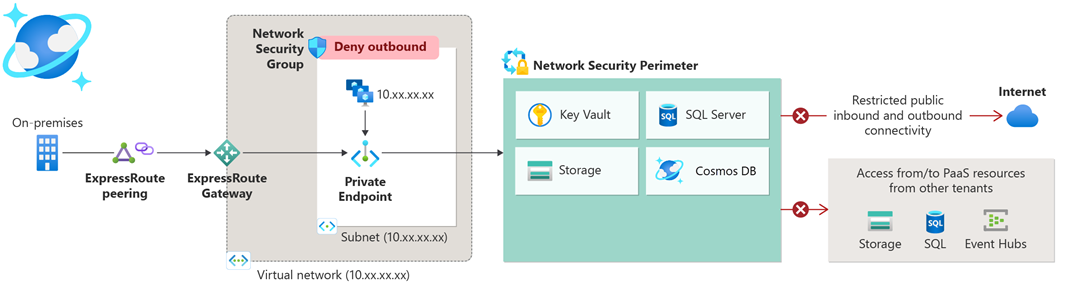
Official Microsoft documentation: Network security perimeter concepts
Pain points
- Inconsistent access controls: PaaS services have partial and inconsistent inbound access controls.
- Varied user experience: access control mechanisms differ across services (portal, API, CLI, etc.).
- Scalability challenges: managing compliance and auditing is complex, requiring custom Azure Policies for each service.
Existing patterns
Here are the existing patterns to avoid public endpoints and secure access:
- VNet injection/integration: allows service instances to run inside the customer's VNet, providing better control and security. See VNet integration for Azure services .
- Private Link / Private Endpoint: used for services running outside the customer's VNet, ensuring secure and private access. See Private Link service overview .
Network access control features in Azure
- Network Security Group (NSG)
- Azure Firewall network rules
- Azure Virtual Network Manager (AVNM) admin rules
- Network Security Perimeter (check current availability and service coverage in the linked reference)
Azure Network Security Perimeter for PaaS resources
- Centrally manages your ACLs and access controls for PaaS resources.
- Service availability and access modes evolve; see What is a network security perimeter?
- Use the current supported-services list rather than assuming every PaaS resource can join.
- API:
Microsoft.Network/networkSecurityPerimeters. - IaC: verify the current resource schema and your pinned Bicep/ARM/Terraform provider support; no tooling-availability claim has been freshly validated for this article.
Overview
- Without Network Security Perimeter: one firewall rule per resource.
- With Network Security Perimeter: one access rule to secure all the resources in the perimeter.
Deployment
- Preflight: confirm the service is supported, required permissions, region, existing public-access settings and dependent services. Inventory legitimate traffic and define a rollback owner.
- Configure: create a perimeter/profile, define reviewed rules, and associate a small test set using the documented learning/transition mode where supported.
- Validate before enforcement: inspect access logs, test an intended allowed client and an intended denied client, and verify application identity permissions independently.
- Promote deliberately: change access mode only after approved results; retest dependencies and retain a documented reversal plan.
No commands in this article were executed against Azure. For private connectivity, continue with Private Endpoints.