
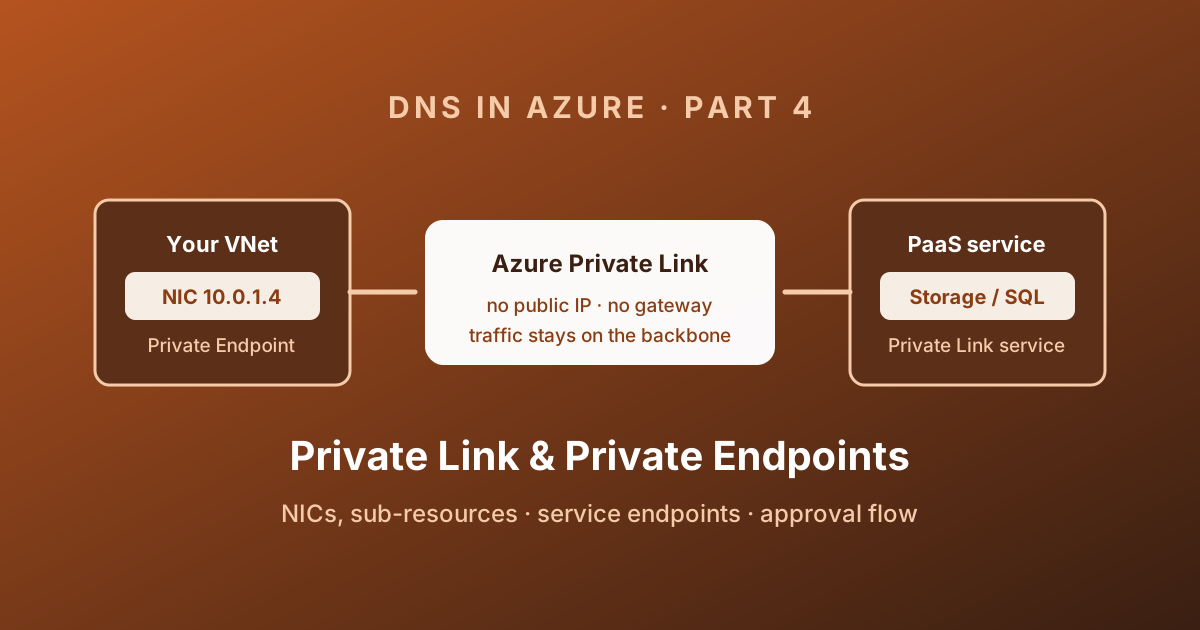
The first three parts of this series were about resolving names. This one is about the thing everybody wants to resolve: a Private Endpoint.
I have split it deliberately. Private Link is a networking construct, and it works whether or not your DNS is correct - the connection simply goes to the wrong place. Most "my Private Endpoint is broken" tickets are actually DNS tickets, and you cannot debug those until you know what the network layer is doing. So Part 4 covers the plumbing, and Part 5 covers the name resolution built on top of it.
Service endpoints versus private endpoints
This comparison comes up in every design review, so here it is properly.
| Criterion | Service endpoint | Private endpoint |
|---|---|---|
| What is created | A route and an identity on a subnet | A network interface with a private IP |
| Address used by the client | The service's public IP | A private IP from your subnet |
| DNS changes needed | None | Yes - the whole reason Part 5 exists |
| Reachable from on-premises | No | Yes, over VPN or ExpressRoute |
| Reachable from peered VNets | No | Yes, regionally and globally peered |
| Granularity | Whole service, per subnet | One specific resource, and one sub-resource of it |
| Data exfiltration control | Weak - any account of that service type is reachable | Strong - only the resource you connected to |
| Cost | Free | Hourly charge plus data processed |
The exfiltration point is the one that usually settles the argument. With a service endpoint to Microsoft.Storage, a VM in that subnet can reach any storage account in Azure, including one in an attacker's subscription. With a private endpoint, it reaches the one account you wired up, and nothing else.
Service endpoints are not deprecated, and they are still a sensible choice for high-volume, low-sensitivity traffic where you do not want a per-endpoint cost. Just do not present them as equivalent to Private Link.
Decide before creating the endpoint
Textual flow: client → ordinary service hostname → DNS answer for the private endpoint NIC → approved connection → selected service sub-resource. DNS, connection approval, routing and service authorisation are separate checks.
Before creation, select the right sub-resource (blob is not file), the target VNet/subnet, who approves the connection and who owns DNS. Compare service/private endpoints below. Disabling the public endpoint is a separate action: first validate the private path and required dependencies, then test an unauthorised public client is rejected.
Copy this final check record:
Service and sub-resource:
Endpoint approval state: Approved
Client FQDN returns: expected private endpoint IP
Effective route/NSG path: intended destination and allowed port
Application login: authorised identity succeeds
Public-network test: unauthorised public access rejected
Owner, change record and rollback:
These are expected checks, not recorded results. Technical execution validation: not recorded; consult Private Endpoint overview . Private Link Service is an advanced branch below, not required to consume a supported PaaS Private Endpoint.
The problem Private Link solves
Every Azure PaaS service ships with a public endpoint. mystorage.blob.core.windows.net resolves to a public IP, and your VM reaches it by leaving the virtual network, crossing the internet-facing edge of the platform, and authenticating.
That is not automatically insecure - the traffic is TLS, the service requires a key or a token - but it is very hard to explain to an auditor, and it is impossible to control with the tools a network team actually owns. Three generations of answers exist:
| Generation | Mechanism | What it gives you |
|---|---|---|
| IP firewall | Allow-list of public IPs on the service | Works, but you are managing public IPs and NAT ranges by hand |
| Service endpoint | The subnet's traffic reaches the service over the backbone, with its private IP presented as identity | No public egress, but the service keeps its public IP and public DNS name |
| Private endpoint | A NIC in your subnet, with a private IP, mapped to the service | The service now has an address inside your address space |
Only the third one changes the shape of the network. That is why it also changes the shape of your DNS.
Anatomy of a private endpoint
A private endpoint is not one object. It is a small graph, and knowing the pieces makes troubleshooting far quicker.
| Piece | Type | Notes |
|---|---|---|
| Private endpoint | Microsoft.Network/privateEndpoints | The resource you create, in a subnet |
| Network interface | Microsoft.Network/networkInterfaces | Created for you, read-only, holds the private IP |
| Private endpoint connection | Child of the target resource | Carries the approval state |
| Private DNS zone group | privateEndpoints/privateDnsZoneGroups | Optional, covered in Part 5 |
Things that follow from this model:
- The NIC is created and owned by the platform. You do not edit it, and it lives and dies with the private endpoint.
- The private IP is allocated dynamically from the subnet by default and does not change for the lifetime of the endpoint. You can pin it statically, and for anything that ends up in a firewall rule or a runbook you should.
- The private endpoint must sit in the same region and subscription as the virtual network. The target service can be in a different region, a different subscription, or a different tenant.
- Connections are one-directional. A client in your VNet connects in; the service has no route back and cannot originate a connection to you. If you need the service to reach into your network, that is VNet integration or a delegated subnet, which is a different feature.
az network private-endpoint create \
  --name pe-sa1-blob \
  --resource-group rg-app \
  --vnet-name vnet-spoke-a \
  --subnet snet-privateendpoints \
  --private-connection-resource-id "/subscriptions/<sub>/resourceGroups/rg-data/providers/Microsoft.Storage/storageAccounts/sa1" \
  --group-id blob \
  --connection-name conn-sa1-blob
Microsoft's diagram of the same idea shows the connection between a consumer virtual network and a Private Link resource:
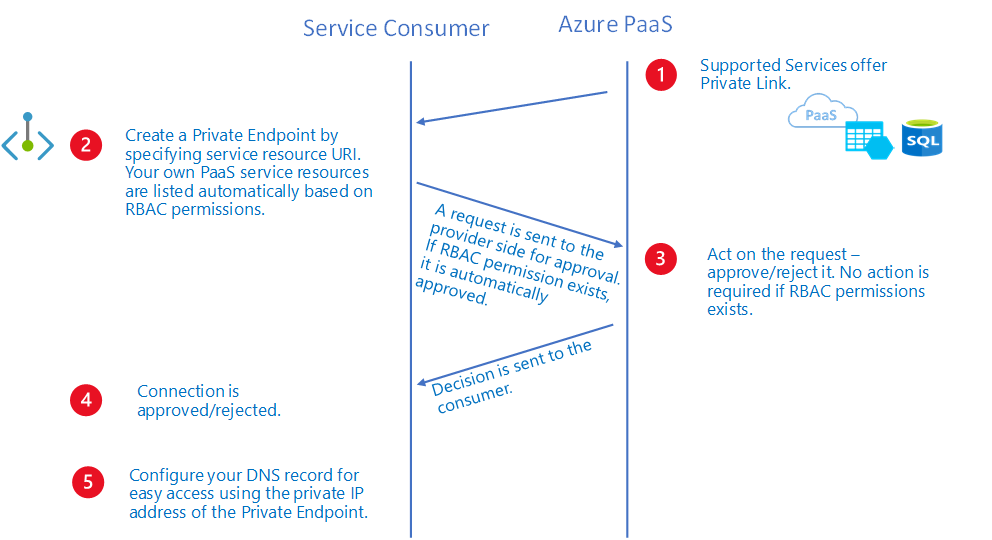
Source: What is a private endpoint? - © Microsoft, Microsoft Learn.
Sub-resources are the detail everyone misses
A private endpoint does not connect to a resource. It connects to one sub-resource (the groupId) of that resource. A storage account is not one endpoint - it is six or more.
| Service | Sub-resources you can target |
|---|---|
| Azure Storage | blob, file, queue, table, web, dfs (plus _secondary variants) |
| Azure SQL Database | sqlServer |
| Azure Key Vault | vault |
| Azure Cosmos DB | Sql, MongoDB, Cassandra, Gremlin, Table, Analytical |
| Azure App Service | sites |
| Azure Container Registry | registry |
| Event Hubs / Service Bus | namespace |
| Azure Monitor | azuremonitor (a Private Link Scope, not the workspace) |
| Your own service | empty - a Private Link service |
Two practical consequences:
- If your app writes blobs and mounts a file share on the same storage account, you need two private endpoints, two IPs, and later two private DNS zones. Wiring up
bloband wondering why SMB fails is a rite of passage. - Each sub-resource has its own recommended private DNS zone. Mixing them into one zone is the single most damaging shortcut in this whole area, and Part 5 explains exactly why.
Azure Monitor is a trap for the unwary. You do not put a private endpoint on a Log Analytics workspace directly - you create an Azure Monitor Private Link Scope (AMPLS), attach the workspaces and Application Insights components to it, and put the private endpoint on the scope. Getting this wrong silently sends telemetry over the public internet.
The approval workflow
A private endpoint connection has a state, and only one of those states carries traffic.
| State | Meaning |
|---|---|
| Pending | Created manually, waiting for the resource owner |
| Approved | Live. Traffic flows |
| Rejected | The owner said no |
| Disconnected | The owner removed the connection. The endpoint is now decoration - delete it |
Approval is automatic when you hold Microsoft.<Provider>/<resourceType>/privateEndpointConnectionsApproval/action on the target. That is the normal case inside one team. Across teams, or across tenants, you use the manual flow: create the endpoint with a request message, the owner approves it from the target resource's Networking blade.
# What is waiting for me on this storage account?
az network private-endpoint-connection list \
  --id "/subscriptions/<sub>/resourceGroups/rg-data/providers/Microsoft.Storage/storageAccounts/sa1" \
  --query "[].{name:name,state:properties.privateLinkServiceConnectionState.status,desc:properties.privateLinkServiceConnectionState.description}" \
  --output table

az network private-endpoint-connection approve \
  --id "<connection-id>" \
--description "Approved for project X"A stuck Pending connection is not a DNS problem, but it looks exactly like one: the name resolves to the private IP and the TCP connection times out. Check the connection state before you touch a single DNS record.
Routing, NSGs, and what the portal will not show you
When a private endpoint is created, the platform injects a /32 route into the subnets that can reach it, with next hop type InterfaceEndpoint. It has a higher priority than any UDR you write, which is deliberate - the platform will not let a route table black-hole a private endpoint by accident.
Some behaviour worth knowing before it surprises you:
- Network policies are off by default on older subnets. NSGs, UDRs and ASGs only apply to a private endpoint when
privateEndpointNetworkPoliciesis enabled on the subnet. If your NSG "does nothing", this is why. - Effective routes and effective security rules are not shown for the private endpoint NIC in the portal. You have to reason about it from the subnet.
- NSG flow logs do not capture inbound traffic to a private endpoint. If flow logs are your audit trail, note the gap.
- Outbound rules on the endpoint are meaningless. The service never originates traffic.
- Sending private endpoint traffic through an NVA needs SNAT on the appliance, because the private endpoint data plane does not guarantee symmetric return paths otherwise.
az network vnet subnet update \
  --resource-group rg-app \
  --vnet-name vnet-spoke-a \
  --name snet-privateendpoints \
  --private-endpoint-network-policies Enabled
I put private endpoints in a dedicated subnet with a descriptive name. Not because the platform requires it - it does not - but because it gives the NSG something to be about, and it keeps the /32 routes in one recognisable range.
Turning off the public endpoint is a separate job
This is the mistake that survives audits and shows up in breach reports.
Creating a private endpoint does not close the public one. mystorage.blob.core.windows.net still resolves publicly, still accepts connections, and still honours its own firewall rules. Anyone with a key can reach it from anywhere.
You have to disable it explicitly, on the resource:
az storage account update \
  --name sa1 \
  --resource-group rg-data \
  --public-network-access Disabled

az keyvault update \
  --name kv1 \
  --resource-group rg-data \
  --public-network-access Disabled
The property is not perfectly uniform across services - some use publicNetworkAccess, some have their own firewall model with a defaultAction, some need both. Two habits make this manageable:
- Enforce it with Azure Policy rather than a runbook. There are built-in policies of the form "Storage accounts should disable public network access" for most of the common services.
- Check it as part of the same pipeline that creates the endpoint. A private endpoint with the public door still open is a false sense of security, which is worse than no security theatre at all.
Before you flip publicNetworkAccess to Disabled, work out what else talks to that resource. Deployment agents, backup services, the portal's own data plane blades, and anything running from a laptop will all stop working. That is the point - but it should be a decision, not a discovery.
Private Link Service: your own service behind an endpoint
Everything above assumes Microsoft is the provider. You can be the provider too.
A Private Link service is published in front of a Standard Load Balancer, and it lets consumers in other VNets, other subscriptions, or other tenants create private endpoints pointing at your service.
| Concept | What it means for you |
|---|---|
| Standard Load Balancer | Mandatory front end. Basic SKU is not supported |
| NAT subnet | A subnet whose IPs are used to NAT incoming Private Link traffic |
| Alias | A globally unique moniker you hand to consumers instead of a resource ID |
| Visibility | Which subscriptions may even see the service |
| Auto-approval | Subscriptions whose connection requests are approved without a human |
| Proxy protocol v2 | Optional - the only way to see the consumer's real source information |
az network private-link-service create \
  --name pls-myapi \
  --resource-group rg-provider \
  --vnet-name vnet-provider \
  --subnet snet-pls-nat \
  --lb-name lb-myapi \
  --lb-frontend-ip-configs "<frontend-ip-config-id>" \
  --location westeurope
The alias is what makes this practical for a SaaS vendor: you publish pls-myapi.<guid>.westeurope.azure.privatelinkservice, a customer creates a private endpoint against it, you approve, and neither side ever sees the other's address space.
Because incoming traffic is NAT'd, your backend sees the NAT subnet's addresses, not the consumer's. If you need per-customer source attribution, enable TCP Proxy protocol v2 on the service and parse it in your application.
Cost, limits, and the things that bite
Private endpoints are cheap individually and surprisingly not-cheap at scale. You pay an hourly rate per endpoint plus per GB processed in and out. A landing zone that automatically creates six endpoints per storage account across forty spokes is a line item worth modelling before you commit.
Other constraints to design around:
- Application Security Groups attached to a private endpoint support up to 50 members.
- Static IP assignment is not supported for a handful of targets, including AKS, Application Gateway, HDInsight, Recovery Services vaults, and third-party Private Link services.
- NSG, UDR and ASG support on private endpoints is unavailable in a small set of regions - West India, Australia Central 2, South Africa West, Brazil Southeast, and all Government and China regions for NSG.
- Storage private endpoints require a GPv2 account.
- Multiple private endpoints can target the same resource, but Microsoft recommends one per Private Link resource per DNS namespace - otherwise you get duplicate A records and a coin flip at resolution time.
That last point is the bridge to the next post. Two endpoints for the same service, in the same private DNS zone, produce two A records for one name. The client picks one. Half your traffic goes to a VNet that cannot route it, and it looks exactly like an intermittent network fault.
A checklist before you call it done
- Private endpoint created in a dedicated subnet, in the same region and subscription as the VNet.
- One endpoint per sub-resource you actually use - not one per resource.
- Connection state is Approved, not Pending or Disconnected.
privateEndpointNetworkPoliciesenabled if you intend NSGs or UDRs to apply.publicNetworkAccessdisabled on the target resource, and enforced by policy.- Static private IP where the address appears in any external configuration.
- Peering and on-premises connectivity in place for every network that needs to reach it.
- DNS - which is all of Part 5.
Coming next
You now have a NIC in your subnet with a private IP, and an application that still connects to a public address, because nothing has told it otherwise.
Part 5 covers the CNAME chain from the public name into the privatelink namespace, the exact zone name for each service, private DNS zone groups and why you should always use them, how to run this at scale with Azure Policy, and how to make the whole thing work from on-premises.
Enjoy!