
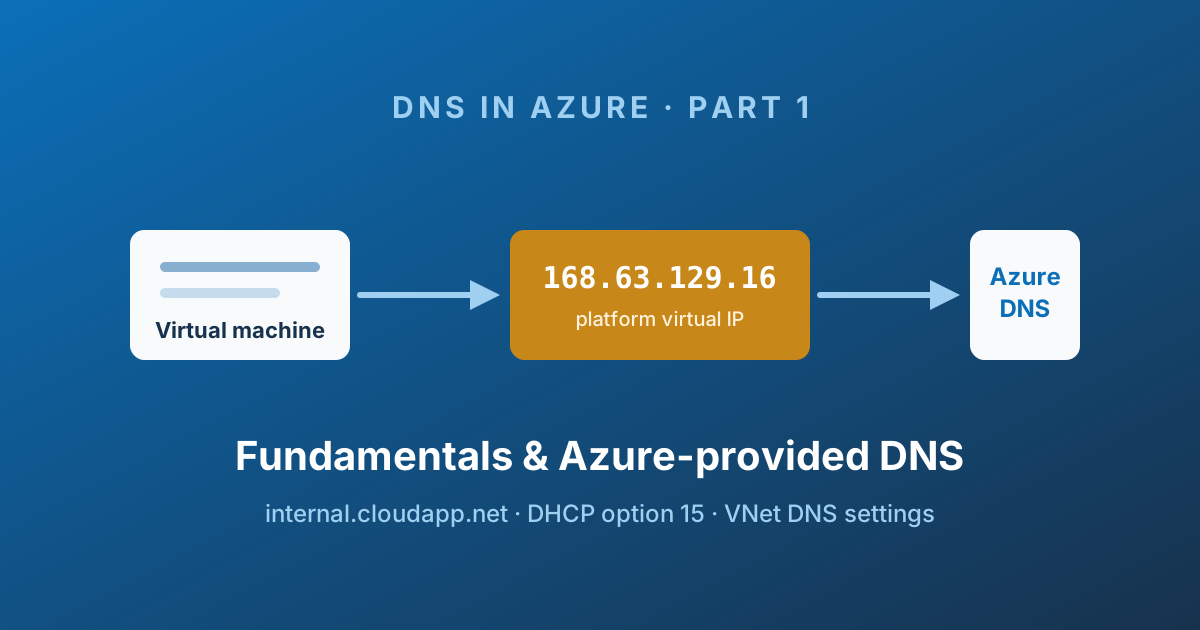
DNS is the least glamorous service in your landing zone and the one that generates the most 2 a.m. incident bridges. Nothing looks broken - the VM is up, the NSG is open, the peering is connected - and yet the application cannot find its database. Nine times out of ten the answer is a name that resolved to the wrong address, or did not resolve at all.
This is the first of an eight-part series on private name resolution in Azure. Public Azure DNS zones (the ones you delegate a registered domain to) are a different topic, and I already covered them in How to Delegate a Domain to Azure DNS. Here I want to walk through what happens inside a virtual network.
I assume you already know what a DNS record is. If terms like recursive query or conditional forwarder are fuzzy, the vocabulary section below should be enough to follow along.
Start learning or diagnose a lookup
Learning: open the glossary below, then read four resolution paths. Diagnosing: go straight to where the VM gets its resolver and the read-only proof, or use the decision tree.
Quick diagnostic record: client/VNet → configured DNS server → queried FQDN → returned CNAME/A record → expected destination. Record each separately; a correct DNS answer does not prove network or application access.
The four paths use stable terms: Azure-provided resolution for the platform's local namespace; private DNS zone for records you own; Private Resolver for managed hybrid forwarding; custom DNS server for a resolver you operate. The VNet/NIC DNS setting decides the initial resolver, not the name of the destination service.
Technical execution validation: not recorded. Use Azure name resolution guidance to verify service behaviour in your environment.
A shared vocabulary
Half of the confusion in DNS troubleshooting comes from two people using the same word for different things. Here is the vocabulary I use for the rest of the series.
| Term | What it means in practice |
|---|---|
| A / AAAA record | Maps a hostname to an IPv4 / IPv6 address. api.corp.internal → 10.20.0.7. |
| CNAME record | An alias pointing one name at another name. Cannot coexist with other records at the same name. |
| PTR record | The reverse direction: an IP address back to a hostname. Lives in a reverse lookup zone. |
| NS record | Declares which name servers are authoritative for a zone. The building block of delegation. |
| SOA record | Zone metadata: primary server, serial number, default negative-caching TTL. |
| Authoritative server | Holds the real data for a zone and answers without asking anyone else. |
| Recursive query | "Give me the final answer." The client hands off the work and waits for a definitive response. |
| Iterative query | "Give me whatever you have." The server may answer with a referral to another server instead. |
| Forwarder | Send everything I cannot answer to this upstream server. |
| Conditional forwarder | Send queries for this specific suffix to that server. BIND calls this a forward zone. |
| Split-horizon DNS | The same zone name exists in two places, and clients get a different answer depending on where they are. Extremely common in Azure. |
| TTL | How long a resolver is allowed to cache an answer. The reason your fix "did not work" for ten minutes. |
Split-horizon deserves a flag now because it is the mechanism behind Private Endpoints, which we get to in Part 2. myaccount.blob.core.windows.net resolving to a public IP from your laptop and a private IP from a VNet is not a bug - it is the whole design.
Microsoft's own illustration of split-horizon makes the idea concrete: the same contoso.com name exists in a public zone and a private zone, and the answer depends entirely on who is asking.
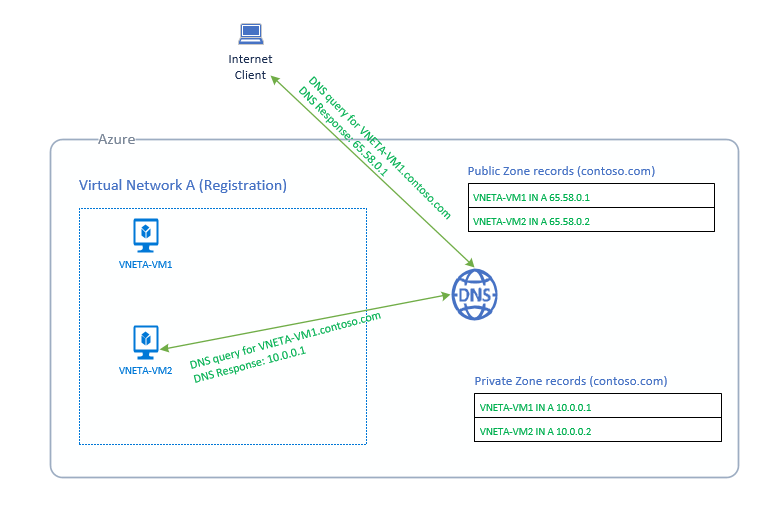
Source: Azure Private DNS scenarios - © Microsoft, Microsoft Learn.
The four ways to resolve a private name in Azure
Before diving into mechanics, it helps to see the whole menu. Every private resolution design in Azure is one of these four, or a combination:
| Option | What it gives you | Where it hurts |
|---|---|---|
| Azure-provided DNS | Zero configuration, automatic records for VMs in one VNet | One opaque namespace per VNet, A and PTR records only |
| Azure Private DNS zones | Your own namespaces, manual records, shared across VNets | Not reachable from on-premises on its own |
| Your own DNS servers | Total control, works with existing AD DS estates | You own the VMs, the patching, the availability, the bill |
| Azure DNS Private Resolver | Managed hybrid forwarding in both directions | Additional resource to design and size |
This post covers the first one. It is the one you get whether you asked for it or not, so it is worth understanding even though you will almost certainly move past it.
168.63.129.16: the address behind everything
If you have spent any time in Azure you have seen 168.63.129.16. It looks like a public address - and technically it is registered to Microsoft - but it does not behave like one. It is a platform virtual IP, identical in every region and every virtual network, that acts as the communication channel between your VM and the Azure fabric.
That single address serves several purposes at once:
- Delivering DHCP leases to your network interfaces
- Carrying VM agent health and "ready state" signals back to the platform
- Answering load balancer health probes
- Serving DNS queries
A few properties are worth committing to memory:
- The route to it is injected by the platform, not by you. Run
route printon a Windows VM orip routeon Linux and you will find it pointing at the subnet gateway. - It is included in the VirtualNetwork service tag, so the default NSG rules already permit it. You do not need to open anything.
- It is reachable from inside a VNet only. There is no path to it from on-premises, which is exactly why Part 3 exists.
- You can block it with an NSG rule if you deliberately want to force every lookup through your own resolver. That is a legitimate design choice, just make sure you understand what else you are cutting off.
Blocking 168.63.129.16 wholesale is riskier than it looks. DHCP, health probes, and VM agent communication share the same address. If you want to restrict DNS specifically, restrict UDP/TCP 53 rather than the address as a whole.
Where a VM actually gets its resolver
Azure runs DHCP for you, and DHCP is how the resolver address reaches the guest OS. The value it hands out comes from the DNS servers setting, which can be configured in two places:
| Scope | Behaviour | Recommendation |
|---|---|---|
| Virtual network | Applies to every NIC in the VNet | Use this |
| Network interface | Overrides the VNet value for one NIC | Avoid unless you have a very specific reason |
Leave it on Default (Azure-provided) and DHCP pushes 168.63.129.16. Set it to Custom and DHCP pushes your addresses instead.
Changing the DNS servers setting on a virtual network does not restart anything. Existing VMs keep their old value until their DHCP lease renews or the NIC is reset. In practice, plan a reboot - or at minimum an ipconfig /renew / nmcli con up - or you will spend an hour debugging a change that never landed.
Verify what the guest actually received:
# Windows
Get-DnsClientServerAddress -AddressFamily IPv4
ipconfig /all# Linux (systemd-resolved)
resolvectl status
cat /etc/resolv.confAzure-provided name resolution
When you create a virtual network, Azure quietly assigns it a private DNS namespace of the form <random-string>.internal.cloudapp.net. You do not choose it, you cannot rename it, and it is unique per VNet.
Two things then happen automatically:
- The suffix is pushed to VMs through DHCP option 15, so the guest OS appends it to single-label names. Pinging
web01becomes a query forweb01.<random>.internal.cloudapp.net. - Every VM deployed into the VNet gets an A record registered in that namespace, plus PTR records in reverse lookup zones for the subnets in use.
The result is that basic host-to-host resolution works out of the box, with no zone to create and nothing to maintain.
A single-VNet lookup, step by step
Take a VNet vnet-lab with 10.30.0.0/16, one subnet 10.30.1.0/24, and two VMs: web01 at 10.30.1.4 and db01 at 10.30.1.5. The DNS servers setting is left at the default.
  ┌──────────────┐   1. query: db01.<random>.internal.cloudapp.net
  │ web01        │ ─────────────────────────────┐
  │ 10.30.1.4    │                              │
  └──────────────┘                              ▼
                                     ┌────────────────────┐
                                     │   168.63.129.16    │
                                     │  platform VIP      │
                                     └─────────┬──────────┘
                                               │ 2. forwarded to
                                               ▼
                                     ┌────────────────────┐
                                     │  Azure-provided    │
                                     │  DNS service       │
                                     │  <random>.internal │
                                     └─────────┬──────────┘
                                               │ 3. answer: 10.30.1.5
  ┌──────────────┐                             │
  │ web01        │ ◀───────────────────────────┘
└──────────────┘web01has no cached entry, so the guest OS appends the DHCP-supplied suffix and sends a recursive query to its configured resolver -168.63.129.16.- The query crosses the platform virtual IP and reaches the Azure-provided DNS service.
- The service is authoritative for that VNet's namespace, finds the A record for
db01, and returns10.30.1.5.
Because of the suffix, ping db01 works just as well as the FQDN. That convenience disappears the moment you move to private zones, which trips people up constantly - I come back to it in Part 2.
Proving it
# Windows - see the suffix and the answer
Resolve-DnsName db01 -Type A
Resolve-DnsName 10.30.1.5 -Type PTR# Linux - query the platform VIP explicitly
dig @168.63.129.16 db01.<random>.internal.cloudapp.net +short
dig @168.63.129.16 -x 10.30.1.5 +shortIf dig against 168.63.129.16 answers but your application still fails, the problem is almost never Azure DNS - it is the search suffix, a stale cache, or the app resolving a different name than you think.
Where it falls apart: the second virtual network
Everything above holds for exactly one virtual network. Now peer vnet-lab with vnet-app, which has its own, different internal.cloudapp.net namespace.
web01 in vnet-lab wants to reach api01 in vnet-app. Two problems appear at once:
- The DHCP suffix is wrong.
web01appends its VNet's suffix, so a single-label query never matches. You must use the full FQDN of the other VNet's namespace. - Even with the correct FQDN, the query fails. The Azure-provided DNS service only answers for the namespace of the VNet the query came from. A query arriving from
vnet-labcannot seevnet-app's records.
The only way to bridge the two with Azure-provided DNS alone is to put a DNS server inside each VNet and chain them:
 vnet-lab (10.30.0.0/16)          │  peering  │      vnet-app (10.40.0.0/16)
                                  │           │
 ┌────────┐    ┌──────────────┐   │           │   ┌──────────────┐    ┌────────────────┐
 │ web01  │───▶│ DNS server 1 │───┼───────────┼──▶│ DNS server 2 │───▶│ 168.63.129.16  │
 └────────┘    │ 10.30.1.10   │   │           │   │ 10.40.1.10   │    │ Azure DNS      │
               └──────────────┘   │           │   └──────────────┘    └────────────────┘
             conditional forwarder                  standard forwarder
for <random2>.internal… to the platform VIPvnet-labis configured with custom DNS servers pointing to10.30.1.10.- DNS server 1 holds a conditional forwarder for
vnet-app's namespace pointing at10.40.1.10. - DNS server 2 has a plain forwarder to
168.63.129.16, which resolves the record againstvnet-app's namespace.
It works. It is also a DNS server per virtual network, forever, with an opaque random suffix in every conditional forwarder. Add a third VNet and you are editing forwarders on every server. This does not scale past a lab.
This is the pattern Microsoft documents as the "before" picture in its DNS Private Resolver architecture guidance - a pair of DNS forwarder VMs sitting in the hub, carrying every query between on-premises and the platform resolver:
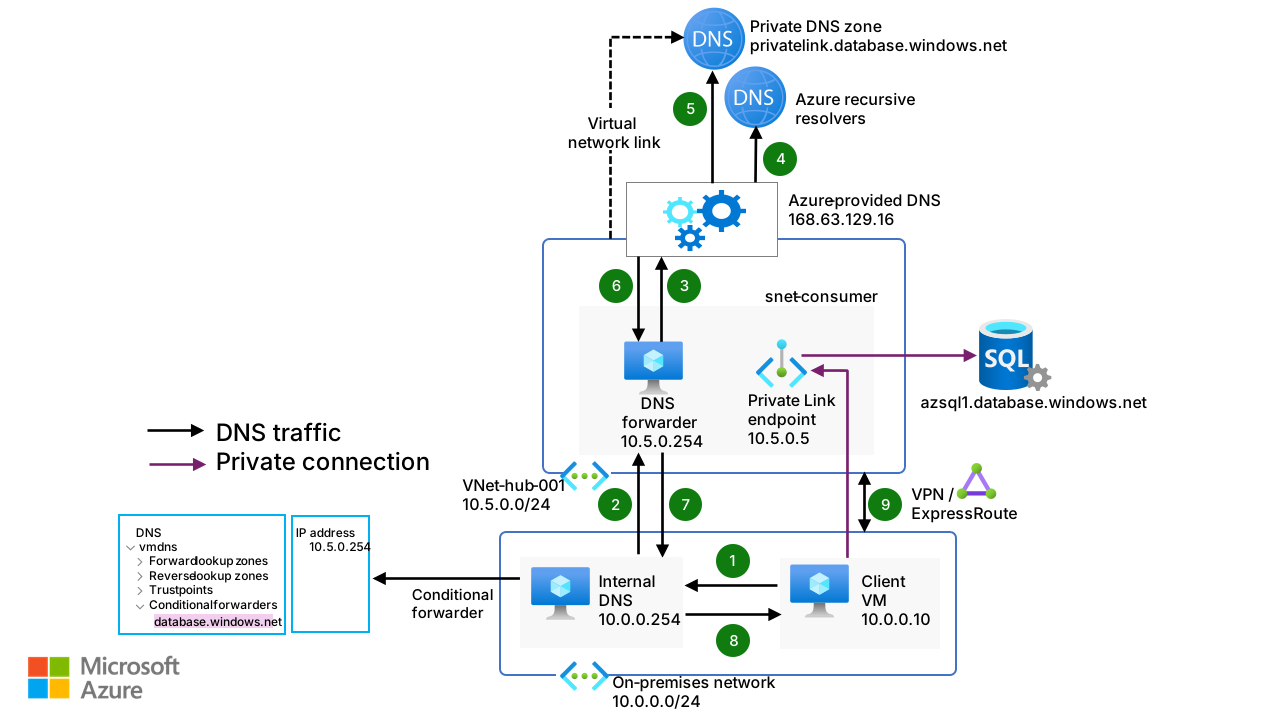
Source: Azure DNS Private Resolver architecture - © Microsoft, Azure Architecture Center.
Every VM in that diagram is one you build, size, patch and pay for. Part 3 replaces the whole box with a managed service.
Scorecard
| Works well | Does not work |
|---|---|
| Zero configuration and zero cost | One namespace per VNet, and you do not choose the name |
| Automatic A record lifecycle for VMs | Only A and PTR records, only auto-registered |
| Automatic PTR records for reverse lookups | No manual records of any kind |
| Scales and stays available without your help | No cross-VNet resolution without your own DNS servers |
| Query logging is available via DNS resolver policy | Not reachable from on-premises |
| No WINS / NetBIOS |
The one genuinely useful takeaway from this post is not "use Azure-provided DNS" - you will not. It is understanding that every private resolution path in Azure eventually terminates at 168.63.129.16, and that the DNS servers setting on the virtual network decides who gets asked first. Every pattern in Parts 2 and 3 is built on those two facts.
Key takeaways
168.63.129.16is the platform virtual IP that carries DHCP, health probes, VM agent traffic, and DNS. It is identical everywhere and reachable only from inside a VNet.- The DNS servers setting on a virtual network decides what DHCP pushes to your VMs. Set it at the VNet level, and remember it does not apply until the lease renews.
- Azure-provided DNS gives every VNet a random
internal.cloudapp.netnamespace with automatic A and PTR records - and nothing else. - The moment you have more than one virtual network, Azure-provided DNS stops being a viable answer.
Next in this series
In Part 2 I move on to Azure Private DNS zones: how the zone and virtual network link resources fit together, what autoregistration really does to your records, the suffix trap that catches everyone on their first migration, and how to design zones so you do not repaint them a year later.
See you there.