
Part 1 established that everything private in Azure eventually terminates at 168.63.129.16. Part 2 showed how private DNS zones make that address genuinely useful. Both ended on the same two gaps:
- A machine on-premises cannot resolve names in an Azure private DNS zone, because it has no path to the platform virtual IP.
- A machine in Azure cannot resolve names hosted by an on-premises DNS server, because Azure DNS has no idea those zones exist.
For years the fix was to run your own DNS servers in a hub VNet - two VMs, forwarders both ways, and a patching schedule. The Azure DNS Private Resolver, generally available since October 2022, closes both gaps as a managed service. This post is about how it works and which architecture to pick.
Choosing a pattern
| If you need... | Use |
|---|---|
| On-premises to resolve Azure private zones | Pattern 1: inbound endpoint and zone links |
| Azure to resolve on-premises zones through a central DNS IP | Pattern 2: centralized |
| Azure-provided DNS with direct ruleset association | Pattern 3: distributed |
| Central forwarding for a VNet without peering | Pattern 4: wildcard rule |
| Central zone management across spokes | Pattern 5: Azure-to-Azure |
If you are unsure, start centralized. It is simpler to reason about, and DNS is a service where being able to explain the path out loud matters more than shaving milliseconds.
Choose by client and destination
Start with the selection table below, then open the matching pattern. All diagrams have original-file links; the text at each pattern states client, destination, path, configuration and limitation without relying on colours or small labels.
Technical execution validation and quota review date: not recorded. Validate current regional availability, per-endpoint queries/second and per-resource quotas in Private Resolver documentation . A listed limit is not a measured workload capacity.
Anatomy of the resolver
The resolver itself is a container for three moving parts.
| Component | Direction | Purpose |
|---|---|---|
| Inbound endpoint | Into Azure | A private IP in your VNet that accepts DNS queries from on-premises, other clouds, or other VNets |
| Outbound endpoint | Out of Azure | The egress point queries leave through when a forwarding rule sends them elsewhere |
| DNS forwarding ruleset | - | A named collection of conditional forwarding rules, attached to an outbound endpoint and linked to virtual networks |
| Forwarding rule | - | One entry in a ruleset: a domain suffix, up to six target IPs, and a port |
A few structural rules follow from that:
- The resolver lives in one virtual network, in the same region as that VNet. One resolver per VNet - they cannot share.
- Each endpoint needs its own dedicated subnet, delegated to
Microsoft.Network/dnsResolvers. Nothing else can live in it. - Subnets must be between /28 and /24. A /28 covers today's limits; a /27 buys you headroom.
- Endpoint subnets cannot be IPv6-enabled.
- An inbound endpoint IP can be static or dynamic. Pick static, always - it goes into on-premises conditional forwarders and you do not want it moving.
az network dns-resolver create \
  --name dnspr-hub-weu \
  --resource-group rg-dns-hub \
  --location westeurope \
  --id /subscriptions/<sub>/resourceGroups/rg-net/providers/Microsoft.Network/virtualNetworks/vnet-hub

az network dns-resolver inbound-endpoint create \
  --dns-resolver-name dnspr-hub-weu \
  --name inbound-weu \
  --resource-group rg-dns-hub \
  --location westeurope \
  --ip-configurations '[{"private-ip-allocation-method":"Static","private-ip-address":"10.30.10.4","id":"<subnet-id-inbound>"}]'

az network dns-resolver outbound-endpoint create \
  --dns-resolver-name dnspr-hub-weu \
  --name outbound-weu \
  --resource-group rg-dns-hub \
  --location westeurope \
--id "<subnet-id-outbound>"The resolver needs network connectivity to work, not magic. On-premises reaching an inbound endpoint requires ExpressRoute or a VPN. An outbound endpoint reaching an on-premises DNS server requires the same. The resolver does not create connectivity - it uses what you already have.
Put together, the reference architecture looks like this - the resolver deployed in the hub, its two endpoint subnets, and the on-premises network attached over ExpressRoute or VPN:
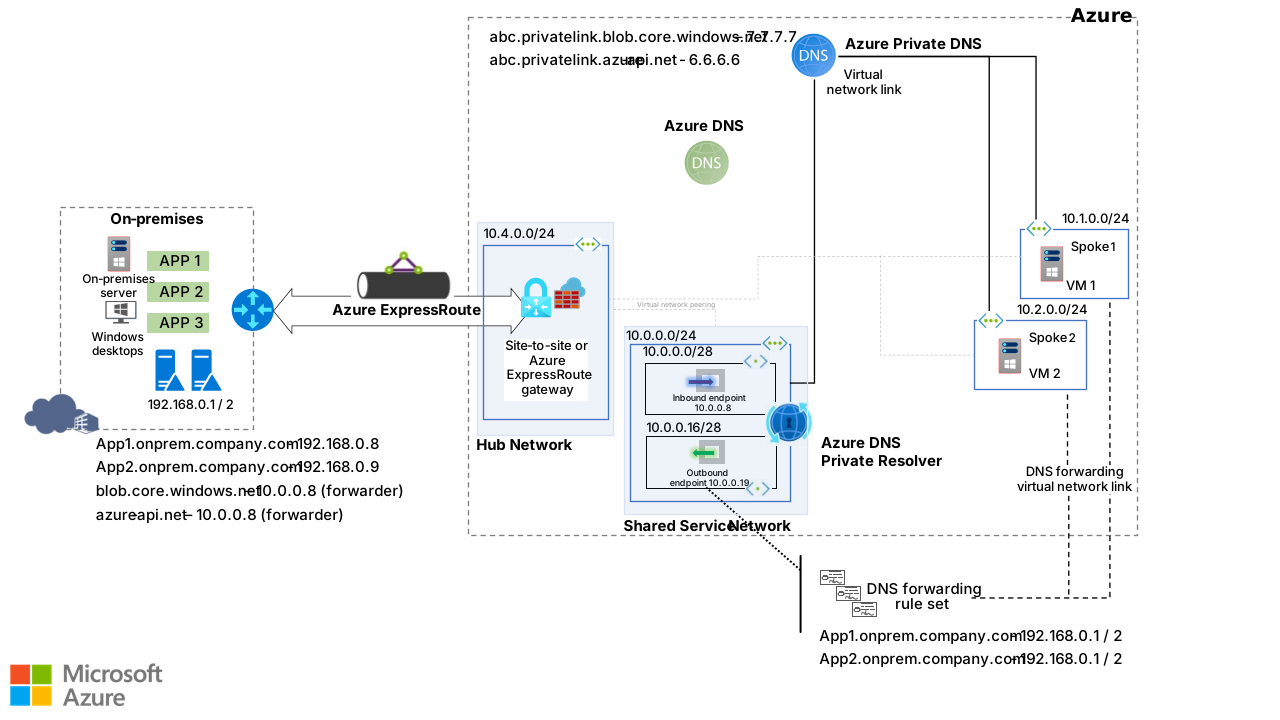
Source: Azure DNS Private Resolver architecture - © Microsoft, Azure Architecture Center.
The evaluation order that explains everything
Most "why did my query go there?" incidents are answered by the order in which the platform evaluates a query. Once a query reaches 168.63.129.16 from a virtual network:
- If the VNet is configured with custom DNS servers, the query never got here - it went to those servers instead.
- Linked private DNS zones are checked first. A match is answered from the zone.
- If no zone matches, DNS forwarding rulesets linked to the VNet are evaluated.
- Rules match on domain suffix. When several rules match, the longest suffix wins.
- On a match, the query is forwarded out of the outbound endpoint to the rule's target servers.
- With no match and no ruleset, Azure DNS resolves the query as a normal recursive lookup.
Two consequences worth internalising:
- Private zones beat rules. If
corp.internalis linked as a private zone and a rule forwardscorp.internalon-premises, the zone wins and the rule never fires. This is the single most common misconfiguration. - A wildcard rule (
.) does not catch everything. Microsoft reserves a set of namespaces - the ones behind platform services - that are always resolved by Azure DNS regardless of your wildcard. That is a feature; without it you would break managed identity, storage, and half the platform.
Pattern 1: on-premises resolving Azure private zones
Client: on-premises. Destination: Azure private zone. Path: local resolver → reachable inbound endpoint → zones linked to the resolver VNet. Configure: conditional forwarding and zone links. Limit: the on-premises resolver needs network reachability to the inbound IP; it cannot query Azure's platform IP directly.
The canonical starting point. A resolver sits in the hub VNet, and the private zones are linked to that hub.
      ON-PREMISES                    │            AZURE (vnet-hub)
                                     │
  ┌──────────┐   ┌────────────────┐  │   ┌──────────────────┐
  │ client   │──▶│ DNS server     │──┼──▶│ Inbound endpoint │
  │          │   │ 192.168.0.10   │  │   │ 10.30.10.4       │
  └──────────┘   └────────────────┘  │   └────────┬─────────┘
                  conditional        │            │
                  forwarder for      │            ▼
                  corp.internal      │   ┌──────────────────┐
                                     │   │  168.63.129.16   │
              ExpressRoute / VPN     │   └────────┬─────────┘
                                     │            ▼
                                     │   ┌──────────────────────────┐
                                     │   │ Private zone             │
                                     │   │ corp.internal (linked)   │
                                     │   │ vm1  A  10.30.1.4        │
│ └──────────────────────────┘- The on-premises client asks its usual DNS server for
vm1.corp.internal. - That server is not authoritative, but it has a conditional forwarder for
corp.internalpointing at10.30.10.4- the inbound endpoint. The query crosses the ExpressRoute or VPN. - The inbound endpoint hands the query to the platform resolver behind
168.63.129.16. - The private zone
corp.internalis linked to the hub VNet, so the record is found and the answer travels back.
The only configuration on the Azure side is: resolver + inbound endpoint + zones linked to the resolver's VNet. No rules needed for this direction.
Microsoft's diagram of the same flow, showing the query travelling from the on-premises server into the inbound endpoint and on to the private zone:
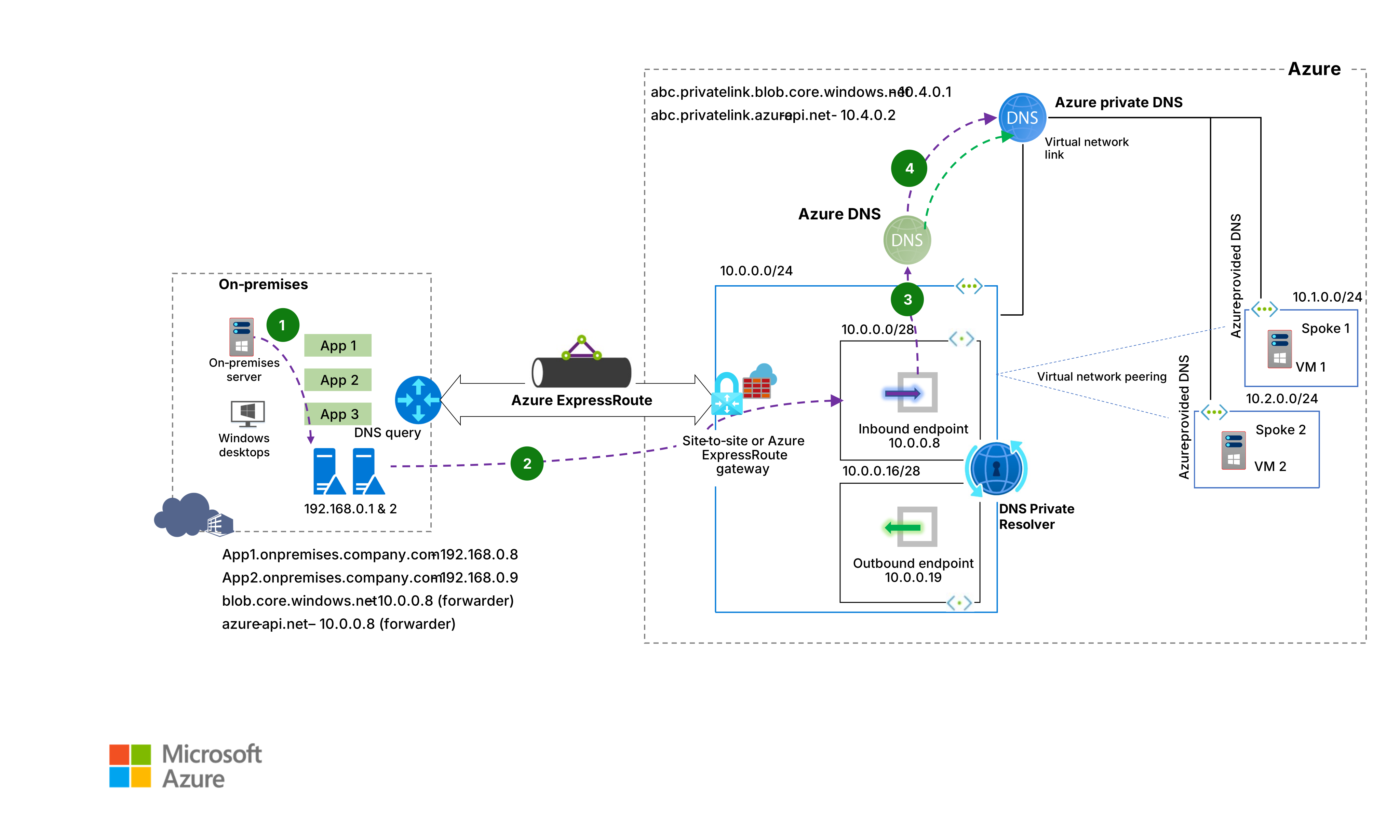
Source: Azure DNS Private Resolver architecture - © Microsoft, Azure Architecture Center.
This is also the pattern that makes privatelink.* zones reachable from on-premises - which is exactly what you need for a hybrid client to hit a Private Endpoint. Forward each public suffix you use (blob.core.windows.net, not privatelink.blob.core.windows.net) to the inbound endpoint, or you will get the public IP and a firewall drop. Part 5 explains exactly why the public suffix is the right target.
Pattern 2: Azure resolving on-premises names, centralized
Client: spoke workload. Destination: on-premises namespace. Path: spoke custom DNS → hub inbound endpoint → matching rule/outbound endpoint → on-premises DNS. Configure: spoke DNS setting, ruleset and destination reachability. Limit: the central inbound path is part of availability/capacity planning; avoid loops.
Now the other direction. This is the architecture you should reach for by default.
Every spoke VNet has its DNS servers setting pointed at the inbound endpoint IP. The ruleset is linked to the hub VNet and attached to the outbound endpoint.
  vnet-spoke-a                        vnet-hub                       ON-PREMISES
  DNS servers = 10.30.10.4
  ┌──────────┐   peering   ┌────────────────────────────┐   │   ┌────────────────┐
  │ app01    │────────────▶│ Inbound  10.30.10.4        │   │   │ DNS server     │
  └──────────┘             │    │                       │   │   │ 192.168.0.10   │
                           │    ▼                       │   │   └────────────────┘
                           │ 168.63.129.16              │   │            ▲
                           │    │                       │   │            │
                           │    ▼  ruleset: onprem.local │  │            │
                           │ Outbound endpoint ──────────┼──┼────────────┘
                           └────────────────────────────┘   │
ExpressRoute / VPNapp01queriessvc.onprem.local. Its VNet's DNS servers setting points at10.30.10.4, so the query is routed over the peering to the inbound endpoint.- The inbound endpoint passes it to the platform resolver. No linked private zone matches
onprem.local. - The ruleset linked to the hub VNet is evaluated. The rule for
onprem.localmatches and forwards the query out of the outbound endpoint to192.168.0.10. - The on-premises server answers authoritatively.
The appeal is that one place holds all the routing logic. Add a new on-premises namespace and you edit one ruleset, not fifty virtual networks.

Source: Azure DNS Private Resolver architecture - © Microsoft, Azure Architecture Center.
az network dns-resolver forwarding-ruleset create \
  --name frs-hybrid \
  --resource-group rg-dns-hub \
  --location westeurope \
  --outbound-endpoints '[{"id":"<outbound-endpoint-id>"}]'

az network dns-resolver forwarding-rule create \
  --ruleset-name frs-hybrid \
  --name rule-onprem-local \
  --resource-group rg-dns-hub \
  --domain-name "onprem.local." \
  --forwarding-rule-state Enabled \
  --target-dns-servers '[{"ip-address":"192.168.0.10","port":53},{"ip-address":"192.168.0.11","port":53}]'

az network dns-resolver vnet-link create \
  --ruleset-name frs-hybrid \
  --name link-spoke-a \
  --resource-group rg-dns-hub \
--id "<vnet-spoke-a-id>"Rule domain names are written as a fully qualified suffix with a trailing dot - onprem.local. - and matching is on suffix, so a rule for onprem.local. also catches svc.eu.onprem.local.. Add a more specific rule if you need a subdomain to go somewhere else; the longest match wins.
Pattern 3: Azure resolving on-premises names, distributed
Client: spoke using Azure-provided DNS. Destination: on-premises namespace. Path: linked forwarding ruleset → outbound endpoint → on-premises DNS. Configure: a ruleset link for each participating VNet. Limit: the ruleset is not a network route; target reachability and DNS ports still need validation.
Same goal, different plumbing. Spokes keep the default DNS servers setting (168.63.129.16), and the ruleset is linked directly to each spoke VNet.
  vnet-spoke-a                                          ON-PREMISES
  DNS servers = Default (168.63.129.16)
  ruleset frs-hybrid linked directly
  ┌──────────┐        ┌──────────────────┐        │   ┌────────────────┐
  │ app01    │───────▶│  168.63.129.16   │        │   │ DNS server     │
  └──────────┘        └────────┬─────────┘        │   │ 192.168.0.10   │
                               │ rule match       │   └────────────────┘
                               ▼                  │            ▲
                      ┌──────────────────┐        │            │
                      │ Outbound endpoint│────────┼────────────┘
                      │ (in vnet-hub)    │        │
                      └──────────────────┘   ExpressRoute / VPN
The query never traverses the inbound endpoint. It goes straight from the platform resolver to the outbound endpoint when a rule matches.
Why bother? Throughput. Each endpoint is capped at 10,000 queries per second. In the centralized pattern every query in your estate crosses the inbound endpoint. For most organisations that is comfortable; for VDI fleets, large container platforms, or anything with a chatty resolver, it is not. The distributed pattern removes the inbound endpoint from the path entirely.
The cost is operational: a ruleset link per spoke, so more objects to manage and more places to look when something forwards to the wrong place.

Source: Azure DNS Private Resolver architecture - © Microsoft, Azure Architecture Center.
Pattern 4: isolated VNets with a wildcard rule
Client: VNet without direct peering to the hub. Destination: names forwarded by the wildcard. Path: linked ruleset → outbound endpoint → configured resolver. Configure: wildcard rule and links deliberately. Limit: a broad rule changes many names; exclude recursive loops and validate private/public outcomes.
Sometimes a workload must sit in a VNet with no peering at all - a compliance boundary, a third-party landing area - and you still want its DNS centrally controlled and logged.
Link a ruleset to that isolated VNet containing a single wildcard rule for . pointing at your central DNS service. Every query the platform does not answer from a linked private zone gets forwarded out.
  isolated VNet (no peering)
  DNS servers = Default
  ruleset with rule "." → 192.168.0.10
  ┌──────────┐    ┌────────────────┐    ┌──────────────────┐    ┌────────────────┐
  │ vm1      │───▶│ 168.63.129.16  │───▶│ Outbound endpoint│───▶│ central DNS    │
  └──────────┘    └────────────────┘    └──────────────────┘    └────────────────┘
                    "." rule matches                              recursive lookup
This works because ruleset links do not require network peering - the link is a control-plane relationship, and the query egresses through the outbound endpoint in the hub.
Remember the reserved namespaces. A . rule will not capture Microsoft's platform domains, which continue to resolve through Azure DNS. Do not build a compliance story that assumes a wildcard rule sees 100% of queries - it does not, by design.
Pattern 5: Azure-to-Azure through the hub
Client: spoke workload. Destination: Azure private zone. Path: spoke → hub inbound endpoint → hub-linked zone. Configure: spoke DNS settings and central zone links. Limit: this centralises resolution, not application connectivity; each application path still needs routing.
You can also use the resolver purely for Azure-internal resolution, and it is often the cleanest way to manage private zones at scale.
Rather than linking every private DNS zone to every spoke VNet - which burns through the 1,000-link-per-zone budget and makes troubleshooting miserable - link all zones to the hub VNet only, and point each spoke's DNS servers setting at the inbound endpoint.
| Approach | Links to manage | Zone link limit pressure | Troubleshooting |
|---|---|---|---|
| Zones linked to every spoke | zones × spokes | High | Hard - many links to inspect |
| Zones linked to the hub, spokes use the inbound endpoint | zones × 1 | Minimal | Easy - one place holds the truth |
The second row is what I recommend for anything beyond a handful of VNets. It also gives you a single choke point where query logging can be applied.
Microsoft documents this as the hub-and-spoke-with-ruleset topology:
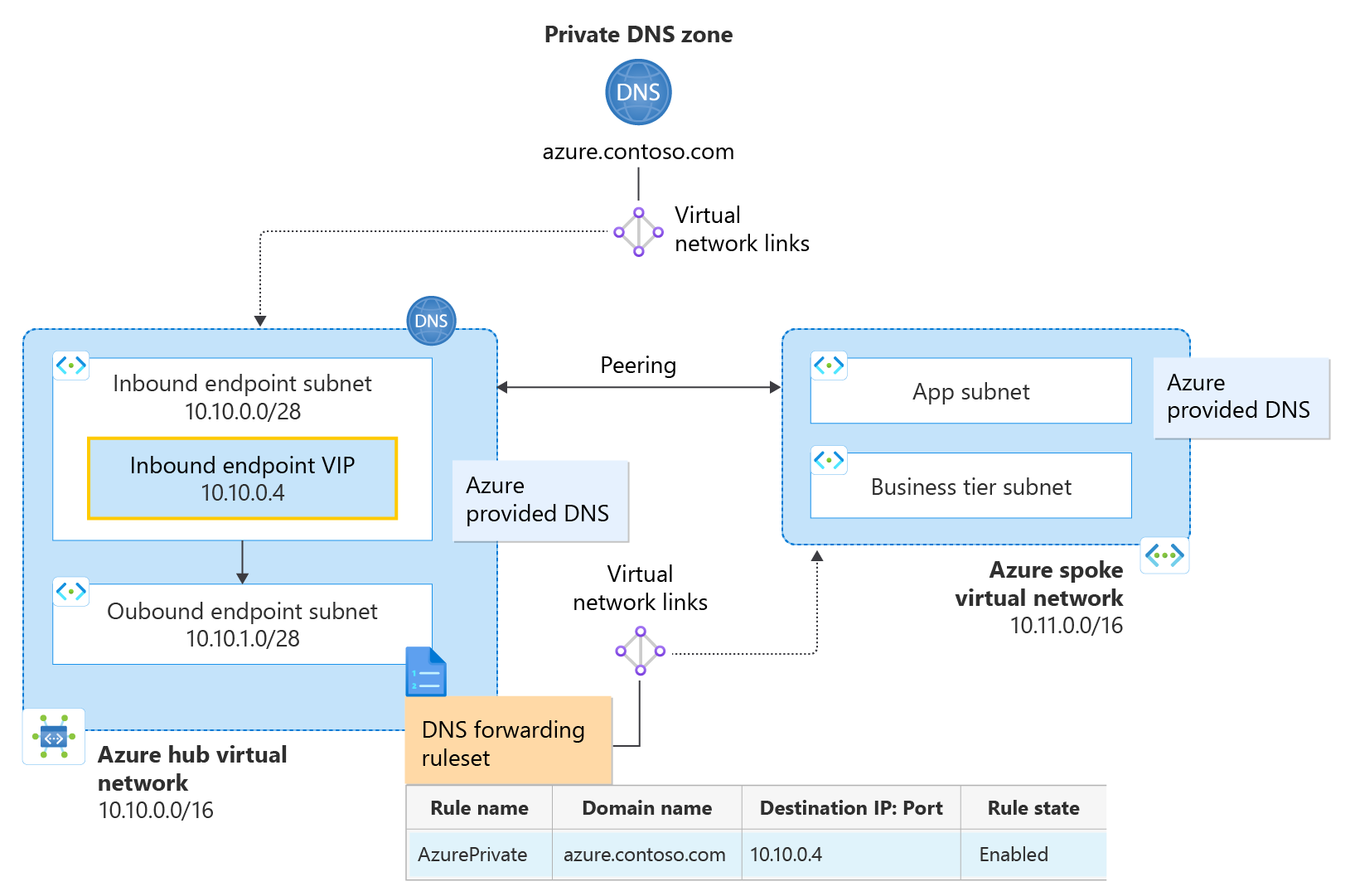
Source: Private resolver architecture - © Microsoft, Microsoft Learn.
Limits and sizing
| Resource | Limit |
|---|---|
| Private resolvers per subscription | 15 |
| Inbound endpoints per resolver | 5 |
| Outbound endpoints per resolver | 5 |
| Queries per second per endpoint | 10,000 |
| Rules per forwarding ruleset | 1,000 |
| Virtual network links per ruleset | 500 |
| Outbound endpoints per ruleset | 2 |
| Rulesets per outbound endpoint | 2 |
| Target DNS servers per rule | 6 |
Also worth knowing before you design:
- Virtual networks with encryption enabled do not support the resolver.
- The resolver is not compatible with Azure Lighthouse.
- ExpressRoute FastPath is not supported.
- Cross-tenant ruleset linking is not supported (unlike private DNS zone links).
- Deleting an outbound endpoint requires deleting its ruleset and virtual network links first.
Query logging and filtering
Historically the biggest complaint about this architecture was visibility: the platform resolver produced no query logs, so teams inserted a BIND or Windows DNS VM purely to capture them - which defeated most of the point of a managed service.
DNS resolver policy removes that need. It applies at the virtual network level, covers both public and private DNS traffic, and lets you:
- Send full query and response logs to a Log Analytics workspace, storage account, or Event Hub
- Allow, alert on, or block queries based on prioritised rules over domain lists
- Subscribe to Microsoft's managed threat intelligence feed to block known malicious domains
A policy applies only to VNets in its own region, so plan one per region you operate in. If your only reason for running a DNS VM was logging, this is your exit path. Part 7 covers the whole feature - traffic rules, domain lists, threat intelligence, and the KQL to make sense of the logs.
Troubleshooting checklist
When resolution fails, work down this list in order - it matches the evaluation order and will find the cause faster than packet captures:
- What is the VM actually using as a resolver?
Get-DnsClientServerAddressorresolvectl status. If it does not match the VNet setting, the DHCP lease is stale. - Did the VNet DNS setting apply? Changing it requires a lease renewal or reboot.
- Is a private zone shadowing your rule? A linked zone always beats a forwarding rule for the same suffix.
- Is the ruleset linked to the right virtual network? Linking it to the hub does nothing for a spoke that points at
168.63.129.16directly. - Is the rule suffix right? Trailing dot, correct suffix,
Enabledstate - and remember longest match wins. - Is there a route and a firewall opening? UDP and TCP 53 both, in both directions, across the ExpressRoute or VPN.
- Is the target server answering? Query it directly:
dig @192.168.0.10 svc.onprem.local. - Are you near the QPS ceiling? Endpoint metrics in Azure Monitor will tell you before your users do.
Useful one-liners:
# What is this VNet linked to, ruleset-wise?
az network dns-resolver vnet-link list \
  --ruleset-name frs-hybrid \
  --resource-group rg-dns-hub \
  --output table

# What rules exist, and are they enabled?
az network dns-resolver forwarding-rule list \
  --ruleset-name frs-hybrid \
  --resource-group rg-dns-hub \
  --query "[].{name:name,domain:domainName,state:forwardingRuleState}" \
  --output table
Where this leaves us
Three posts, one throughline:
- Part 1 - every private query in a virtual network ends up at
168.63.129.16, and the VNet's DNS servers setting decides who is asked first. - Part 2 - private DNS zones give you real namespaces and real records, but they only exist for virtual networks you explicitly link, and they always win over forwarding rules.
- Part 3 - the resolver adds the two hybrid directions the platform could not do on its own, driven by rulesets evaluated in a documented, predictable order.
That covers name resolution as an infrastructure service. The second half of the series is about the thing everyone actually wants to resolve.
Part 4 takes apart Private Link and Private Endpoints as a networking construct, Part 5 covers the privatelink CNAME chain and private DNS zone groups, Part 6 explains the NXDOMAIN behaviour and the fallback policy that fixes it, Part 7 finally gets you query logs and filtering, and Part 8 turns the whole series into an interactive decision tree.
If I had to compress the story so far into one piece of advice: centralize DNS, and be able to draw the query path on a whiteboard. The architecture you can explain in thirty seconds is the one you will still be able to debug at 2 a.m.
Enjoy!