
In Part 1 I finished on a fairly blunt conclusion: Azure-provided name resolution stops being useful the moment you own more than one virtual network. You get a namespace you did not choose, records you cannot create by hand, and no way to share any of it across VNets.
Azure Private DNS zones are the answer to all three. This post covers how the service is built, the behaviours that surprise people on day one, the role it plays in Private Endpoints, and how to lay out zones so you are not re-architecting them in eighteen months.
Create, link, register, verify
Resolution means a client can look up an existing record, such as vm1.corp.internal. A link with registrationEnabled = false permits zone resolution through the Azure DNS path; it does not create VM records.
Registration means Azure maintains supported VM records for the linked VNet. A link with registrationEnabled = true includes resolution and adds that record-management behaviour. It does not automatically make vm1 a valid short name or register Private Endpoints.
Follow one example: zone corp.internal, resource group rg-dns-hub, client VNet vnet-spoke-a. Create/link → choose registration → check the full name/suffix → verify.
Checklist: correct zone spelling; intended VNet resource ID; link provisioning complete; registration set deliberately; expected A record exists; client uses Azure DNS or a forwarding path into it; full-name query returns the expected IP. Test network connectivity separately.
Technical execution validation: not recorded. Compare limits and linking behaviour with Private DNS documentation .
What private DNS zones actually give you
A private DNS zone is a namespace you own, hosted by the platform, resolvable only from virtual networks you explicitly attach it to. Compared to the default internal.cloudapp.net namespace:
- You pick the name.
corp.internal,prod.contoso.com, whatever fits your naming standard. - You can create records by hand - A, AAAA, CNAME, MX, PTR, SRV, TXT, SOA.
- One zone can serve many virtual networks, in many regions, across many subscriptions.
- VM records can still be managed automatically if you want them to be.
- There is no infrastructure to build. No VM, no patching, no availability design.
Records in a private zone are never resolvable from the internet. A private zone can share a name with a public zone you own, and that is a perfectly normal split-horizon setup - internal clients get the private answer, everyone else gets the public one.
The resource model
Two resource types do all the work, both under the Microsoft.Network provider:
| Resource | Type | What it does |
|---|---|---|
| Private DNS zone | Microsoft.Network/privateDnsZones | Holds the namespace and its record sets |
| Virtual network link | Microsoft.Network/privateDnsZones/virtualNetworkLinks | Attaches one VNet to one zone |
The link is the part people underestimate. A zone with no links resolves nothing. Creating the zone and populating records is only half the job - until a virtual network is linked, clients in that VNet have no idea the zone exists.
The relationships are worth stating precisely, because the asymmetry matters:
- A zone can be linked to many virtual networks.
- A virtual network can be linked to many zones for resolution.
- A virtual network can be linked to exactly one zone with autoregistration enabled.
- Links can cross subscriptions inside the same tenant, and cross-tenant linking is supported through PowerShell / CLI / ARM.
# Create the zone (note: the zone itself has no location - it is global)
az network private-dns zone create \
  --resource-group rg-dns-hub \
  --name corp.internal

# Link a virtual network for resolution only
az network private-dns link vnet create \
  --resource-group rg-dns-hub \
  --zone-name corp.internal \
  --name link-vnet-spoke-a \
  --virtual-network /subscriptions/<sub>/resourceGroups/rg-net/providers/Microsoft.Network/virtualNetworks/vnet-spoke-a \
  --registration-enabled false
Registration versus resolution
Every link carries a boolean, registrationEnabled, and it is the single most misread setting in the service.
| Link type | Clients can resolve records in the zone | VMs in the VNet auto-create their own A records |
|---|---|---|
Resolution (registrationEnabled = false) | Yes | No |
Registration (registrationEnabled = true) | Yes | Yes |
A registration link is a resolution link plus automatic record management. It is not an alternative to it.
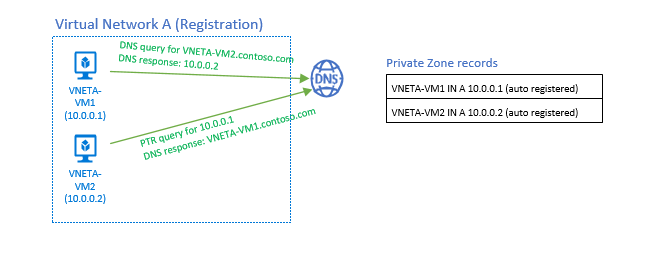
When autoregistration is on, the platform maintains an A record per VM in that VNet. Three details you need to know before you rely on it:
- Records created this way carry an
isAutoRegisteredproperty set totrue. You cannot edit them by hand, and manual records with the same name will conflict. - Their TTL is 10 seconds, not the usual hour. That is deliberate - it keeps ephemeral compute honest - but it means these names are effectively uncached.
- The record is deleted when the VM is deleted. Deallocating a VM does not remove it.
Autoregistration only covers virtual machines. Private Endpoints, App Service, container workloads and everything else still need records created by you, by policy, or by the resource provider.
Microsoft's diagram of a single registration-linked virtual network shows what the platform maintains on your behalf - one auto-registered A record per VM, and PTR answers for the matching reverse lookups:
Source: Azure Private DNS scenarios - © Microsoft, Microsoft Learn.
# Link a virtual network WITH autoregistration - only one such link per VNet
az network private-dns link vnet create \
  --resource-group rg-dns-hub \
  --zone-name corp.internal \
  --name link-vnet-hub-reg \
  --virtual-network vnet-hub \
  --registration-enabled true
The suffix trap
Here is the one that catches every team on their first migration.
Linking a private zone to a virtual network does not change the DNS suffix the guest OS receives. DHCP option 15 still hands out the VNet's internal.cloudapp.net namespace. So on a VM linked to corp.internal with autoregistration:
Resolve-DnsName web01              # answers from <random>.internal.cloudapp.net
Resolve-DnsName web01.corp.internal # answers from your private zone
Both work, and both may return the same address - but they came from different zones. The consequences are practical:
- Always configure applications, connection strings and certificates with the FQDN. Single-label names are a trap.
- If you need the private zone suffix appended automatically, set it yourself in the guest OS (DNS suffix search list on Windows,
searchin/etc/resolv.confor the netplan/NetworkManager equivalent on Linux).
This is by design, not an oversight: Microsoft keeps the platform suffix stable so you stay in control of what your VMs append.
Resolution order inside a VNet
When a VM in a linked VNet sends a query to 168.63.129.16, the platform evaluates it in this order:
- Is there a linked private DNS zone matching the queried name? If so, answer from it. If the record does not exist in that zone, return NXDOMAIN - the platform does not fall through to public DNS for a name inside a zone it is authoritative for.
- Otherwise, resolve through Azure DNS as a normal recursive public lookup.
Step 1 is why a half-populated private zone is worse than no zone at all. Link contoso.com as a private zone with only three records, and every other *.contoso.com name that used to resolve publicly from that VNet now returns NXDOMAIN. This is the classic self-inflicted outage with split-horizon zones - if you take over a namespace privately, you own all of it.
There is a second, equally important caveat: if the virtual network is configured with custom DNS servers instead of the default, linked private zones are no longer consulted automatically. Your custom server must forward to 168.63.129.16 (or you must use a Private DNS Resolver, covered in Part 3) for the zone to be reachable.
Walkthrough: two VNets, one zone
Zone corp.internal exists in a hub resource group. vnet-hub is linked with autoregistration; vnet-spoke-a is linked for resolution only. Both use the default DNS servers setting.
        vnet-spoke-a                              vnet-hub
        (resolution link)                      (registration link)
   ┌────────────────────┐                   ┌────────────────────┐
   │  app01             │                   │  db01              │
   │  10.40.1.5         │                   │  10.30.1.4         │
   └─────────┬──────────┘                   └────────────────────┘
             │ 1. db01.corp.internal                   ▲
             ▼                                         │ auto-registered A record
     ┌──────────────────┐                              │
     │  168.63.129.16   │                              │
     └────────┬─────────┘                              │
              │ 2. zone corp.internal is linked        │
              ▼                                        │
     ┌──────────────────────────────────────┐          │
     │  Private DNS zone: corp.internal     │──────────┘
     │  db01  A  10.30.1.4  (TTL 10)        │
     └────────────────┬─────────────────────┘
                      │ 3. answer: 10.30.1.4
                      ▼
app01 connects over the peeringapp01queriesdb01.corp.internal(FQDN, because the suffix is not appended for it) and sends it to the platform VIP.- The platform sees a private zone named
corp.internallinked tovnet-spoke-aand resolves against it. - The A record - registered automatically when
db01booted invnet-hub- is returned.
Note that vnet-spoke-a never needed a registration link, and the two VNets do not need to know anything about each other's namespaces. That is the whole improvement over Part 1.
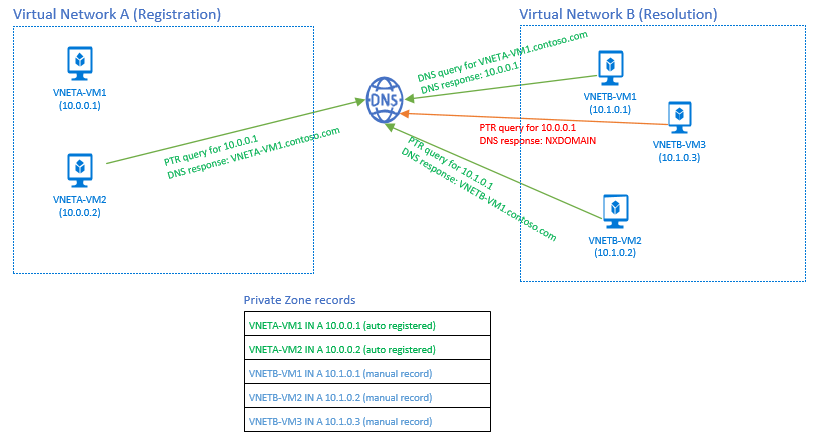
Microsoft's version of the same scenario adds a useful detail: records auto-registered from the registration-linked VNet coexist with records you create manually for the resolution-linked one, and PTR lookups only work for the addresses the platform registered:
Source: Azure Private DNS scenarios - © Microsoft, Microsoft Learn.
Global resource, regional control plane
Private DNS zones are global. The data plane is replicated across regions, so a zone can serve virtual networks in West Europe and East US simultaneously. This is the recommended pattern: one zone per namespace, linked widely - not one zone per region.
The nuance is that a zone still lives in a resource group, and resource groups are regional. During a regional outage affecting the resource group's location you may be unable to modify the zone - create records, add links - while DNS resolution for the linked virtual networks keeps working normally.
Practical consequence: put your shared zones in a resource group in a region you consider primary, and do not assume you can make emergency record changes during a failover of that same region.
Private Endpoints and the privatelink zones
If you use Azure Private Link - and in a landing zone you will - private DNS zones stop being optional.
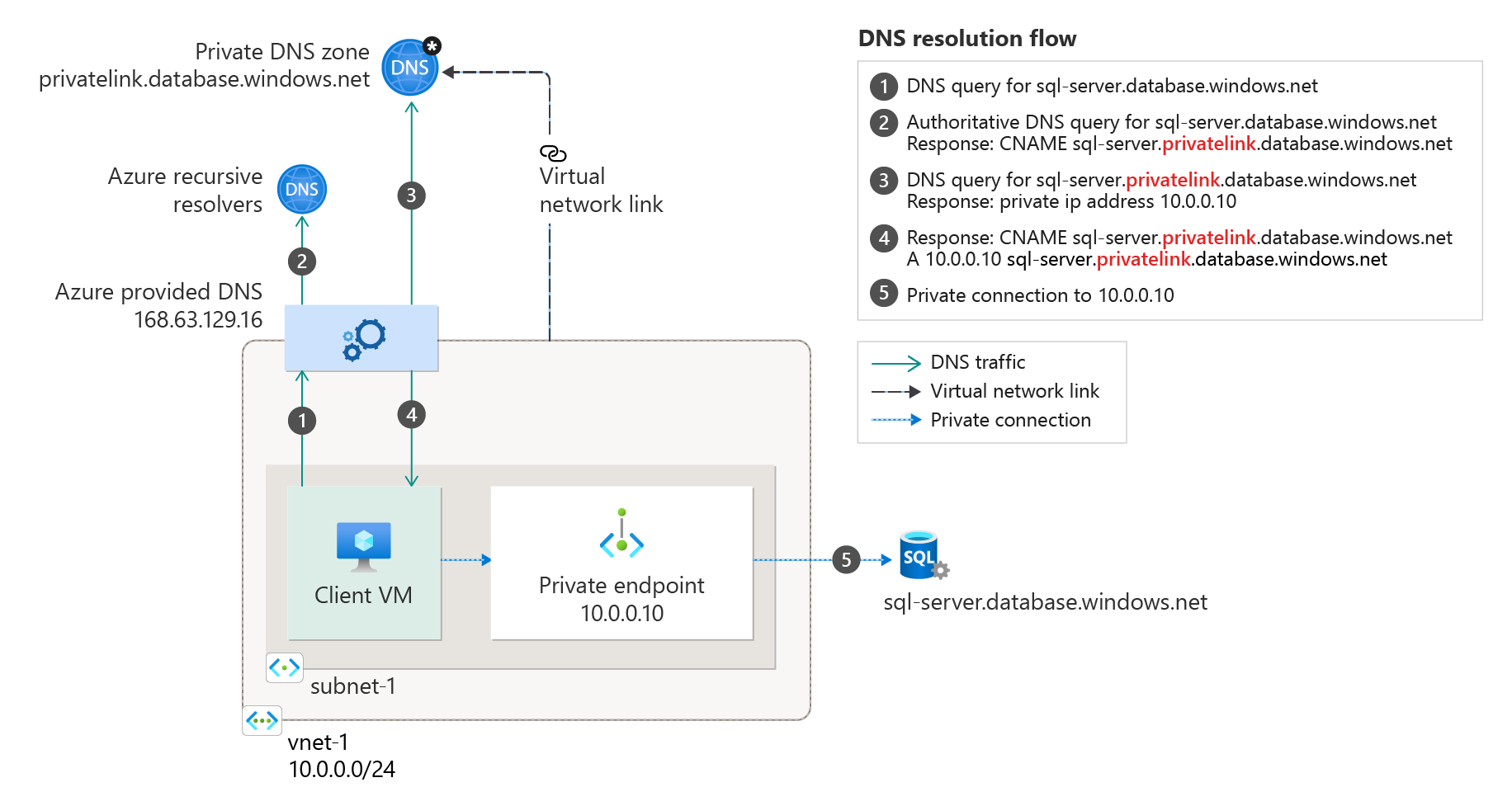
A Private Endpoint gives a PaaS resource a private IP in your VNet, but the client still connects using the public FQDN, for example mystorage.blob.core.windows.net. The certificate is issued for that name, so you cannot invent your own. Resolution has to be redirected instead:
- The public name has a CNAME to a
privatelink.*name, maintained by Microsoft. - You host that
privatelink.*zone privately and put an A record in it pointing at the endpoint's private IP. - Clients in linked VNets follow the CNAME into your private zone and get the private address. Clients outside get the public one.
Microsoft's diagram traces that chain end to end - the public name, the CNAME into privatelink.database.windows.net, the A record in the private zone, and finally the connection to the endpoint's private IP:
Source: Private endpoint DNS integration - © Microsoft, Microsoft Learn.
The zone names are fixed - you must use exactly what Microsoft publishes. A few of the common ones:
| Service | Private DNS zone name |
|---|---|
| Blob storage | privatelink.blob.core.windows.net |
| Azure SQL Database | privatelink.database.windows.net |
| Key Vault | privatelink.vaultcore.azure.net |
| Azure Container Registry | privatelink.azurecr.io |
| App Service / Functions | privatelink.azurewebsites.net |
| Cosmos DB (SQL API) | privatelink.documents.azure.com |
Do not manage these records by hand. Enable the Private DNS zone group on the Private Endpoint so the platform writes the A record for you, and enforce it with the built-in Azure Policy definitions (Configure ... to use private DNS zones) so nobody creates an endpoint that resolves to nothing. Manual privatelink records are one of the most common sources of stale DNS in Azure.
Limits that shape your design
These are the numbers to design against, not to discover in production:
| Resource | Limit |
|---|---|
| Private DNS zones per subscription | 1,000 |
| Record sets per zone | 25,000 |
| Records per record set | 20 |
| Virtual network links per zone | 1,000 |
| Virtual network links per zone with autoregistration | 100 |
| Zones a virtual network can be linked to | 1,000 |
| Zones a virtual network can be linked to with autoregistration | 1 |
Two restrictions also matter:
- Single-label zones are not supported.
corpis invalid;corp.internalis fine. - You cannot create NS delegations inside a private zone. To use a child domain, create it as its own zone and link it directly.
The 100 autoregistration links ceiling is the one that bites at scale. If your standard is "every spoke registers into the shared zone", you hit the wall at 100 spokes. Link widely for resolution, sparingly for registration.
Zone design patterns
There is no universally correct layout, but there are three that show up repeatedly.
| Pattern | Layout | Good for | Watch out for |
|---|---|---|---|
| Zone per application | app1.corp.internal, app2.corp.internal, each delegated to its team | Autonomy, fast-moving product teams | Zone sprawl, inconsistent TTL and naming, more links to manage |
| Zone per environment | dev.corp.internal, prod.corp.internal, owned centrally | Clean separation, simple RBAC boundaries | Central team becomes a ticket queue for record changes |
| Centralized in a hub | All zones live in a shared connectivity subscription, linked outward | Consistency, one place to audit, matches Cloud Adoption Framework | Requires discipline and automation to stay responsive |
My default recommendation for a landing zone: all privatelink.* zones centralized in the connectivity subscription and enforced by policy, plus application zones split per environment with RBAC delegated at the zone level. That gives platform teams control over the part that breaks silently and gives application teams control over the part they change daily.
This is also what the Cloud Adoption Framework prescribes - a single set of private DNS zones held in the connectivity subscription, serving every workload subscription:
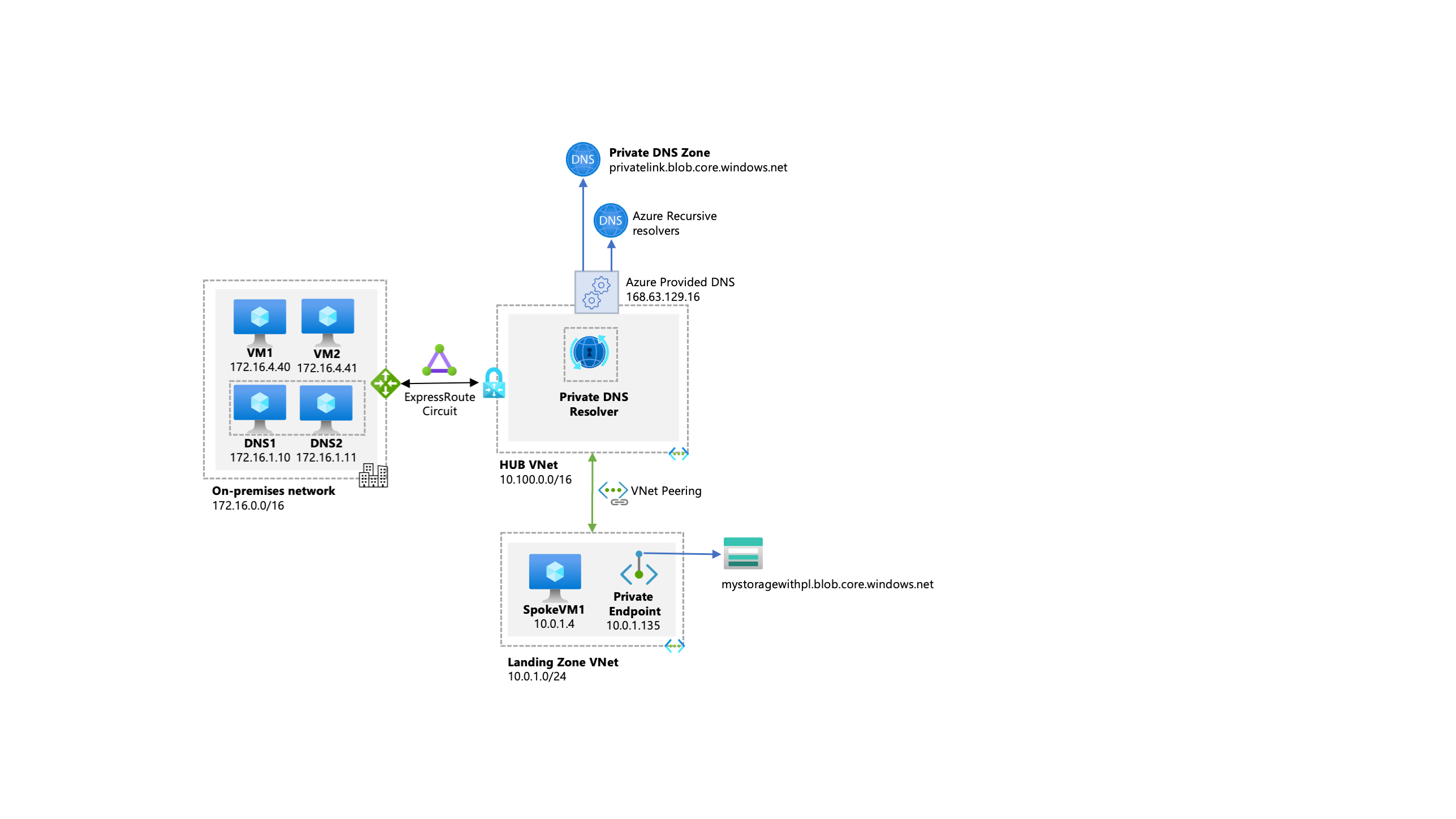
Source: Private Link and DNS integration at scale - © Microsoft, Cloud Adoption Framework.
Building it with Bicep
Zones and links are trivial to express as code, which is exactly how they should be managed:
param zoneName string = 'corp.internal'
param vnetId string

resource zone 'Microsoft.Network/privateDnsZones@2024-06-01' = {
  name: zoneName
  location: 'global'
}

resource link 'Microsoft.Network/privateDnsZones/virtualNetworkLinks@2024-06-01' = {
  parent: zone
  name: 'link-${uniqueString(vnetId)}'
  location: 'global'
  properties: {
    registrationEnabled: false
    virtualNetwork: {
      id: vnetId
    }
  }
}

resource apiRecord 'Microsoft.Network/privateDnsZones/A@2024-06-01' = {
  parent: zone
  name: 'api'
  properties: {
    ttl: 3600
    aRecords: [
      {
        ipv4Address: '10.30.1.20'
      }
    ]
  }
}
Note location: 'global' on all three - a reminder that the zone is not a regional resource even though its resource group is.
Verifying a zone works
Resolve-DnsName api.corp.internal -Server 168.63.129.16dig @168.63.129.16 api.corp.internal +short# List what a VNet is actually linked to - the first thing to check
# when a record "exists" but does not resolve
az network private-dns link vnet list \
--resource-group rg-dns-hub \
--zone-name corp.internal \
--output tableIf the record exists in the portal but the query returns NXDOMAIN, the cause is almost always one of: no link to the querying VNet, the VNet is using custom DNS servers, or you are querying the wrong zone because of the suffix trap.
Scorecard
| Works well | Still missing |
|---|---|
| Custom namespaces, all common record types | On-premises clients cannot resolve these zones on their own |
| Fully managed, no servers to run or patch | Custom DNS servers on the VNet bypass linked zones unless they forward to the VIP |
| Global data plane across regions | Control plane depends on the resource group's region |
| Automatic record lifecycle for VMs | Autoregistration capped at 100 VNet links per zone |
| RBAC can be delegated per zone | Azure cannot resolve on-premises namespaces from a VNet |
| The foundation for Private Endpoints | No WINS / NetBIOS |
Both remaining gaps are hybrid gaps - and both are what the Azure DNS Private Resolver was built to close.
Next in this series
Part 3 covers the Azure DNS Private Resolver: inbound endpoints, outbound endpoints, forwarding rulesets, the centralized and distributed architectures, the query-evaluation order that explains most "why did it forward there?" incidents, and how to get DNS query logging without a third-party server.
The rest of the series then moves on to Private Link: Part 4 on Private Endpoints, Part 5 on the privatelink DNS chain, Part 6 on fallback to internet, Part 7 on DNS security policies, and Part 8 which ties it all together in an interactive decision tree.
See you there.