
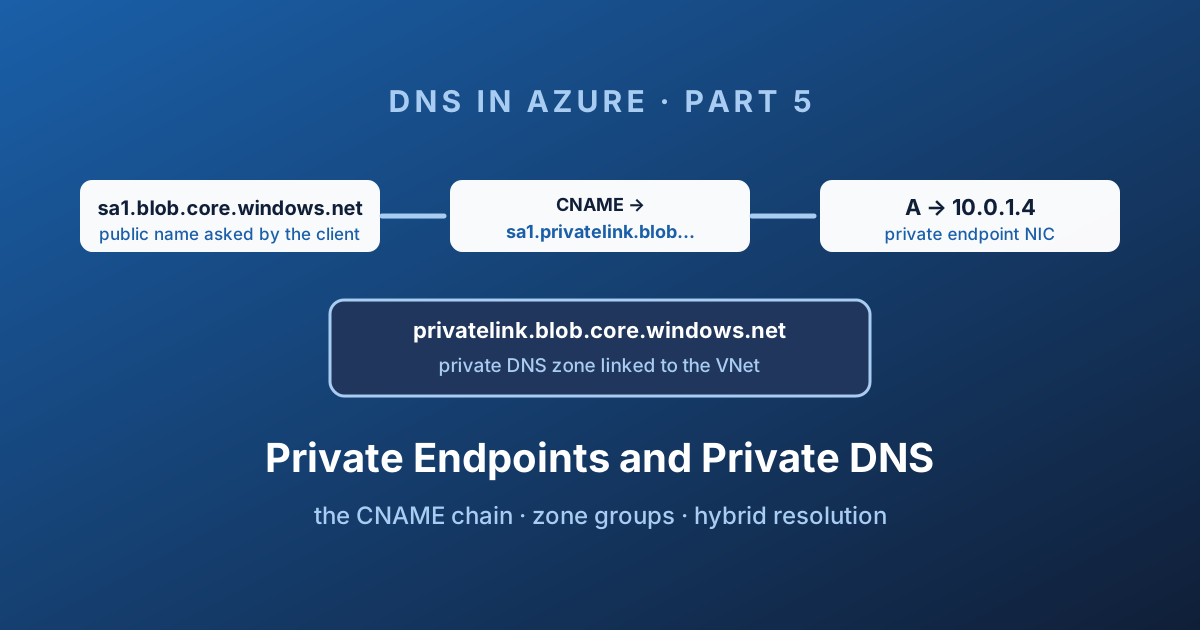
Part 4 ended with a working private endpoint and an application that still connects to a public IP address. Nothing is broken. The network interface exists, the connection is approved, the public endpoint is disabled - and the client cannot connect, because it never asked for the private address.
This post is the missing half: how a public name like sa1.blob.core.windows.net ends up answering with 10.0.1.4, and how to build that so it keeps working when you have four hundred endpoints instead of one.
The CNAME chain
One example throughout this path: sa1.blob.core.windows.net (application name) → sa1.privatelink.blob.core.windows.net (public CNAME target) → 10.0.1.4 (private zone A record in this illustrative environment). Keep the application hostname; do not replace connection strings with the privatelink name.
Need a zone name? Search the service-to-zone table. Copy returns the displayed value only; placeholders such as <region> and <dns-zone> still need service-specific substitution. Zone groups manage records, while zone placement and VNet links govern who can resolve them.
Everything here rests on one design decision Microsoft made, and once you have seen it the whole model becomes obvious.
Applications hard-code service names. Connection strings, SDK defaults, ARM outputs - they all use sa1.blob.core.windows.net. Microsoft could not ask every customer to rewrite them, so instead they made the public name point somewhere useful.
When a resource is Private Link enabled, its public DNS record becomes a CNAME into a special namespace:
  Client asks:      sa1.blob.core.windows.net
                              │
                              ▼
  Public Azure DNS  CNAME  →  sa1.privatelink.blob.core.windows.net
                              │
              ┌───────────────┴────────────────┐
              │                                │
     private zone linked              no private zone
              │                                │
              ▼                                ▼
        A  10.0.1.4                  CNAME → blob.xyz.store.core.windows.net
     private endpoint NIC                      A  20.60.x.x  (public)
Read that carefully, because it explains almost every symptom you will ever see:
- The client never asks for a
privatelinkname. It asks for the public name and gets redirected. This is why on-premises conditional forwarders must target the public suffix, not theprivatelinkone. - The redirect happens in public Azure DNS, for everyone, all the time. It is not something you enable.
- Whether you get a private or a public answer depends entirely on whether a private DNS zone named exactly
privatelink.<suffix>is linked to the virtual network the query came from. - If the zone exists but has no record for
sa1, you get NXDOMAIN - not a public fallback. That behaviour is the entire subject of Part 6.
You can watch the chain from any Azure VM:
# Inside a VNet with the zone linked
dig sa1.blob.core.windows.net

# ;; ANSWER SECTION:
# sa1.blob.core.windows.net.             CNAME  sa1.privatelink.blob.core.windows.net.
# sa1.privatelink.blob.core.windows.net. A      10.0.1.4
If the second line is missing, the zone is not linked to that VNet. If the second line points at a public IP, the zone is not linked and you are seeing the normal public chain. Those two are different problems with the same symptom.
The zone name has to be exact
There is no fuzzy matching here. The zone name must be character-for-character the value Microsoft publishes for that service and sub-resource. Getting it almost right produces a zone that resolves nothing.
| Service | Sub-resource | Private DNS zone name |
|---|---|---|
| Storage - Blob | blob | privatelink.blob.core.windows.net |
| Storage - File | file | privatelink.file.core.windows.net |
| Storage - Queue | queue | privatelink.queue.core.windows.net |
| Storage - Table | table | privatelink.table.core.windows.net |
| Storage - Data Lake Gen2 | dfs | privatelink.dfs.core.windows.net |
| Storage - Static website | web | privatelink.web.core.windows.net |
| Azure SQL Database | sqlServer | privatelink.database.windows.net |
| Azure SQL Managed Instance | managedInstance | privatelink.<dns-zone>.database.windows.net |
| Azure Key Vault | vault | privatelink.vaultcore.azure.net |
| Azure Cosmos DB (SQL) | Sql | privatelink.documents.azure.com |
| Azure Container Registry | registry | privatelink.azurecr.io |
| Azure App Service / Functions | sites | privatelink.azurewebsites.net |
| Azure Kubernetes Service | management | privatelink.<region>.azmk8s.io |
| Event Hubs / Service Bus | namespace | privatelink.servicebus.windows.net |
| Azure Monitor (AMPLS) | azuremonitor | privatelink.monitor.azure.com (additional zones required; see current service documentation) |
| Azure Automation | Webhook, DSCAndHybridWorker | privatelink.azure-automation.net |
| Azure Database for PostgreSQL | postgresqlServer | privatelink.postgres.database.azure.com |
| Azure Database for MySQL | mysqlServer | privatelink.mysql.database.azure.com |
| Azure Cache for Redis | redisCache | privatelink.redis.cache.windows.net |
| Azure AI Search | searchService | privatelink.search.windows.net |
| Azure App Configuration | configurationStores | privatelink.azconfig.io |
Key Vault is the classic trap. The public name is kv1.vault.azure.net, but the private zone is privatelink.vaultcore.azure.net. Creating privatelink.vault.azure.net looks right, deploys cleanly, and resolves nothing. Always check the published list rather than deriving the name.
Two more that catch people out:
- Azure Monitor requires multiple service-specific zones, not just the one shown in the table. Consult the current Azure Monitor private-link DNS configuration rather than using a fixed count from this article.
- App Service creates two records per site:
mysiteandmysite.scm. The Kudu/SCM endpoint is how your deployment pipeline connects, so if deployments break after you go private, that record is why.
The authoritative, always-current list is Azure Private Endpoint private DNS zone values . Bookmark it; it changes as services are added.
Zone-list technical validation date: not recorded. This is a local reference for Azure public-cloud examples, not an exhaustive current service/sovereign-cloud inventory.
Private DNS zone groups: use them
You can create the A record by hand. Read the private endpoint's NIC, take the IP, create a record in the zone. It works, and it will drift the first time somebody redeploys the endpoint.
A private DNS zone group is a child resource of the private endpoint that binds it to one or more private DNS zones. The platform then owns the record: it creates it, keeps the IP in sync, and deletes it when the endpoint is deleted.
az network private-endpoint dns-zone-group create \
  --resource-group rg-app \
  --endpoint-name pe-sa1-blob \
  --name default \
  --private-dns-zone "/subscriptions/<sub>/resourceGroups/rg-dns-hub/providers/Microsoft.Network/privateDnsZones/privatelink.blob.core.windows.net" \
  --zone-name blob
The zone does not have to live in the same subscription or resource group as the endpoint, which is exactly what you want: endpoints belong to application teams, zones belong to the platform team.
| Approach | Record lifecycle | Drift risk | Verdict |
|---|---|---|---|
| Manual A record | You | High | Only for a lab |
| Private DNS zone group | Platform | None | Default choice |
| Config-management tool writing records | Your pipeline | Medium | Acceptable if you already have one |
A private DNS zone group can reference up to five zones. That is what makes the App Service and Azure Monitor cases workable in a single group.
Where the zones should live
The zone itself is a global resource, and a virtual network link is what makes it resolvable. That gives you a design choice, and only one of the options survives contact with a real estate.
  ANTI-PATTERN: a zone per spoke        RECOMMENDED: zones in the hub
  ┌──────────────┐                      ┌──────────────────────────────┐
  │ spoke-a      │  privatelink.blob... │  rg-dns-hub (platform team)  │
  │  zone copy 1 │                      │   privatelink.blob...        │
  ├──────────────┤                      │   privatelink.database...    │
  │ spoke-b      │  privatelink.blob... │   privatelink.vaultcore...   │
  │  zone copy 2 │                      └──────────────┬───────────────┘
  ├──────────────┤                                     │ vnet links
  │ spoke-c      │  privatelink.blob...        ┌───────┼───────┐
  │  zone copy 3 │                             ▼       ▼       ▼
  └──────────────┘                          spoke-a spoke-b spoke-c
   3 sources of truth, records              one source of truth,
   invisible to each other                  every VNet resolves it
The rule is simple: one private DNS zone per namespace, for the whole tenant, in a resource group the platform team owns. Link every virtual network that needs to resolve it.
Duplicate zones with the same name are the most expensive mistake in this area because they fail partially. Spoke A resolves its own storage account and gets NXDOMAIN for spoke B's, which nobody notices until a cross-team integration ships.
You have a generous budget to work with - a private DNS zone supports 1,000 virtual network links for resolution, and a virtual network can be linked to many zones. If you are pushing that ceiling, the answer is the Private Resolver pattern from Part 3: link the zones to the hub only and point spokes at the inbound endpoint.
Doing this at scale with Azure Policy
Use the Policies catalogue to locate candidate definitions and the assignment guide to review identity, scope and remediation before rollout. A matching policy name is not evidence that it fits your zone ownership model.
At ten endpoints you do this in Bicep. At four hundred, created by teams who do not know what a privatelink zone is, you need the platform to do it for them.
Azure Policy has a built-in DeployIfNotExists effect for exactly this, one per service:
> Configure Azure Storage accounts to use private DNS zones > Configure Azure Key Vaults to use private DNS zones > Configure Azure SQL Database servers to use private DNS zones
Assign them at management-group scope with the hub zone resource ID as a parameter. When any team creates a private endpoint anywhere in the estate, the policy adds the zone group and the record appears.
Pair each with the matching Deny policy - "Storage accounts should use private link", "Public network access should be disabled" - and the guardrail is complete: teams can only build the shape you support.
DeployIfNotExists needs a managed identity with permissions on the zone's resource group. Use a remediation task to fix the endpoints that already exist; the policy only fires on create or update by itself.
Resolving from on-premises
This is the part that trips up hybrid environments, and it comes straight from the CNAME chain.
Your on-premises conditional forwarder must target the public suffix. Forward blob.core.windows.net - not privatelink.blob.core.windows.net - to something that can see the private zone. The client asks for the public name; a resolver that only knows the privatelink suffix is never consulted.
   ON-PREMISES                          │      AZURE (vnet-hub)
                                        │
  ┌────────┐   ┌────────────────────┐   │  ┌──────────────────┐
  │ client │──▶│ DNS server         │───┼─▶│ Inbound endpoint │
  └────────┘   │ cond. forwarder    │   │  │ 10.30.10.4       │
               │ blob.core.windows  │   │  └────────┬─────────┘
               │ .net → 10.30.10.4  │   │           ▼
               └────────────────────┘   │  ┌──────────────────┐
                                        │  │  168.63.129.16   │
          ExpressRoute / VPN            │  └────────┬─────────┘
                                        │           ▼
                                        │  ┌───────────────────────────┐
                                        │  │ privatelink.blob... zone  │
                                        │  │ sa1  A  10.0.1.4          │
                                        │  └───────────────────────────┘
Two supported ways to terminate that forwarder in Azure:
| Target | Notes |
|---|---|
| DNS Private Resolver inbound endpoint | Managed, no VMs, the current recommendation |
| A DNS forwarder VM in a linked VNet | The pre-2022 pattern. Still works, still needs patching and an availability design |
Either way, the resolver must sit in - or forward to - a virtual network that has the privatelink zones linked, because that is what makes the private answer visible.
Microsoft's diagram of the resolver-based version:
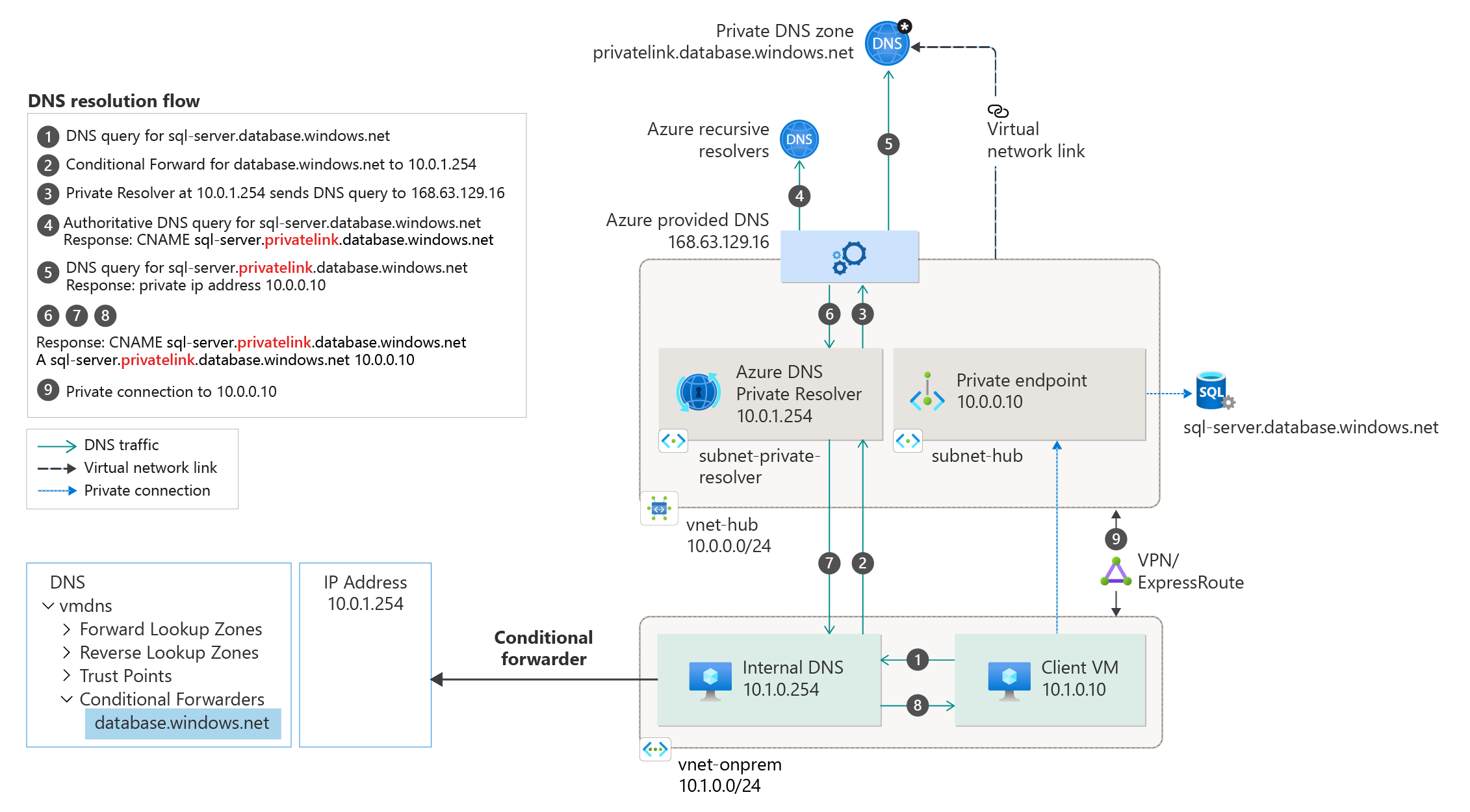
Source: Azure Private Endpoint DNS integration scenarios - © Microsoft, Microsoft Learn.
Do not create a zone named blob.core.windows.net (without privatelink) on your on-premises DNS servers as a shortcut. You have just made yourself authoritative for a namespace Microsoft owns, and every name in it that you have not manually created stops resolving - for every client that uses those servers.
Verifying and troubleshooting
Work in this order. It follows the chain, and it finds the answer faster than guessing.
- Does the public name CNAME to
privatelink? If not, the resource is not Private Link enabled, or you are querying the wrong name. - Does the
privatelinkname resolve to a private IP? If it returns NXDOMAIN, the zone is not linked to this VNet, or the record does not exist. - Is the zone name exactly right? Compare against the published list, character by character.
- **Is the zone linked to this virtual network?** Not the hub, not a peer - the VNet the client is in, unless you are using the resolver pattern.
- Is there more than one zone with this name in the tenant? This is the silent one. Check with Resource Graph.
- Does the private IP match the private endpoint's NIC? A stale manual record points at a deleted endpoint's address.
- Is the private endpoint connection Approved? Resolution can be perfect and traffic still blocked - see Part 4.
- Does the VNet use custom DNS servers? If so, they must forward to
168.63.129.16or to a resolver inbound endpoint, or linked zones are never consulted at all.
# Every privatelink zone in the tenant, and how many VNets can see it
az graph query -q "
resources
| where type == 'microsoft.network/privatednszones'
| where name startswith 'privatelink.'
| project name, resourceGroup, subscriptionId,
          links = toint(properties.numberOfVirtualNetworkLinks),
          records = toint(properties.numberOfRecordSets)
| order by name asc" --output table
Any zone name appearing more than once in that output is a future incident. Merge the records into one zone, relink the virtual networks, and delete the duplicates.
# What does this endpoint's NIC actually hold?
az network private-endpoint show \
  --name pe-sa1-blob \
  --resource-group rg-app \
  --query "customDnsConfigs" \
  --output json
customDnsConfigs gives you the FQDN and IP pair the platform expects to see in DNS. If your zone disagrees with it, your zone is wrong.
Coming next
The chain is now complete: public name, CNAME into privatelink, private zone, A record, private IP. Which works beautifully until you query a privatelink name that your zone does not contain - and instead of the public answer you would have got yesterday, you get NXDOMAIN.
Part 6 is about that failure mode and the resolutionPolicy setting that fixes it, why it took Microsoft years to ship, and the cases where you should deliberately leave it off.
Enjoy!